
Community Robot Apps cliff detection sample PRO thetechguru USA 2 Participants EzAng robo rad Download EZB File In order to use this app, you need Synthiam ARC software. Cliff Detection Sample ForARC Authorthetechguru Created Aug 2019 Last updated Aug 2019 Demonstrates using a Sharp IR sensor pointed down at the front of the robot to stop and reverse the robot when it detects a cliff edge. Upgrade to ARC Pro ARC Pro is more than a tool; it's a creative playground for robot enthusiasts, where you can turn your wildest ideas into reality. Compare Pro Features View Subscription Plans robo rad Canada #1 Aug 2019 1 Hey, very awesome,will incorporate that to my bot for when he does mascot work on a music stage! Reply Quote Share EzAng PRO USA #2 Aug 2019 thetechguru, how do you create a downloadable app as you have done? Reply Quote Share thetechguru PRO USA #3 Aug 2019 Quote:thetechguru, how do you create a downloadable app as you have done?In ARC, on the main menu there are two save options. One saves locally, and the other saves to Synthiam and automatically creates the post. Alan Reply Quote Share EzAng PRO USA #4 Aug 2019 I will check, thanks Reply Quote Share EzAng PRO USA #5 Aug 2019 When I go to "save", it goes into my projects folder as a .EZB file Reply Quote Share EzAng PRO USA #6 Aug 2019 I see another way of saving, make it public? Reply Quote Share thetechguru PRO USA #7 Aug 2019 Quote:[/quote][quote]I see another way of saving, make it public?Yes Reply Quote Share EzAng PRO USA #8 Feb 2021 I know this is an old thread, but I have a question: Why do you use the HBridge PWM Movement Panel on your app? I am interested in table top robots that don't fall off the table, any info? Reply Quote Share Login to post a comment

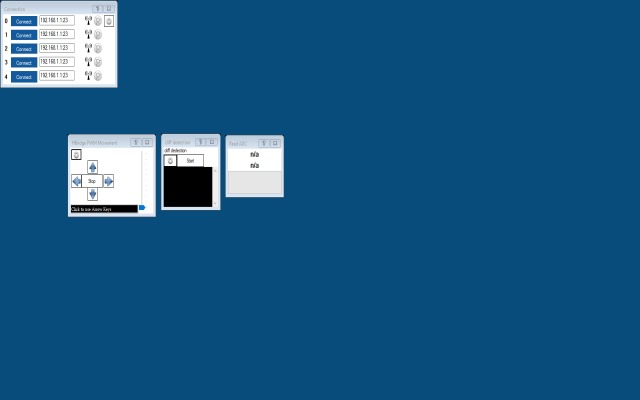
PRO thetechguru USA 2 Participants EzAng robo rad Download EZB File In order to use this app, you need Synthiam ARC software. Cliff Detection Sample ForARC Authorthetechguru Created Aug 2019 Last updated Aug 2019 Demonstrates using a Sharp IR sensor pointed down at the front of the robot to stop and reverse the robot when it detects a cliff edge.

robo rad Canada #1 Aug 2019 1 Hey, very awesome,will incorporate that to my bot for when he does mascot work on a music stage! Reply Quote Share
EzAng PRO USA #2 Aug 2019 thetechguru, how do you create a downloadable app as you have done? Reply Quote Share
thetechguru PRO USA #3 Aug 2019 Quote:thetechguru, how do you create a downloadable app as you have done?In ARC, on the main menu there are two save options. One saves locally, and the other saves to Synthiam and automatically creates the post. Alan Reply Quote Share
Quote:thetechguru, how do you create a downloadable app as you have done?In ARC, on the main menu there are two save options. One saves locally, and the other saves to Synthiam and automatically creates the post. Alan
EzAng PRO USA #5 Aug 2019 When I go to "save", it goes into my projects folder as a .EZB file Reply Quote Share
thetechguru PRO USA #7 Aug 2019 Quote:[/quote][quote]I see another way of saving, make it public?Yes Reply Quote Share
EzAng PRO USA #8 Feb 2021 I know this is an old thread, but I have a question: Why do you use the HBridge PWM Movement Panel on your app? I am interested in table top robots that don't fall off the table, any info? Reply Quote Share
I know this is an old thread, but I have a question: Why do you use the HBridge PWM Movement Panel on your app? I am interested in table top robots that don't fall off the table, any info?
Hey, very awesome,will incorporate that to my bot for when he does mascot work on a music stage!
thetechguru, how do you create a downloadable app as you have done?
Alan
I will check, thanks
When I go to "save", it goes into my projects folder as a .EZB file
I see another way of saving, make it public?
I know this is an old thread, but I have a question:
Why do you use the HBridge PWM Movement Panel on your app?
I am interested in table top robots that don't fall off the table, any info?