
Change Release Notes
Screen real estate has been a popular discussion in the past. Because ARC is a graphical control software, the controls can take up large amounts of screen space. There was an option that I had implemented a few months ago called Advanced and Basic view. Being an ARC user myself, I have never really felt it was a solution.
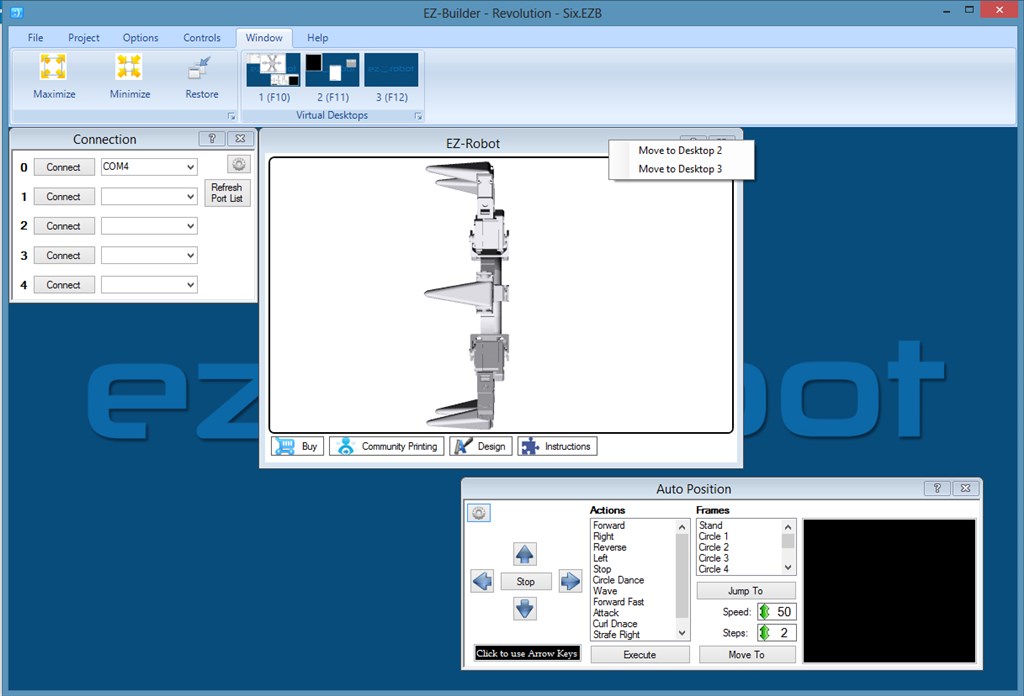
Today we introduce Virtual Desktops built into ARC.
Removed Basic/Advanced view
Add Virtual Desktop feature. Change desktops under the Window menu tab, or press F10, F11, F12. Additionally, you can move existing controls to other desktops by right-clicking on the Title Bar and selecting the destination desktop.
Auto Position controls hide the servo ports unless the Checkbox is checked. Making it much easier to move servo positions.
Configurable Wallpaper per project. Using the Project Details button, you can now select wallpaper for your project.
ARC Downloads
ARC
FREE- 1 third-party plugin skill per project
- Trial cloud services
- Personal, DIY & education use
- Updated every 6–12 months
 Download
ARC
PRO- Use on 2+ PCs simultaneously
- Unlimited robot skills
- Cloud backup & revision history
- Weekly features & bug fixes
- Business use permitted
ARC
RUNTIME- Load & run any ARC project
- Read-only mode
- Unlimited robot skills
- Includes early access fixes & features
- Minimum requirements: Windows 10 or higher, 2 GB RAM, 500 MB free disk space.
- Recommended: Windows 10 or higher, 8 GB RAM, 1 GB free disk space.
- Prices are in USD.
- More about each edition: Download & install guide.
- Latest changes: Release notes.
Compare Editions
| Feature |
ARC
FREE
|
ARC
PRO
|
|---|---|---|
| Get ARC Free | View Plans | |
| Usage | Personal · DIY · Education | Personal · DIY · Education · Business |
| Early access to new features & fixes | — | ✓ |
| Simultaneous microcontroller connections * | 1 | 255 |
| Robot skills * | 20 | Unlimited |
| Skill Store plugins * | 1 | Unlimited |
| Cognitive services usage ** | 10 / day | 6,000 / day |
| Auto-positions gait actions * | 40 | Unlimited |
| Speech recognition phrases * | 10 | Unlimited |
| Camera devices * | 1 | Unlimited |
| Vision resolution | max 320×240 | Unlimited |
| Interface builder * | 2 | Unlimited |
| Cloud project size | — | 128 MB |
| Cloud project revision history | — | ✓ |
| Create Exosphere requests | — | 50 / month |
| Exosphere API access | — | Contact Us |
| Volume license discounts | — | Contact Us |
| Get ARC Free | View Plans |
* Per robot project
** 1,000 per cognitive type: vision recognition, speech recognition, face detection, sentiment, text recognition, emotion detection, azure text to speech

Upgrade to ARC Pro
Experience early access to the latest features and updates. You'll have everything that is needed to unleash your robot's potential.
I'm loving the VDTs. It's cool to have a background page with all of my connections and infos on one screen and then movement and camera on another. Super awesome work guys. Super awesome!
folks.. when I tryed to install the new update, the antivirus program blocked it. It says that contains an "suspicious" software! I can't believe on that! It should be some error on my computer, rigth ? does anyone exeperienced that error ?! and, now I can't instal a previous version.. because it says that there is an newer version installed... but.. does not work. please, help! best regards.
I am using the Windows 7. the antivirus is the avast free.
Tevans
try uninstalling the program form Control panel/add-remove software the you should be able to install any version you want.
Also turn off your anti-virus while installing it. See if there is a way to add ARC installer as an exception in your anti-virus.
I've had this happen to me before and researched this. I use avast free. If it's flagging EZ try deleting the file and re-downloading. Your DL may have a slight corruption and antivirus will flag it. You still need to uninstall it from the control panel though.
Either disable when downloading/installing or add it as an exception if your AV software allows exceptions. Usually those false positives happen due to the way the installation file is packaged... to be blunt, get decent AV software (seriously, it's worth paying good money for piece of mind when you think about what's on your PC).
The download/installer is perfectly safe just to put anyone's mind at ease though.
Thanks folks. I turned off the AV while downloading and installing, and everything is working now...