
Change Release Notes
This release has a few enhancements and a new feature - which I think is pretty neat
Configure which sensor data is displayed in Sensor Stream Server
new Video Player ControlCommand() for FullSreen and Restore Screen mode
Variable data are now cleared when a new project is loaded
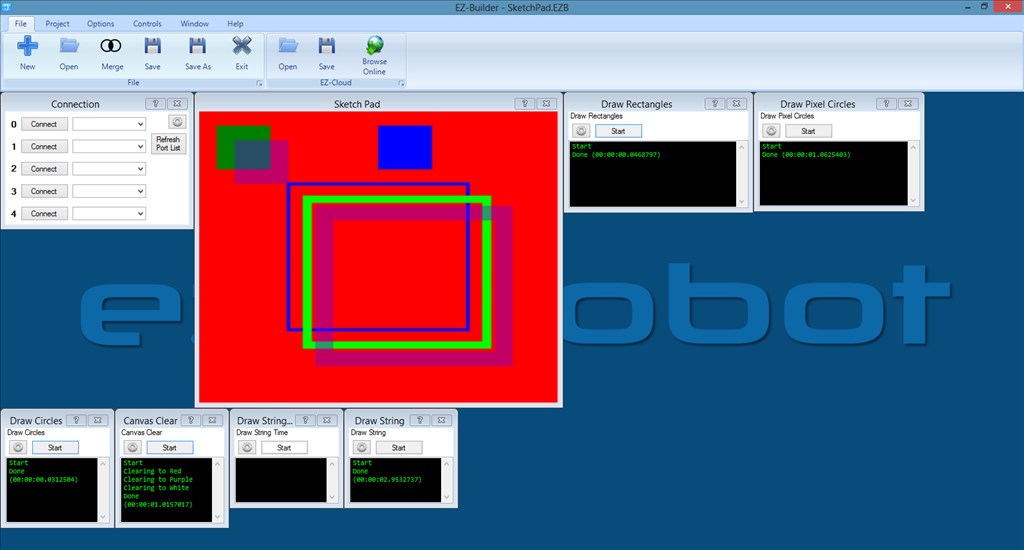
New control SketchPad. Use ControlCommand() parameters to custom draw on the control. Use the control for custom room mapping. Or robot path history. Or face expressions in full screen mode. Or or or
... There is an example of how to use it in the Examples folderi2cWrite and i2cRead fix. Look at the i2c example for BlinkM in the Examples folder
Memory Garbage collection forced for 3D Robot Designer. If opening and closing the 3D designer dozens of time in a session with lower memory PC would error.
Screenshot of the new SketchPad Control
ARC Downloads
ARC
FREE- 1 third-party plugin skill per project
- Trial cloud services
- Personal, DIY & education use
- Updated every 6–12 months
 Download
ARC
PRO- Use on 2+ PCs simultaneously
- Unlimited robot skills
- Cloud backup & revision history
- Weekly features & bug fixes
- Business use permitted
ARC
RUNTIME- Load & run any ARC project
- Read-only mode
- Unlimited robot skills
- Includes early access fixes & features
- Minimum requirements: Windows 10 or higher, 2 GB RAM, 500 MB free disk space.
- Recommended: Windows 10 or higher, 8 GB RAM, 1 GB free disk space.
- Prices are in USD.
- More about each edition: Download & install guide.
- Latest changes: Release notes.
Compare Editions
| Feature |
ARC
FREE
|
ARC
PRO
|
|---|---|---|
| Get ARC Free | View Plans | |
| Usage | Personal · DIY · Education | Personal · DIY · Education · Business |
| Early access to new features & fixes | — | ✓ |
| Simultaneous microcontroller connections * | 1 | 255 |
| Robot skills * | 20 | Unlimited |
| Skill Store plugins * | 1 | Unlimited |
| Cognitive services usage ** | 10 / day | 6,000 / day |
| Auto-positions gait actions * | 40 | Unlimited |
| Speech recognition phrases * | 10 | Unlimited |
| Camera devices * | 1 | Unlimited |
| Vision resolution | max 320×240 | Unlimited |
| Interface builder * | 2 | Unlimited |
| Cloud project size | — | 128 MB |
| Cloud project revision history | — | ✓ |
| Create Exosphere requests | — | 50 / month |
| Exosphere API access | — | Contact Us |
| Volume license discounts | — | Contact Us |
| Get ARC Free | View Plans |
* Per robot project
** 1,000 per cognitive type: vision recognition, speech recognition, face detection, sentiment, text recognition, emotion detection, azure text to speech

Upgrade to ARC Pro
Stay at the forefront of robot programming innovation with ARC Pro, ensuring your robot is always equipped with the latest advancements.
hold on let me check.
Worked fine for me last night for about an hour.
its fine for me too. Hmmmm... Im not sure whats causing your problems.
Anyone having sendserial issues with the new ARC versions?
I went to load up my Hasbro R2 today and I'm getting nothing for my audio. It was working flawlessly before.
I understand there was some syntax changes with the last few releases, but I'm trying to send a basic command.
sendserial(D0, 9600, 0x01)
I'll be tearing it apart to check everything, but seems weird to just not work at all now.
I had I2C issues with the syntax change and my LCD commands needed to be in brackets but they were ascii (TT, CL etc) and the script told me it was wrong.
I haven't tried it connected up but the tellymate examples still run OK, I'll connect it up and check it out when I get chance but that wont be until tomorrow night at the earliest.
Does it report a script error? Or does it just not do anything?
Rich,
No script error. The audio board blinks like it's receiving but no output.
I'm double checking all connections (Volume, speaker ect) but Like I said it was working great before.
Something has changed. Two of the same MP3 modules both not working.
Edit
Big R2 - Sparkfun MP3Trigger works fine OmniBot (MrT) - MDFly MP3 Module does not work Hasbro R2 - MDFLY MP3 Module does not work
It may be a stupid question but is the volume turned up? Code 0xE9
Also, I noticed the baud for the MDFly is 4800 not 9600
And a last check, try sending 0xEC to resume, if for some reason it has been set to hold.
Just ideas from looking at the datasheet, hopefully one of them works.
Edit: I just noticed there are a couple of MDFly boards, the baud and codes may be different depending on which one you have.
Rich,
My boards are an older version.
Always used 9600 baud, I send a multi-script command to max the volume (0xE9).
Datasheet for my specific model says "9600, 8, N, 1"
I have six of the exact same board.