
Change Release Notes
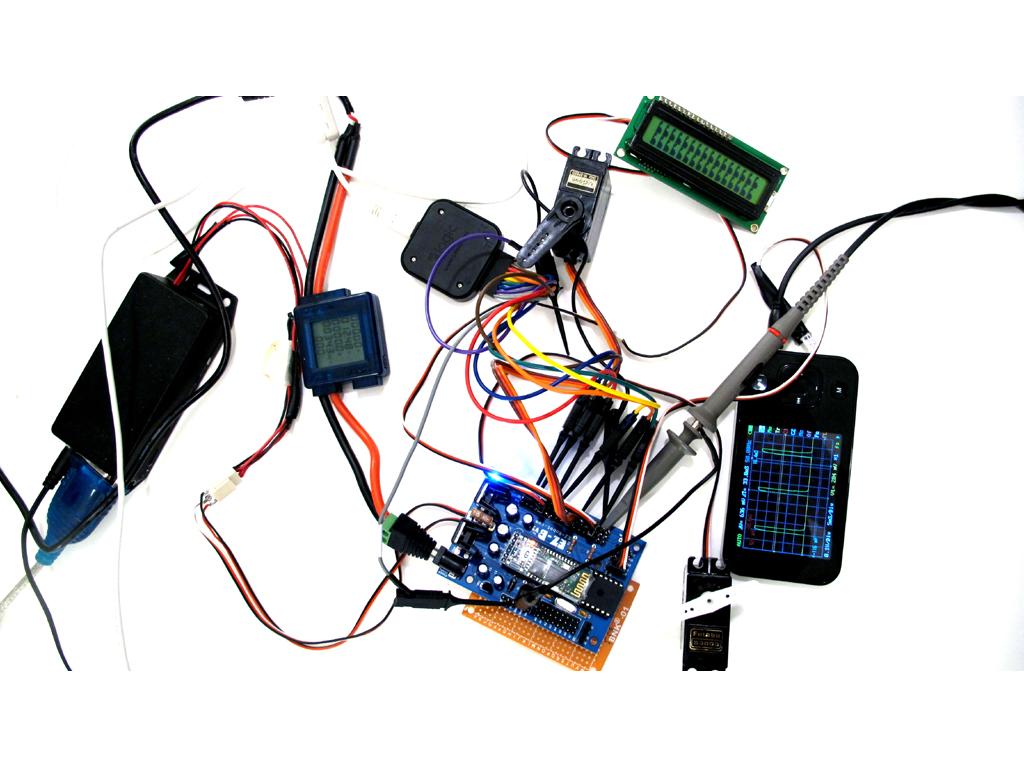
We hacked away at the EZ-B Firmware over the past 48 hours to resolve the servo jitter issue. This has been a crazy past few days. The release 15.3 seemed to cause issues with some controllers, and that's because there are a few differences between EZ-B versions. They were tested in-house, but clearly not good enough. We setup a new testing environment with a pile of servos and sensors to verify older boards.
The only downfall to the latest firmware is the servo position resolution is now 100 vs 130. Not a dramatic difference, but the lower resolution is required for the servo speed.
- bug fix random ports going high
- bug fix servo jitter
- enhancements to PWM duty cycle
- enhancements to ez-b bootup speed
- camera tracking enhancement for slower cpu's
Download: ARC
ARC Downloads
ARC
FREE- 1 third-party plugin skill per project
- Trial cloud services
- Personal, DIY & education use
- Updated every 6–12 months
 Download
ARC
PRO- Use on 2+ PCs simultaneously
- Unlimited robot skills
- Cloud backup & revision history
- Weekly features & bug fixes
- Business use permitted
ARC
RUNTIME- Load & run any ARC project
- Read-only mode
- Unlimited robot skills
- Includes early access fixes & features
- Minimum requirements: Windows 10 or higher, 2 GB RAM, 500 MB free disk space.
- Recommended: Windows 10 or higher, 8 GB RAM, 1 GB free disk space.
- Prices are in USD.
- More about each edition: Download & install guide.
- Latest changes: Release notes.
Compare Editions
| Feature |
ARC
FREE
|
ARC
PRO
|
|---|---|---|
| Get ARC Free | View Plans | |
| Usage | Personal · DIY · Education | Personal · DIY · Education · Business |
| Early access to new features & fixes | — | ✓ |
| Simultaneous microcontroller connections * | 1 | 255 |
| Robot skills * | 20 | Unlimited |
| Skill Store plugins * | 1 | Unlimited |
| Cognitive services usage ** | 10 / day | 6,000 / day |
| Auto-positions gait actions * | 40 | Unlimited |
| Speech recognition phrases * | 10 | Unlimited |
| Camera devices * | 1 | Unlimited |
| Vision resolution | max 320×240 | Unlimited |
| Interface builder * | 2 | Unlimited |
| Cloud project size | — | 128 MB |
| Cloud project revision history | — | ✓ |
| Create Exosphere requests | — | 50 / month |
| Exosphere API access | — | Contact Us |
| Volume license discounts | — | Contact Us |
| Get ARC Free | View Plans |
* Per robot project
** 1,000 per cognitive type: vision recognition, speech recognition, face detection, sentiment, text recognition, emotion detection, azure text to speech

Upgrade to ARC Pro
Become a Synthiam ARC Pro subscriber to unleash the power of easy and powerful robot programming
It's working perfectly for me, awesome work! I do not notice any random positioning with press release either, it is solid for me. I'm happy with this one!
@DJ - Love that pic at the top of this post showing the EZ-B going through it's paces! When I see something like that I always think, "If it's not a rat's nest of wires, you're not really doing SCIENCE!" thumbs up!
Oh bother.
Firmare update seemed to go fine - saw the last message about rebooting ez-b ...
But now on power up the board led remains dark even though the bluetooth flashes red as it should.
And of course nothing works.
Trying to connect with the Firmware update software says -
Attempting connection to COM5 Comm Err: The operation has timed out. BbytesToExpect: 1
Received: Disconnected Connection Failed: System.Exception: Controller Not Responding at EZ_B.EZB.Connect(String portName) Disconnected
Attempting connection to COM6 Connection Failed: System.TimeoutException: The write timed out. at System.IO.Ports.SerialStream.Write(Byte[] array, Int32 offset, Int32 count, Int32 timeout) at System.IO.Ports.SerialPort.Write(Byte[] buffer, Int32 offset, Int32 count) at EZ_B.EZB.Connect(String portName) Disconnected
This is return to base isn't it?
Good thing I ordered a second board yesterday ...
JOC
JOC I think you need to restart the firmware updater and give the EZB sometime to reboot itself. I had to wait a little while last night for one of my boards to start up which it has never done before
@winstn60
Actually, you are right about the random positioning of ports when they are released. I do not notice it when I manually press a release button. But when animating a led and quickly releasing and turning on a port, to create a pulsing or flickering effect, introduces what seems like a spike in the ports position. and so those leds first light up bright before turning off.
Also, I have this one servo set up with two RC hydraulic car damper springs to have it settle in a centered position when its released. The port seems to also overshoot when it is released, espescialy when it is driven and then released with a moderate-high pace. Sometimes the port goes high making it over shoot, sometimes it goes lower and sometimes it seems to stick in its current position, but generally it never realy seems to go exactly where I would like it to go.
Not sure, but is this what you mean? If so then I am noticing the same.
Great Work DJ! I also found a little issue, the radar scan seems to still be calibrated to your previous 130 position servo control. I'm guessing center should be 50 now and it looks like 70 is what it's set too.
not really raining on your parade too much I hope (or snow, being from AB)
I've just upgraded to HiFive and now i have a problem.
I can't connect while using my usb->ttl adapter, but when i swap it with the original bluetooth adapter, it works just fine. Now all of the sudden, the LED won't turn on, but the LED on the bluetooth module will. It also won't connect anymore
:D
Just waited like @winstn60 and now it works again!
Edit: aaaaand the connection keeps dropping