
fredebec
France
Asked
— Edited
Easydriver And NEMA17 Stepper Motor
Hi,
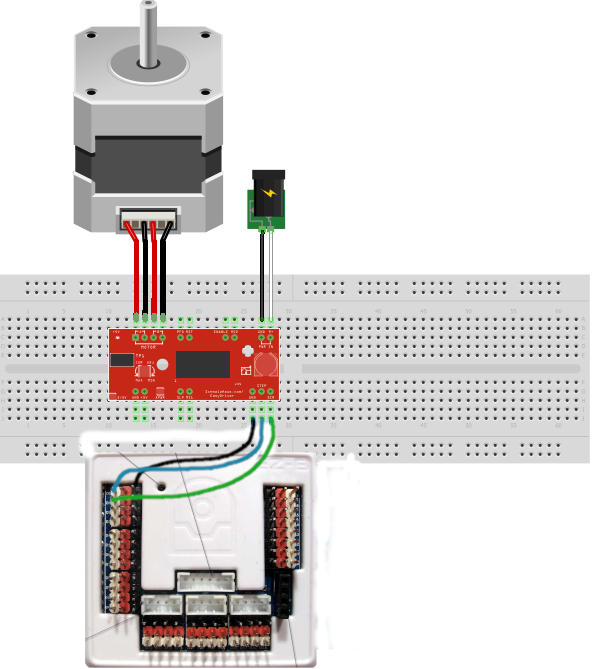
I am trying to use a NEMA17 stepper motor (from an old 3D printer) with the EZB v4, through the EasyDriver - Stepper Motor Driver from Sparkfun. I have connected everything this way:
and use the following code (from this thread: Link):
$x = 0
:loop

  $x = $x + 1
  SET(D1,ON) # dir pin (maintain current direction)
  SET(D0,ON) # step pin
  Sleep(1)
  SET(D0,OFF) # step pin
  Sleep(1)

  print($x) # let me know the loop progress
  if($x = 6400)
  $x = 0 # don't go crazy
  endif

goto (loop)
But the motor barely moves and I cannot change the speed by playing with Sleep().
I use a 24v 15A alim (the same I used before with this stepper motor in my 3D printer) so I should have enough power
Any idea what I do wrong ?
Related Hardware (view all EZB hardware)

EZ-B V4
by EZ-Robot
EZ-B v4/2 robot controller: dual Cortex ARM, Wi-Fi, audio/video, 24 servo/digital ports, I2C/UART, camera and Synthiam ARC control for custom robots
Wi-Fi / USB
Servos
24
Camera
Audio
UART
3
I2C
ADC
8
Digital
24
Related Robot Skill (view all robot skills)

Set Digital
by Synthiam
Toggle a digital I/O port between TTL low (0V) and high (3.3V/5V) in ARC; select board and port, simple on/off control-signal only.

For something as granular and repetitive as a stepper, use an Arduino between the stepper driver and ezb. Or, use an Arduino as an ezb with stepper capability added.
Operating systems for PCs, such as windows and Linux and macOS are not real-time. They don’t have precision such as the stepper would need. Additionally there’s overhead of the entire network and WiFi stack.
@DJ
What do you mean by that? I already have an "EZBfied" Arduino Mega, so I am interested