

fredebec
France
Asked
Ezbpi Server - Access To The Pi Gpios
Hi,
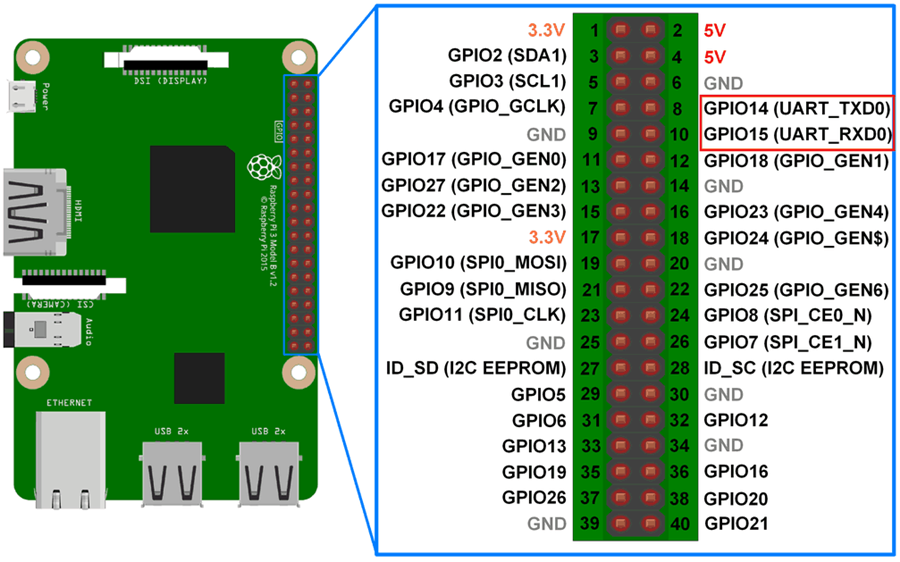
I have successfully connected ARC to the Pi using the EZBPi server, but I don't understand how to access the GPIOs of the Pi. If I want to set or read a digital port, how do I know which port in ARC correspond the right GPIO pinout?
Related Hardware (view all EZB hardware)
Raspberry Pi
by Pi Foundation
Run Synthiam ARC on Raspberry Pi 4+ with Windows 11 for robot control; use external EZB/Arduino for reliable I/O, SSD/USB storage recommended
Wi-Fi
Servos
✕
Camera
Audio
UART
✕
I2C
ADC
✕
Digital
✕
Related Robot Skills (view all robot skills)

Read Digital
by Synthiam
Read TTL digital input from an ARC I/O port; real-time red/green status for low (0V) or high (+3.3/5V), selectable board/port and read interval.

Set Digital
by Synthiam
Toggle a digital I/O port between TTL low (0V) and high (3.3V/5V) in ARC; select board and port, simple on/off control-signal only.

check this page: https://synthiam.com/GettingStarted/Build-Robots/Raspberry-Pi-17681

I believe the EZ-PI server uses the GPIOx mapping so ARC PORT 5 = GPIO5 = Raspberry PI PIN 29 If my guess is correct the GPIO24,GPIO25,GPIO26,GPIO27 are inaccessible due to EZB protocol limit of 24 ports (0..23)Thanks PTP,
I was aware of the Pi GPIOs map, but I didn't get that there was a direct match between ARC port numbers and the Pi GPIO numbers. I am going to test it tonight.
Bear in mind the raspberry pi is not 5v tolerant.
if you are reading logic voltages the limit is 3.3v
Ok, I made a test and it doesn't work. As a test, I try to switch on/off a LED with the "Set Digital" control. It works with my EZB v4 (so no issue with the LED), but not with the Pi (I have tested different pinouts)...
Can you explain how you wire the led ?
you can’t wire a led without a resistor.
The LED is indeed wired with a resistor and works with the EZB v4 (I can switch it with the Set Digital control). It works also on the Pi if I plug it on the 3.3v pinout (+ground). It just seems that i cannot set digital on other GPIOs...
Let's troubleshoot the issue:
connect your led (and the resistor) to pin 12 (GPIO 18)
open a console and run the commands below:
initialize the pin direction:
switch on:
switch off:
Let me know if you can toggle the led.
OK, thanks ptp
But first command, first error.
I don't have a /gpio18 folder in /sys/class/gpio