
jp15sil24
 Resolved by Athena!
EZ-B V4 Units Troubleshooting
I have two older EZ-B v4 units that are causing problems. I don’t use them regularly-only occasionally for testing. i made 2,3 reset on both EZBs. I’ve included logs for both devices.
The first one (EZ-B v4.x/2 c89346552d30) does not produce any sound at startup. I can connect to it, and the servos are working, but the soundboard does not work. I also connected via the web interface and confirmed that both "connection audio chime" and "startup audio chime" are enabled.
Could the speaker be faulty? If so, is it possible to replace it with a standard small speaker?
here is the debug log and the settings from the web interface for EZ-B v4.x/2 c89346552d30. The EZ-B Wi-Fi Robot Controller
Current Configuration
System Name:   EZ-B v4.x/2
SSID:   EZ-B v4.x/2 c89346552d30
WiFi Mode:   Custom AP Mode (Ad-Hoc)
System Uptime:   35 seconds and 404 milliseconds
Model:   EZ-B v4.x/2
Version:   WiFi 3165 v2018.09.30.00

Audio Chimes

Startup Audio Chime:
ENABLED

Connection Audio Chime:
ENABLED


Debug log:

Internet available: True
Another ARC instance already running: False
Current firmware src version is 2026.5.11.0
Available firmware src version is 2026.5.11.0. Downloading: False
Loading firmware src file
22 firmware sources loaded
Windows version: Microsoft Windows NT 10.0.26200.0
Synthiam account: [email protected]
Screen Resolution: 1920x1080 (96x96 DPI, 100% scaling)
ARC Pro Version: 2026.04.14.00
Adding 1 robot skill(s) to page 0:
 - ARC.UCForms.FormConnection (Connection)

Adding 1 robot skill(s) to page 0:
 - ARC.FormBookmarks (Bookmarks)

Discovered EZ-B v4.x/2 (192.168.1.1:23) (Type: EZ-B v4.x/2).
Discovered EZ-B v4.x/2 (192.168.1.1:24) (Type: Camera).
Attempting connection on 192.168.1.1:23
Connected to 192.168.1.1:23 (tx timeout: 2000, rx timeout: 2000, tx buffer: 20000 rx buffer: 20000)
Reports EZB v4 OS With Comm 2
Firmware 'EZ-B v4.x/2 Native Firmware' (0x02) on 'EZ-Robot EZ-B v4.x/2' supports the following capabilities:
 - ADC with 12 bit Resolution
 - Can stream Audio v4 codec
 - Reports battery voltage
 - Reports CPU temperature
 - Read/Write Digital I/O Ports
 - Hardware UART TX/RX with DMA buffer and adjustable baud rate
 - I2C Master
 - LIPO battery protection & shutdown
 - PWM Duty on digital ports
 - PWM servos on digital ports
 - PWM servos on digital ports can release their position
 - servo speed for PWM servos on digital ports
 - Has NVRam configuration and can be restored to default settings
 - Transmit Uart TX on all digital ports
 - Adjustable I2C clock speed
 - Configurable UART TX digital port baud timing
 - Ultrasonic Ping distance sensor support
 - 12 Byte Unique Identifier
 - Can stream video v4 codec
 - Native UART Connectivity from ARC
 - Native WiFi Connectivity from ARC
 - Broadcasts to ARC's PnP network scanner

EZ-B v4.x/2 Native Firmware ID: 65-49-0-0-221-255-58-57-58-37-38-38
Setting battery monitor voltage: 7.0
Setting battery protection: True
Setting i2c rate: 100000
EZ-B voltage is 8.16v
EZ-B temperature is 25.45c
Connected
Adding 1 robot skill(s) to page 0:
 - ARC.UCForms.FormSoundBoardEZBv4 (Soundboard v4)
The second unit (EZ-B v4.x/2 d0bae42be049) also does not produce any startup chime and does not connect at all. When I click "connect," it disconnects immediately. Here is the log output. I tested the battery on a third EZ-B v4 unit, and it works fine-the startup chime plays and the connection is stable. here is the debug log and the settings from the web interface for EZ-B v4.x/2 d0bae42be049
Current Configuration
System Name:   EZ-B v4.x/2
SSID:   EZ-B v4.x/2 d0bae42be049
WiFi Mode:   Custom AP Mode (Ad-Hoc)
System Uptime:   5 minutes, 9 seconds and 518 milliseconds
Model:   EZ-B v4.x/2
Version:   WiFi 3165 v2017.01.05.00
Audio Chimes

Startup Audio Chime:
ENABLED

Connection Audio Chime:
ENABLED


Debug log:

Attempting connection on 192.168.1.1:23
Connected to 192.168.1.1:23 (tx timeout: 2000, rx timeout: 2000, tx buffer: 20000 rx buffer: 20000)
Reports EZB v4 OS With Comm 2
Firmware 'EZ-B v4.x/2 Native Firmware' (0x02) on 'EZ-Robot EZ-B v4.x/2' supports the following capabilities:
 - ADC with 12 bit Resolution
 - Can stream Audio v4 codec
 - Reports battery voltage
 - Reports CPU temperature
 - Read/Write Digital I/O Ports
 - Hardware UART TX/RX with DMA buffer and adjustable baud rate
 - I2C Master
 - LIPO battery protection & shutdown
 - PWM Duty on digital ports
 - PWM servos on digital ports
 - PWM servos on digital ports can release their position
 - servo speed for PWM servos on digital ports
 - Has NVRam configuration and can be restored to default settings
 - Transmit Uart TX on all digital ports
 - Adjustable I2C clock speed
 - Configurable UART TX digital port baud timing
 - Ultrasonic Ping distance sensor support
 - 12 Byte Unique Identifier
 - Can stream video v4 codec
 - Native UART Connectivity from ARC
 - Native WiFi Connectivity from ARC
 - Broadcasts to ARC's PnP network scanner

TCP Comm Error: Unable to read data from the transport connection: A connection attempt failed because the connected party did not properly respond after a period of time, or established connection failed because connected host has failed to respond.
Sent: 2
Bytes Expected: 12
Received (0 bytes):
Disconnected
EZ-B v4.x/2 Native Firmware ID: 0-0-0-0-0-0-0-0-0-0-0-0
Setting battery monitor voltage: 7.0
Setting battery protection: True
Not connected attempting to initEZB from Connection Control. System.Exception: Not connected
   at EZ_B.Uart.SetBaudClock(BAUD_RATE_ENUM baudRate, Int32 clockSpeed)
   at ARC.UCForms.FormConnection.hrVHhV7oqIydvt2LgltD(Object , BAUD_RATE_ENUM , Int32 )
   at ARC.UCForms.FormConnection.R2FeOqaDLRW(Int32  , ConfigurationFormV2  )
Connected
EZB Not Responding:Unable to connect to 192.168.1.1:23. This PC appears to be connected to a network with the IP address that was specified. However, the connection could not be established with the EZB.

Would you like to view the tutorial for connecting to WiFi EZB devices?
Related Hardware (view all EZB hardware)

Related Robot Skills (view all robot skills)



Thanks - good details and logs. Short summary of likely causes and a prioritized troubleshooting plan below so you can isolate which unit needs repair or part replacement.
Summary diagnosis (from your logs)
EZ-B v4.x/2 c89346552d30 (Unit A)
EZ-B v4.x/2 d0bae42be049 (Unit B)
Stepbystep troubleshooting (do these in order)
Speaker replacement guidance
What I recommend you try next (in order)
Tell me results of the quick tests (LED patterns, camera working, speaker swap / resistance reading) and I’ll give the next exact steps - including safe speaker replacement instructions or board-level checks for the likely I/O-board failure.
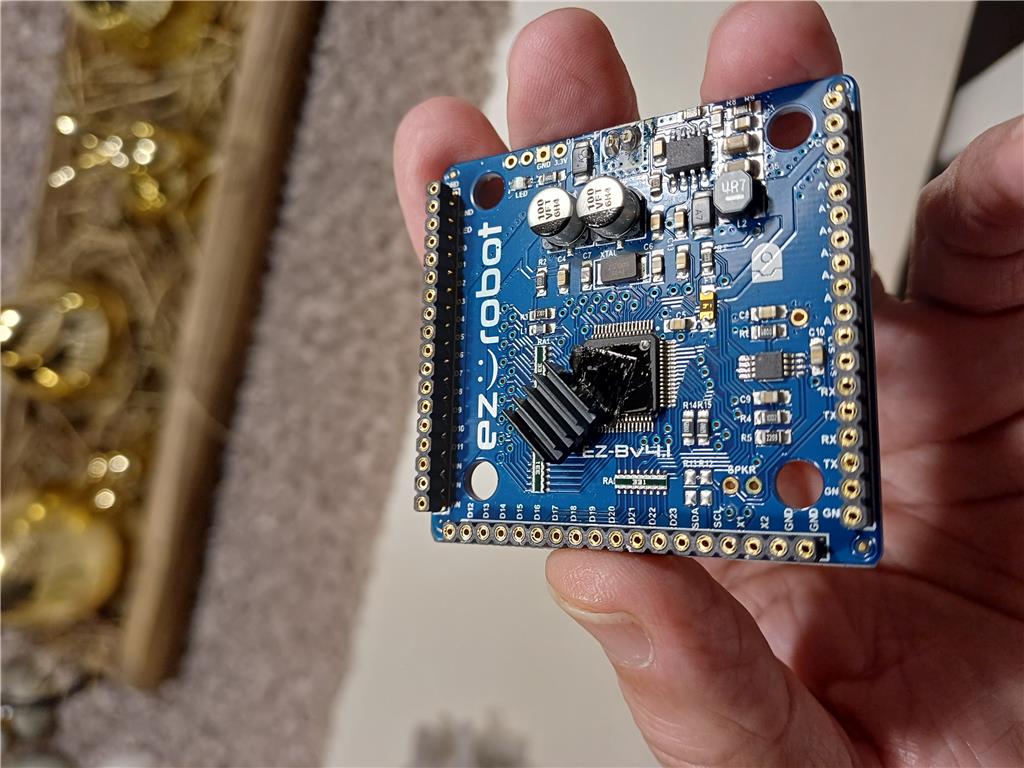
On the EZ-B v4.x/2 c89346552d30 (Unit A), the small heatsink on the chip had shifted and was touching contacts on the PCB. See the photo-I repositioned it and glued it back in place. It is now working again. There was probably a short circuit. I’m quite lucky it still works now (sound, servos, etc.).
For the other EZ-B v4.x/2 d0bae42be049 (Unit B), the heatsink had also moved, or it may have been incorrectly positioned during assembly. However, it was not touching the PCB-it was still sitting on the chip. I still have the same connection problem.
I can connect using the web UI, and the camera also works. I loaded the "Connection Diagnostic" robot skill, and the ping works as well. Here is the log:
i forgot to say. the led flashes blue at power up
For the EZ-B v4.x/2 d0bae42be049 (no sound and no connection), I used a cold spray on the EZ-B and the connection started working. I also tested the speaker with another one, and it worked.
I reconnected everything, and it is now working properly. However, I still have some doubts after using the cold spray-I may have a cold solder joint.
Tomorrow I will run a longer test to let it warm up a bit, and we’ll see how it behaves.
here's the log for EZ-B v4.x/2 d0bae42be049 (Unit B) after the cold spray.
Great troubleshooting and nice catch with the heatsinks - that definitely explains intermittent behavior. Your cold-spray test is a classic indicator of a bad/cold solder joint (cooling changed a joint dimension and temporarily restored contact). Below I’ll summarize what likely happened, what to watch for, and step-by-step repair and verification options you can take next.
What likely happened
What to watch for (symptoms of an intermittent cold solder joint)
Recommended verification tests (run these first)
If the behavior is intermittent (likely), repair paths
Heatsink and insulating tips
Tools & supplies that help
If you want step-by-step solder reflow instructions
Follow-ups and next actions for you
Useful links
Nice work so far - you’ve already isolated and improved both units. If you want, upload a close-up photo of the suspect chip/connector area (clear, high-res) and I’ll point out the specific pins/pads I’d reflow first. Do you have a fine-tip soldering iron and flux, or would you prefer step-by-step instructions for non-solder solutions (insulation, securing heatsink, or replacement)?
I wrote a script that checks temperature and voltage; audio and servo skills are also being used. I’m also using the "stress test" skill. No errors since last night.
I don’t think the heatsink was installed incorrectly at the factory-more likely it shifted on the chip over time due to heat and the adhesive. Anyway, it’s working fine now.