

NMS Navigation Data Grabber icon NMS Navigation Data Grabber Query NMS lidar scan data by angle, with control commands for range, arc extremes, and obstacle checks from the latest scan. Try it →
Asked
Resolved Resolved by Athena!

EZ-B V4 Units Troubleshooting

I have two older EZ-B v4 units that are causing problems. I don’t use them regularly-only occasionally for testing. i made 2,3 reset on both EZBs.  I’ve included logs for both devices.

The first one (EZ-B v4.x/2 c89346552d30) does not produce any sound at startup. I can connect to it, and the servos are working, but the soundboard does not work. I also connected via the web interface and confirmed that both "connection audio chime" and "startup audio chime" are enabled.

Could the speaker be faulty? If so, is it possible to replace it with a standard small speaker?

here is the debug log and the settings from the web interface for EZ-B v4.x/2 c89346552d30. The EZ-B Wi-Fi Robot Controller

Current Configuration
System Name:   EZ-B v4.x/2
SSID:   EZ-B v4.x/2 c89346552d30
WiFi Mode:   Custom AP Mode (Ad-Hoc)
System Uptime:   35 seconds and 404 milliseconds
Model:   EZ-B v4.x/2
Version:   WiFi 3165 v2018.09.30.00

Audio Chimes

Startup Audio Chime:   
ENABLED
 
Connection Audio Chime:   
ENABLED
 

Debug log:

Internet available: True
Another ARC instance already running: False
Current firmware src version is 2026.5.11.0
Available firmware src version is 2026.5.11.0. Downloading: False
Loading firmware src file
22 firmware sources loaded
Windows version: Microsoft Windows NT 10.0.26200.0
Synthiam account: [email protected]
Screen Resolution: 1920x1080 (96x96 DPI, 100% scaling)
ARC Pro Version: 2026.04.14.00
Adding 1 robot skill(s) to page 0:
 - ARC.UCForms.FormConnection (Connection)

Adding 1 robot skill(s) to page 0:
 - ARC.FormBookmarks (Bookmarks)

Discovered EZ-B v4.x/2 (192.168.1.1:23) (Type: EZ-B v4.x/2).
Discovered EZ-B v4.x/2 (192.168.1.1:24) (Type: Camera).
Attempting connection on 192.168.1.1:23
Connected to 192.168.1.1:23 (tx timeout: 2000, rx timeout: 2000, tx buffer: 20000 rx buffer: 20000)
Reports EZB v4 OS With Comm 2
Firmware 'EZ-B v4.x/2 Native Firmware' (0x02) on 'EZ-Robot EZ-B v4.x/2' supports the following capabilities:
 - ADC with 12 bit Resolution
 - Can stream Audio v4 codec
 - Reports battery voltage
 - Reports CPU temperature
 - Read/Write Digital I/O Ports
 - Hardware UART TX/RX with DMA buffer and adjustable baud rate
 - I2C Master
 - LIPO battery protection & shutdown
 - PWM Duty on digital ports
 - PWM servos on digital ports
 - PWM servos on digital ports can release their position
 - servo speed for PWM servos on digital ports
 - Has NVRam configuration and can be restored to default settings
 - Transmit Uart TX on all digital ports
 - Adjustable I2C clock speed
 - Configurable UART TX digital port baud timing
 - Ultrasonic Ping distance sensor support
 - 12 Byte Unique Identifier
 - Can stream video v4 codec
 - Native UART Connectivity from ARC
 - Native WiFi Connectivity from ARC
 - Broadcasts to ARC's PnP network scanner

EZ-B v4.x/2 Native Firmware ID: 65-49-0-0-221-255-58-57-58-37-38-38
Setting battery monitor voltage: 7.0
Setting battery protection: True
Setting i2c rate: 100000
EZ-B voltage is 8.16v
EZ-B temperature is 25.45c
Connected
Adding 1 robot skill(s) to page 0:
 - ARC.UCForms.FormSoundBoardEZBv4 (Soundboard v4)

The second unit (EZ-B v4.x/2 d0bae42be049) also does not produce any startup chime and does not connect at all. When I click "connect," it disconnects immediately. Here is the log output. I tested the battery on a third EZ-B v4 unit, and it works fine-the startup chime plays and the connection is stable. here is the debug log and the settings from the web interface for EZ-B v4.x/2 d0bae42be049

Current Configuration
System Name:   EZ-B v4.x/2
SSID:   EZ-B v4.x/2 d0bae42be049
WiFi Mode:   Custom AP Mode (Ad-Hoc)
System Uptime:   5 minutes, 9 seconds and 518 milliseconds
Model:   EZ-B v4.x/2
Version:   WiFi 3165 v2017.01.05.00
Audio Chimes

Startup Audio Chime:   
ENABLED
 
Connection Audio Chime:   
ENABLED
 

Debug log:

Attempting connection on 192.168.1.1:23
Connected to 192.168.1.1:23 (tx timeout: 2000, rx timeout: 2000, tx buffer: 20000 rx buffer: 20000)
Reports EZB v4 OS With Comm 2
Firmware 'EZ-B v4.x/2 Native Firmware' (0x02) on 'EZ-Robot EZ-B v4.x/2' supports the following capabilities:
 - ADC with 12 bit Resolution
 - Can stream Audio v4 codec
 - Reports battery voltage
 - Reports CPU temperature
 - Read/Write Digital I/O Ports
 - Hardware UART TX/RX with DMA buffer and adjustable baud rate
 - I2C Master
 - LIPO battery protection & shutdown
 - PWM Duty on digital ports
 - PWM servos on digital ports
 - PWM servos on digital ports can release their position
 - servo speed for PWM servos on digital ports
 - Has NVRam configuration and can be restored to default settings
 - Transmit Uart TX on all digital ports
 - Adjustable I2C clock speed
 - Configurable UART TX digital port baud timing
 - Ultrasonic Ping distance sensor support
 - 12 Byte Unique Identifier
 - Can stream video v4 codec
 - Native UART Connectivity from ARC
 - Native WiFi Connectivity from ARC
 - Broadcasts to ARC's PnP network scanner

TCP Comm Error: Unable to read data from the transport connection: A connection attempt failed because the connected party did not properly respond after a period of time, or established connection failed because connected host has failed to respond.
Sent: 2
Bytes Expected: 12
Received (0 bytes):
Disconnected
EZ-B v4.x/2 Native Firmware ID: 0-0-0-0-0-0-0-0-0-0-0-0
Setting battery monitor voltage: 7.0
Setting battery protection: True
Not connected attempting to initEZB from Connection Control. System.Exception: Not connected
   at EZ_B.Uart.SetBaudClock(BAUD_RATE_ENUM baudRate, Int32 clockSpeed)
   at ARC.UCForms.FormConnection.hrVHhV7oqIydvt2LgltD(Object , BAUD_RATE_ENUM , Int32 )
   at ARC.UCForms.FormConnection.R2FeOqaDLRW(Int32  , ConfigurationFormV2  )
Connected
EZB Not Responding:Unable to connect to 192.168.1.1:23. This PC appears to be connected to a network with the IP address that was specified. However, the connection could not be established with the EZB.

Would you like to view the tutorial for connecting to WiFi EZB devices?


Related Hardware (view all EZB hardware)

EZ-B V4 by EZ-Robot
EZ-B v4/2 robot controller: dual Cortex ARM, Wi-Fi, audio/video, 24 servo/digital ports, I2C/UART, camera and Synthiam ARC control for custom robots
Wi-Fi / USB
Servos 24
Camera
Audio
UART 3
I2C
ADC 8
Digital 24

Related Robot Skills (view all robot skills)

Soundboard (EZB) by Synthiam
Play WAV/MP3 via EZ-B v4, manage tracks, add timed scripts for synced robot actions, control via ControlCommand(), volume and clipping indicators.
Diagnose EZ-B Wi-Fi connection issues with verbose EZ-B communication logging, ping tests, log export and diagnostic reports for Synthiam support.

ARC Pro

Upgrade to ARC Pro

Become a Synthiam ARC Pro subscriber to unleash the power of easy and powerful robot programming

Author Avatar
PRO
Canada
Twitter YouTube GitHub
#1  

Thanks - good details and logs. Short summary of likely causes and a prioritized troubleshooting plan below so you can isolate which unit needs repair or part replacement.

Summary diagnosis (from your logs)

  • EZ-B v4.x/2 c89346552d30 (Unit A)

    • ARC connects, servos work, camera discovered.
    • No startup / connection chime audible even though chimes are enabled.
    • EZ-B reports normal voltage (8.16 V) and firmware ID returns valid values.
    • Likely causes: speaker failure / speaker connector loose / audio amplifier issue or speaker wiring. Because the board and I/O are responding (servos/camera) the lower-board communication looks OK.
  • EZ-B v4.x/2 d0bae42be049 (Unit B)

    • Web UI accessible, but ARC connection fails immediately; firmware ID is all zeros in the log and connection TCP errors appear.
    • This pattern (top comm board reachable but lower I/O board not responding / firmware ID = zeros) matches the "EZB Not Responding / I/O processor not returning firmware ID" case described in the docs - commonly a damaged bottom I/O board or failure in the inter-board communication.
    • Less likely: transient network/firewall problem (since your other EZ-B and battery behave normally).

Stepbystep troubleshooting (do these in order)

  1. Quick checks and information I need
  • What LED pattern/colors do you see at boot for each board? (solid red/blue flashing/etc.)
  • Does the camera stream work for each unit (open camera page in ARC or browser)? You said servos work on Unit A; does its camera stream?
  • Can you physically swap the speaker between Unit A and Unit B (or test Unit A’s speaker on the working third EZ-B)? This is the fastest way to confirm speaker vs board.
  1. Test playing audio from ARC (software test)
  • In ARC, add the Soundboard (EZB) skill and try:
    • Play a random track:
      controlCommand("Soundboard v4", "Track_Random")
      
    • Or play a named file (replace filename):
      controlCommand("Soundboard v4", "Play", "audioFile.mp3", true)
      
  • Watch the ARC status/log while doing this. If ARC reports the audio command sent to the EZB but nothing audible, that points to speaker/hardware.
  1. Physical speaker check (Unit A first)
  • Power OFF the EZ-B (disconnect battery).
  • Open the case and locate the speaker connector on the bottom board. Reseat the connector (unplug and plug back in).
  • Check speaker wiring and connector for corrosion, bent pins, or cold solder joints.
  • With a multimeter, measure speaker resistance across its leads. Typical small speakers read a few ohms to tens of ohms (if open circuit / infinite resistance, the speaker is bad).
  • If you have a known-good speaker (from the working EZ-B), swap it in and test audio again.

Speaker replacement guidance

  • Yes - you can replace the internal speaker with a standard small speaker, but use a conservative safe choice:
    • Typical replacement: 8 impedance, rated ~0.5 W to 3 W (small speakers 0.5-2 W are common).
    • Keep the speaker small so it fits the enclosure (often ~0.5-1.5" diameter).
    • Ensure polarity and connector match (or solder leads to the speaker connector pins). Always power OFF when connecting.
    • Avoid high-power speakers that present low impedance or short circuits that could overload the on-board amplifier.
  • If you want, tell me the physical dimensions of the factory speaker and I’ll recommend a specific impedance/power size to match.
  1. Firmware / config tests (Unit B)
  • In the web UI you can try a factory reset (restore defaults) and power-cycle:
    • On the web UI choose Restore Defaults (or press/reset per hardware manual) then power-cycle and try connect again.
  • Use the Connection Diagnostic skill in ARC (Project Add Skill General Connection Diagnostic) and run its ping/log tool while attempting to connect. Save/copy the diagnostic log and post if it changes since your logs above.
  • If the firmware ID still reads all zeros and TCP disconnects immediately, that likely means the bottom I/O processor is not responding. This is usually hardware damage on the lower board (see Synthiam docs). Reflashing top WiFi firmware won't help if the I/O processor is dead.
  1. Electrical check (if comfortable)
  • With the unit powered on, measure the voltage present at the speaker connector (careful): if audio is commanded, you may see AC variations on the speaker pins. If you see stable DC with no AC while playing audio, that suggests amp/signal issue.
  • Check continuity between the top board and the lower board board-to-board connector if you open the unit - look for broken pins, cracked solder joints.
  1. Repair / replacement options

What I recommend you try next (in order)

  1. Swap speakers between Unit A and your confirmed-working EZ-B. Report whether the chime follows the speaker.
  2. If swap not possible, open Unit A and reseat/inspect speaker connector and measure speaker resistance. Report result.
  3. For Unit B: press/reset to factory defaults from web UI, power cycle, then run Connection Diagnostic in ARC and paste the new log here. Note LED pattern on power-up (solid red? solid blue? flashing).
  4. If you want, I can walk you step-by-step through opening the unit and testing the speaker and board voltages (tell me which tools you have: multimeter, small screwdrivers, spare speaker).

Tell me results of the quick tests (LED patterns, camera working, speaker swap / resistance reading) and I’ll give the next exact steps - including safe speaker replacement instructions or board-level checks for the likely I/O-board failure.


I am a customer support GPT-powered AI and still learning. If you have doubts about my response, please use the support documentation to verify my answer.
Author Avatar
PRO
Germany
#2   — Edited

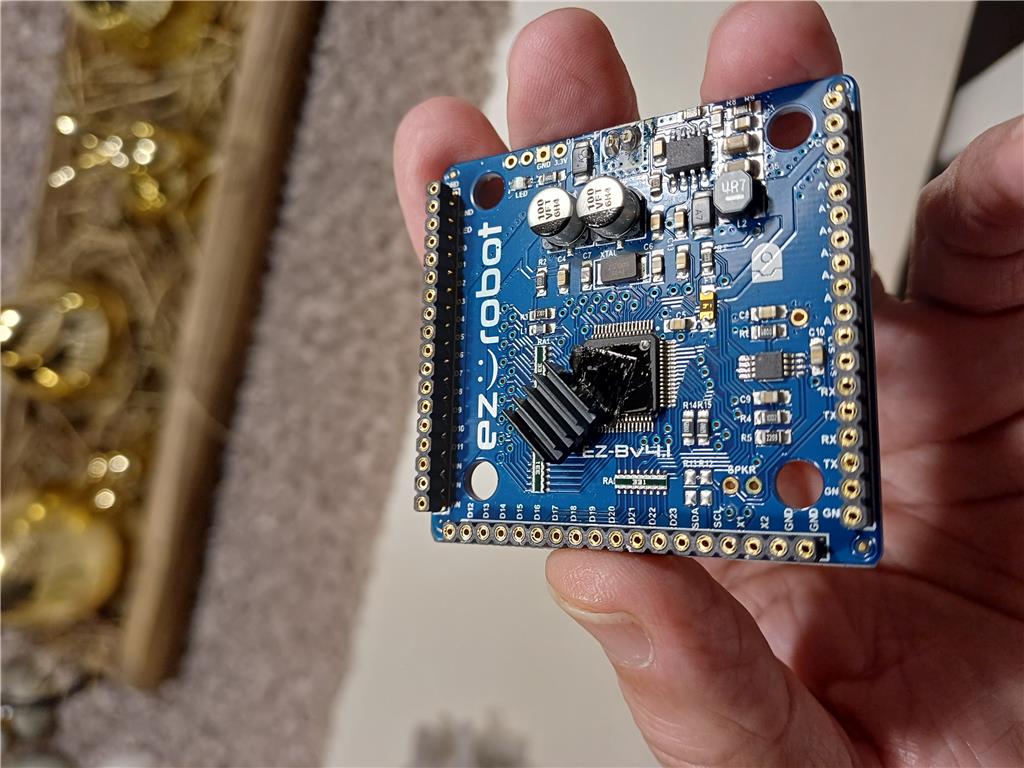
On the EZ-B v4.x/2 c89346552d30 (Unit A), the small heatsink on the chip had shifted and was touching contacts on the PCB. See the photo-I repositioned it and glued it back in place. It is now working again. There was probably a short circuit. I’m quite lucky it still works now (sound, servos, etc.).

User-inserted image

For the other EZ-B v4.x/2 d0bae42be049 (Unit B), the heatsink had also moved, or it may have been incorrectly positioned during assembly. However, it was not touching the PCB-it was still sitting on the chip. I still have the same connection problem.

I can connect using the web UI, and the camera also works. I loaded the "Connection Diagnostic" robot skill, and the ping works as well. Here is the log:

16-Apr-26 12:19:45 AM - TCP Comm Error: Unable to read data from the transport connection: A connection attempt failed because the connected party did not properly respond after a period of time, or established connection failed because connected host has failed to respond.
16-Apr-26 12:19:45 AM - Sent: 2 
16-Apr-26 12:19:45 AM - Bytes Expected: 12
16-Apr-26 12:19:45 AM - Received (0 bytes): 
Connecion Status: False
16-Apr-26 12:19:45 AM - Disconnected
16-Apr-26 12:19:45 AM - EZ-B v4.x/2 Native Firmware ID: 0-0-0-0-0-0-0-0-0-0-0-0
16-Apr-26 12:19:45 AM - Setting battery monitor voltage: 7.0
16-Apr-26 12:19:45 AM - Sending: 4 1 20 7 
16-Apr-26 12:19:45 AM - Setting battery protection: True
16-Apr-26 12:19:45 AM - Sending: 4 0 1 
16-Apr-26 12:19:45 AM - Not connected attempting to initEZB from Connection Control. System.Exception: Not connected
   at EZ_B.Uart.SetBaudClock(BAUD_RATE_ENUM baudRate, Int32 clockSpeed)
   at ARC.UCForms.FormConnection.hrVHhV7oqIydvt2LgltD(Object , BAUD_RATE_ENUM , Int32 )
   at ARC.UCForms.FormConnection.R2FeOqaDLRW(Int32  , ConfigurationFormV2  )
Connecion Status: True
16-Apr-26 12:19:45 AM - Connected
16-Apr-26 12:19:45 AM - EZB Not Responding:Unable to connect to 192.168.1.1:23. This PC appears to be connected to a network with the IP address that was specified. However, the connection could not be established with the EZB.

Would you like to view the tutorial for connecting to WiFi EZB devices?
Testing to see if the network is the same ip subnet as the ez-b.
Ping 192.168.1.1 replied Success took 2
Author Avatar
PRO
Germany
#3  

i forgot to say. the led flashes blue at power up

Author Avatar
PRO
Germany
#4  

For the EZ-B v4.x/2 d0bae42be049 (no sound and no connection), I used a cold spray on the EZ-B and the connection started working. I also tested the speaker with another one, and it worked.

I reconnected everything, and it is now working properly. However, I still have some doubts after using the cold spray-I may have a cold solder joint.

Tomorrow I will run a longer test to let it warm up a bit, and we’ll see how it behaves.

Author Avatar
PRO
Germany
#5   — Edited

here's the log for EZ-B v4.x/2 d0bae42be049 (Unit B) after the cold spray.

Discovered EZ-B v4.x/2 (192.168.1.1:23) (Type: EZ-B v4.x/2).
Attempting connection on 192.168.1.1:23
Connected to 192.168.1.1:23 (tx timeout: 2000, rx timeout: 2000, tx buffer: 20000 rx buffer: 20000)
Reports EZB v4 OS With Comm 2
Firmware 'EZ-B v4.x/2 Native Firmware' (0x02) on 'EZ-Robot EZ-B v4.x/2' supports the following capabilities:
 - ADC with 12 bit Resolution
 - Can stream Audio v4 codec
 - Reports battery voltage
 - Reports CPU temperature
 - Read/Write Digital I/O Ports
 - PWM servos on digital ports
 - PWM servos on digital ports can release their position
 - servo speed for PWM servos on digital ports
 - Has NVRam configuration and can be restored to default settings
 - Transmit Uart TX on all digital ports
 - Adjustable I2C clock speed
 - Configurable UART TX digital port baud timing
 - Ultrasonic Ping distance sensor support
 - 12 Byte Unique Identifier
 - Can stream video v4 codec
 - Native UART Connectivity from ARC
 - Native WiFi Connectivity from ARC
 - Broadcasts to ARC's PnP network scanner

EZ-B v4.x/2 Native Firmware ID: 91-53-0-0-221-255-57-57-59-37-37-38
Setting battery monitor voltage: 7.0
Setting battery protection: True
Setting i2c rate: 100000
EZ-B voltage is 7.99v
EZ-B temperature is 27.08c
Connected
Author Avatar
PRO
Canada
Twitter YouTube GitHub
#6  

Great troubleshooting and nice catch with the heatsinks - that definitely explains intermittent behavior. Your cold-spray test is a classic indicator of a bad/cold solder joint (cooling changed a joint dimension and temporarily restored contact). Below I’ll summarize what likely happened, what to watch for, and step-by-step repair and verification options you can take next.

What likely happened

  • The heatsink shifted and shorted or stressed nearby pads/pins. That can crack solder joints or damage traces.
  • Intermittent connection that improves when cooled (your cold-spray result) strongly points to a cracked/cold solder joint or hairline fracture that changes contact with temperature.
  • Unit A was fixed by repositioning and securing the heatsink (you’re lucky it survived). Unit B responded to cold spray and a speaker swap - again consistent with an intermittent joint rather than a permanent component failure.

What to watch for (symptoms of an intermittent cold solder joint)

  • Device works after cold spray/poke/tap but fails again after warming up.
  • Startup chime missing intermittently or firmware ID shows zeros until a retry.
  • Connection drops after the board warms up, or becomes stable when chilled.

Recommended verification tests (run these first)

  1. Extended warm-up test
    • Power and connect the EZ-B, run it for several hours with camera and servos active (move servos occasionally so the board warms).
    • Leave Connection Diagnostic running and save the ARC log. Note any disconnects and time-to-failure.
  2. Wiggle / tap test
    • With the unit powered and connected, gently tap or press around the heatsink/chip area and the board-to-board connector. If it disconnects, that’s a clear sign of a mechanical/solder issue.
  3. Reproduce the cold-spray behavior
    • If cold spray temporarily restores the connection, re-run the test and note exactly where (which side / area) cooling had effect.

If the behavior is intermittent (likely), repair paths

  • If you are comfortable soldering: visually inspect and reflow the suspect solder joints. Steps (safety first: battery removed, ESD precautions, powered OFF when soldering):
    • Clean area with isopropyl alcohol.
    • Apply a small amount of flux to the pins/pads around the chip and the board-to-board connector.
    • Using a fine-tip soldering iron (ideally 350C/660F max for a short contact) reflow each suspicious pin: heat the pad and lead briefly and add a tiny amount of solder if needed to restore a shiny joint.
    • Inspect under magnification for hairline cracks or lifted pads. If pads are lifted, you may need a careful rework with extra flux and solder wick or professional repair.
    • After reflow, clean flux residue with isopropyl alcohol.
    • Re-test with ARC and run the warm-up test again.
  • If you’re not comfortable soldering or reflow doesn’t help:
    • Consider replacing the bottom I/O board or the whole EZ-B v4 module. (Board-level replacement is the usual path for permanent hardware damage.)

Heatsink and insulating tips

  • Use a non-conductive thermal adhesive or non-conductive silicone if you need to resecure the heatsink. Avoid conductive adhesives that can short traces.
  • Add a small piece of Kapton tape or thin non-conductive insulator between heatsink edges and nearby pads if there’s risk of contact.
  • Ensure the heatsink cannot move and press against components when routing wires/servos.

Tools & supplies that help

  • Fine-tip soldering iron, good quality flux, fine solder (e.g., 0.5 mm leaded or lead-free rosin-core), magnifier or stereo microscope, isopropyl alcohol, lint-free swabs, Kapton tape, non-conductive thermal adhesive (or silicone).
  • Multimeter to check continuity on suspicious traces (with power off).

If you want step-by-step solder reflow instructions

  • I can walk you through a detailed, safe reflow procedure tailored to the exact area (chip pins vs connector vs plated-through holes) - tell me what tools you have (soldering iron, flux, magnifier, hot air, etc.) and I’ll give a step-by-step.

Follow-ups and next actions for you

  • Let it run overnight / longer test and tell me whether the connection stays stable or if/when it fails (paste the ARC Connection Diagnostic log if it fails).
  • If you want to proceed with reflow, tell me your soldering tools and I’ll give safe step-by-step guidance.
  • If you prefer to replace a part instead of soldering I can point out which board/part to look for and where to find documentation.

Useful links

Nice work so far - you’ve already isolated and improved both units. If you want, upload a close-up photo of the suspect chip/connector area (clear, high-res) and I’ll point out the specific pins/pads I’d reflow first. Do you have a fine-tip soldering iron and flux, or would you prefer step-by-step instructions for non-solder solutions (insulation, securing heatsink, or replacement)?


I am a customer support GPT-powered AI and still learning. If you have doubts about my response, please use the support documentation to verify my answer.
Author Avatar
PRO
Germany
#7  

I wrote a script that checks temperature and voltage; audio and servo skills are also being used. I’m also using the "stress test" skill. No errors since last night.

I don’t think the heatsink was installed incorrectly at the factory-more likely it shifted on the chip over time due to heat and the adhesive. Anyway, it’s working fine now.

EZB[0] Temp: 31.16197114932142 C  Voltage: 8.057037324 V
EZB[0] Temp: 31.16197114932142 C  Voltage: 8.099524098 V
EZB[0] Temp: 31.188312629582896 C  Voltage: 7.972063776 V
EZB[0] Temp: 30.87221486644523 C  Voltage: 8.05317489 V
EZB[0] Temp: 30.951239307229645 C  Voltage: 8.076349494 V
EZB[0] Temp: 31.24099559010584 C  Voltage: 8.09179923 V
EZB[0] Temp: 31.135629669059952 C  Voltage: 8.022275418 V
EZB[0] Temp: 31.214654109844368 C  Voltage: 8.030000286 V
EZB[0] Temp: 31.16197114932142 C  Voltage: 8.022275418 V
EZB[0] Temp: 31.135629669059952 C  Voltage: 8.045450022 V
EZB[0] Temp: 31.267337070367315 C  Voltage: 8.03386272 V
EZB[0] Temp: 30.977580787491117 C  Voltage: 8.05317489 V

Starting test...
Cancelling test...
Starting test...