


Asked
— Edited
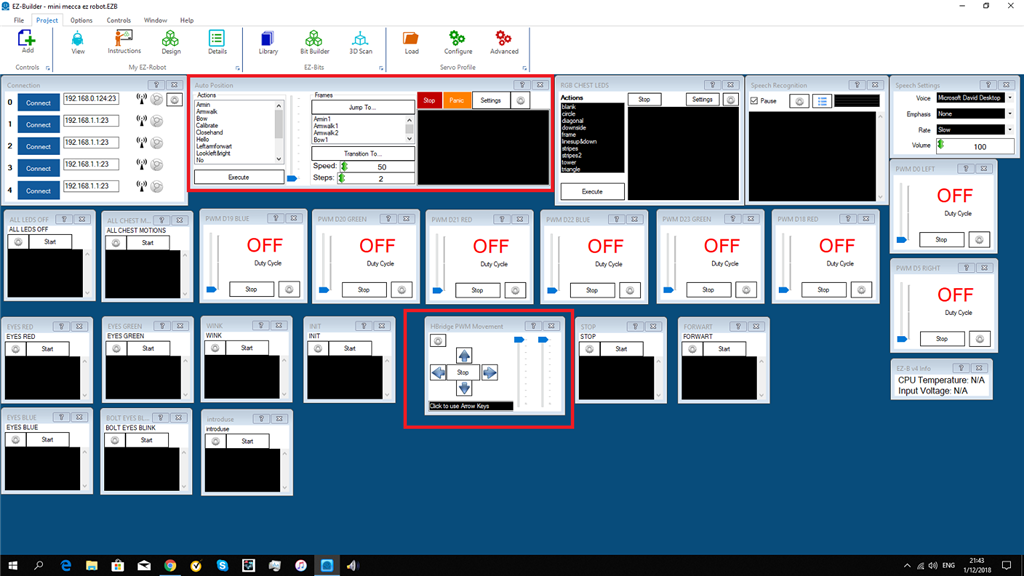
Ad Movement To Forwart()
i cant seems to ad a movement to script movement panel?
Forward( 255,5000 ) sleep(1000) ControlCommand("Auto Position", AutoPositionAction, "Armwalk")
anyone thank you

Your action in Auto Position is not set to repeat if it only runs once
Why does your code tell it to right or reverse in the right or reverse? You're telling the command to do the command when it does the command to do the command that does the command in the command when the command runs the command to do the command from the command with the command.... for ever
My instructions did not instruct you to enter the movement into the movement of the movement. You've created an infinite loop. Careful, the universe is a fragile place
Read the manual for the control before using it. Here is a copy from the manual from the link i provided in my previous post.
this is arkward.all i see is 10 times the word command,and now am lost. i dont have action forwart/backwart/left&right in the auto position. the action turn head left&right is repeat also the action move arms is repeat. so ok something is not right in the movement.thats why the wheels didn turn of eek. infinite means forever? says buzz lightyear.
Set the ARMWALK ACTION in your Auto Position for REPEAT
Edit the FORWARD script in the MOVEMENT SCRIPT to the following...
that's it. Do not add code anywhere else. Remove the RIGHT() and LEFT() and all other code you've had.
ok that works.but only for one command.thank you for your patients
dj&justin
found it.i put the two motions together.armwalk&lookleft&right.
That is pretty cool! And before now, I didn't know MOVEMENT SCRIPT worked that way.
i learned tree new things.i am very happy.these mini meccanoids are very good to start robotics.i notest one thing do.the speed bar dont stay in position you , set it for.
paste the code in your movement script