

Change Release Notes
Introducing one of the World's most important robot platform AI integrations ever:
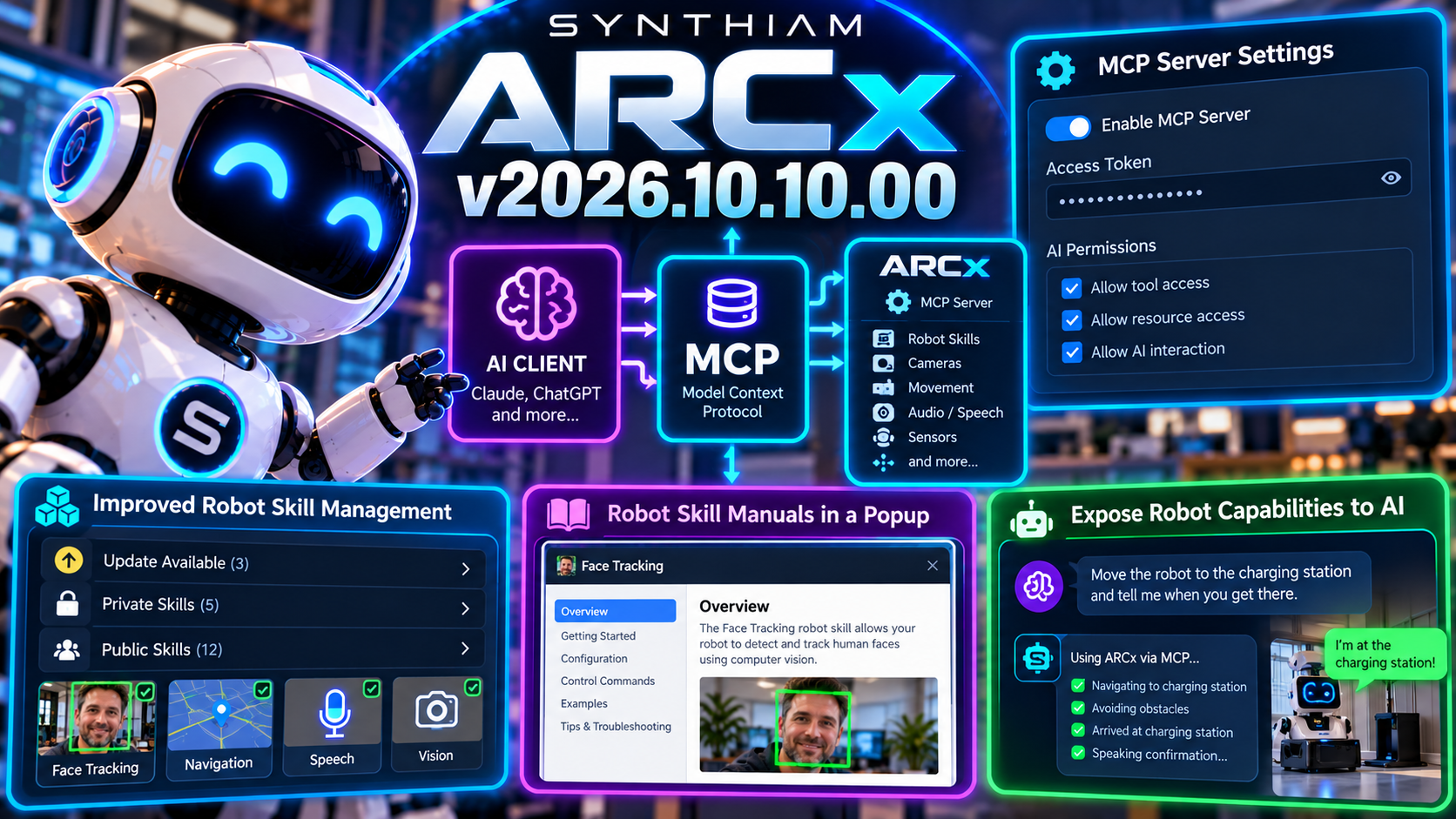
Model Context Protocol support.
ARCx can now expose robot capabilities to compatible AI clients through an integrated MCP server, creating a standardized bridge between artificial intelligence and the real-world capabilities available inside your ARCx project.
Read manual here: https://synthiam.com/Support/ai-integration/Model-Context-Protocol
Your robot already has cameras, motors, sensors, speech, scripts, and Robot Skills.
Now AI can have a structured way to discover and interact with them.
New Model Context Protocol Server
ARCx now includes an integrated MCP server that can be enabled directly from the application.
MCP - Model Context Protocol - provides a standardized way for AI systems to discover tools, resources, and capabilities exposed by other applications.
In ARCx, that means compatible AI clients can interact with the functionality you choose to make available from your robot project.
This opens the door to AI that can do more than simply talk about your robot.
It can potentially use the robot's capabilities as tools. And it gets even better. Your selected AI can also add robot skills, configure robot skills, and run projects. You can watch an entire robot project get built in real time as the AI adds and configures it based on your specifications. Instruct the AI to build a robot project and describe your ports, servos, motors, and configuration.
Turn Robot Skills Into AI Tools
ARCx Robot Skills already provide the building blocks for real-world robot functionality.
Movement.
Vision.
Audio.
Speech.
Sensors.
Automation.
Custom hardware.
With MCP, ARCx can expose selected capabilities to AI clients in a way they can understand and invoke.
That creates an exciting foundation for experiences where an AI can reason about a task and then ask ARCx to perform the appropriate real-world action.
AI provides the intelligence.
ARCx provides the robot.
You Control What AI Can Access
Connecting AI to a robot shouldn't mean handing it the keys to everything.
ARCx includes new MCP configuration controls that let you decide how the server operates and what AI clients are allowed to access.
The new settings include controls for:
- Enabling or disabling the MCP server
- Configuring an access token
- Managing AI permissions
- Controlling exposed tools and resources
This keeps the integration flexible while allowing developers to decide exactly how much control an AI client should have.
Access Token Protection
The MCP server can be protected with an access token, helping prevent unauthorized clients from connecting to ARCx.
That becomes especially important when ARCx is running on a network or when the robot exposes capabilities that can affect hardware in the physical world.
AI connectivity is useful.
Controlled AI connectivity is much better.
New MCP Documentation
Documentation has been expanded to explain how ARCx's MCP tools and resources work and how Robot Skills can expose functionality to AI clients.
This gives robot skill developers a clearer path toward building capabilities specifically designed for AI-driven robotics.
We're not just adding an AI button.
We're building an interface between AI systems and the ARCx robotics ecosystem.
Better robot skill Management
Robot Skill management also received a major usability improvement in this release.
Installed Robot Skills are now organized into clearer groups such as:
- Update Available
- Private
- Public
ARCx dynamically categorizes installed skills based on their current status and available store versions, making it much easier to see what needs attention.
Instead of hunting through one long collection of skills, you can immediately see what's installed, what's private, and what has an update waiting.
Robot Skill Manuals Now Open Inside ARCx
Robot Skill documentation is also much easier to access.
Clicking a robot skill can now open its manual directly inside a popup dialog in ARCx instead of launching a separate browser tab.
That means you can:
Read the instructions.
Close the dialog.
Keep building.
No tab juggling required.
The embedded manual also respects your selected ARCx theme for a more consistent experience.
Cleaner Debug Logging
ARCx logging received some cleanup as well.
Log formatting has been refined to include useful method information where appropriate while omitting internal details that don't add value.
The result is cleaner diagnostic output that's easier to scan when you're trying to figure out what your robot is doing.
Because debugging robots is already interesting enough without the logs fighting back.
Updated robot skill Template
The robot skill template has also been updated for this release, ensuring new Robot Skills start from the latest ARCx foundation.
Project files, installer configuration, and release versioning have all been updated for v2026.10.10.00.
The Robot Just Became an AI Tool
ARCx has always been about connecting software intelligence to real hardware.
With Model Context Protocol support, that connection becomes much more interesting.
An AI can understand the tools ARCx exposes.
ARCx can connect those tools to Robot Skills.
Robot Skills can control the physical world.
That's the bridge.
AI thinks.
ARCx acts.
The robot does.
Download ARCx
Install ARCx on the computer that runs your robot — from a first prototype to a commercial product or an industrial cell. Available for Windows 64-bit, Linux 64-bit and Linux ARM64 for Raspberry Pi (Ubuntu 24.04 LTS 64-bit).
Linux
Ubuntu, Debian & friends
64-bit (x64) (zip)
Raspberry Pi
Single board computers
Linux ARM64 (zip)
Requires Ubuntu 24.04 LTS (64-bit)
ARCx is always evolving. Follow along in the community for updates.
Follow ARCx development Download ARC today
Upgrade to ARC Pro
Experience the transformation – subscribe to Synthiam ARC Pro and watch your robot evolve into a marvel of innovation and intelligence.
ok, can't do it now anyway. but will for sure try it out tomorrow.
To add to this, while the current ARCx release is missing that MCP feature set, it will be included in the next release. However, the current ARC release does include this functionality. This means ARC users can ask their AI agent to create a robot skill, and it is possible. ARCx requires the next update.
The ARCx 2026.10.10.02 we just published includes the MCP hooks for creating robot skills. Now you just need to connect your agent to the ARCx MCP server and tell it what you want your new robot skill to do. It will create a robot skill based on the user controls provided by the ARCx platform.
Awesome. I will be trying it in the morning and will give you a status update.
Oh boy - i can say this new version is amazing. Here's what i did...
I loaded ARCx and went to the Options Preferences menu and enabled the MCP server
I went into my VS Code where Claude and open ai codex is installed. I added the ARCx MCP server to Claude code
In claude code, i said "create a robot skill using arcx mcp that shows a graph of system resources kind of like windows task manager. and make custom ui templates as well that i can add"
and it started making it! it registered the robot skill on synthiam.com. it created the template for the robot skill. it wrote the code. compiled it. created screenshots. wrote a manual to put on the skill store. it did the whole thing!
Here's a quick update on my progress with MCP and ARCx robot skill development.
My first skill was a simple "Hello World" test, just to see if I could successfully create, build, and install a custom skill. That worked perfectly!
With that success, I moved on to something more practical: developing a native Pushover Robot Skill, since Pushover is already part of my robot's operating environment. I'm happy to report that it's working great!
I've successfully tested sending notifications directly from the skill and through ARCx JavaScript.
Now I'm looking at other parts of my project that could benefit from becoming native Robot Skills. There are quite a few possibilities, and I'm excited to explore them.
A big thank-you to the Synthiam team for adding MCP support. It's opening up a whole new set of possibilities for developing and expanding my robot's capabilities. Really impressive stuff!
Ok, this is very interesting and I think I'm getting excited. I was just thinking the other day if AI could makes a ARC (x) robot skill because I have no idea how to. but have wanted to learn. At the time I only use ARC and am happy and grateful that the feature has been added to that platform.
One thing that has me wondering; You guys have given ARCx the ability to build a complete working project for a robot using integrated AI. OK, that sounds amazing. I've been building, changing and refining my ARC project for my one and only robot for years now. It's a complicated collection of skills and stand alone scripts that work with each other and depend on precise settings to servos and motors. These settings need to be adjusted so when they command motors and sensors they safely run and don't destroy the robot. I assume that any project built by AI would have to be checked thoroughly to make sure that all settings are within tolerance. I'm not too sure how to ask this but.... Are there safety measures built into this MPC feature that can build your project for you? How does MPC know where all your limits are?
@dbeard , I'm watching your progress closely. Thanks for posting and sharing your journey. I also use Pushover to send notices to my cell phone if my B9 robot has any issues that it's scanning for. Mainly like occasional computer to EZB disconnects. Like you, as a starting point, I'll be trying to have MPC make a skill like you did to do this. I hope you don't mind me reaching out to you off forum for advice if needed. I won't be able to have any fun with all this for a little while. Right now I'm involved in a major upgrade to my B9 robot arm that's keeping me from exploring this new platform and these new features.
Hi Dave. I am in learning mode, but it is cool the possibilities. Reach out anytime. I will see if I can post the pushover skill, once i make sure it is working good.