

Change Release Notes
ARCx v2026.10.06.01 introduces a powerful new way to turn your robot into a complete interactive experience.
Robot projects can now open a Custom UI in kiosk mode on a specific monitor, making it possible to create full-screen displays, dashboards, control panels, animated faces, telepresence screens, information kiosks, and more - directly from ARCx.
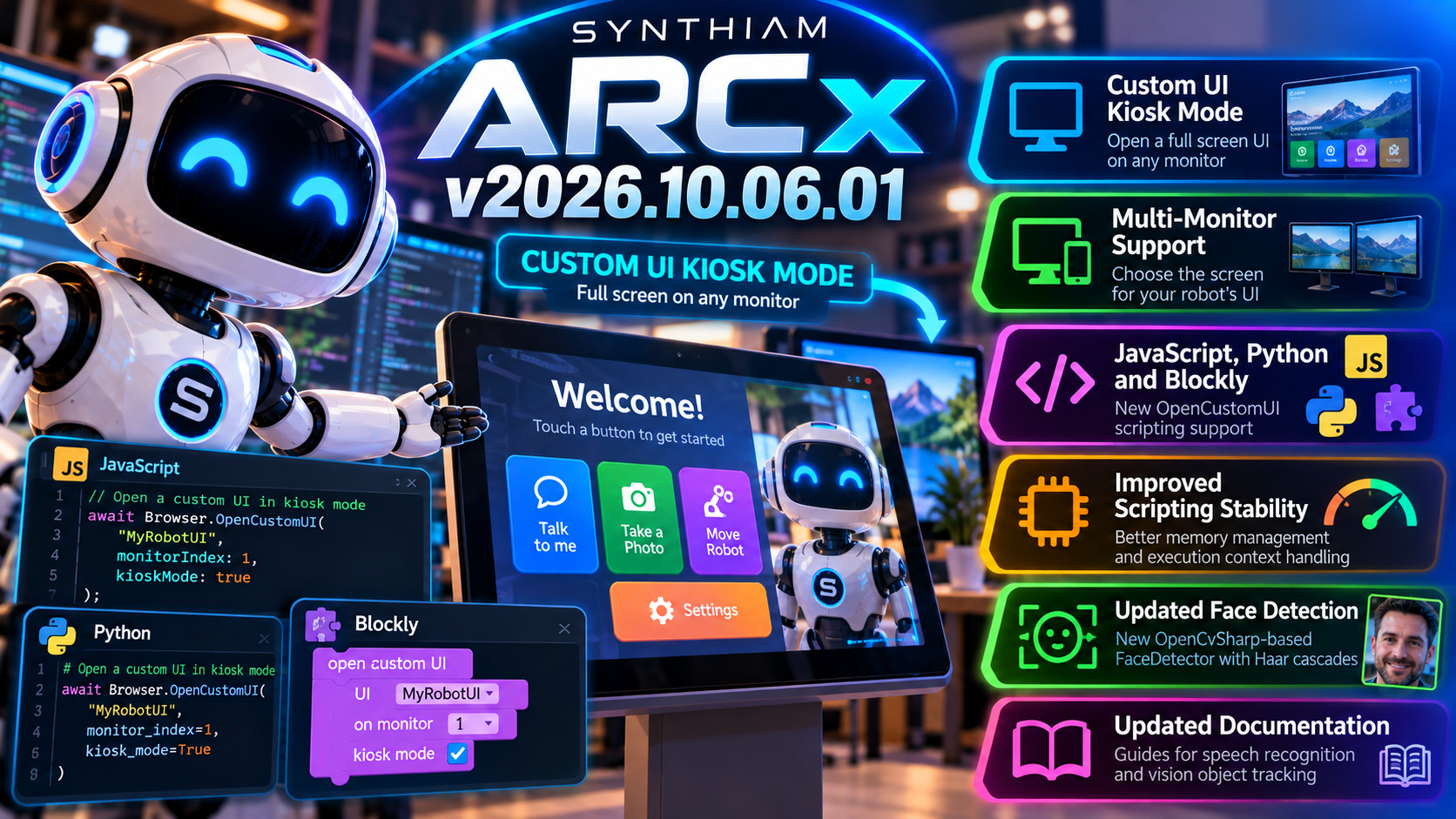
This release also includes important improvements to the JavaScript and Python scripting engines to reduce memory growth and improve reliability during long-running projects.
New Custom UI Kiosk Mode
ARCx can now launch a Custom UI as a dedicated full-screen kiosk display.
Your script can specify which screen or monitor should display the interface, allowing the ARCx server and the robot's visible interface to live on completely different displays.
That makes ARCx ideal for robots with built-in screens.
For example:
- Display an animated robot face
- Show a telepresence interface
- Build an interactive information kiosk
- Present buttons and controls to a user
- Display status information or sensor data
- Create a full-screen customer experience
- Run a dedicated UI on a robot-mounted touchscreen
Your robot can now have an interface designed specifically for the person standing in front of it.
Multi-Monitor Robot Experiences
The new Custom UI functionality allows you to select the target monitor.
That means a robot computer could have:
Monitor 1: ARCx development and diagnostics
Monitor 2: The robot's public-facing interface
Or perhaps several displays serving completely different purposes.
ARCx handles the robot.
The Custom UI handles the experience.
JavaScript & Python Support
The new kiosk functionality is available directly from ARCx scripting.
New OpenCustomUI functionality has been added to both the JavaScript and Python APIs, allowing scripts to control when and where the interface appears.
That makes it easy to create robot behavior such as:
Person approaches robot wakes up custom interface appears interaction begins.
All under script control.
Blockly Support Too
You don't need to write code to use it.
New Blockly blocks have been added for the Custom UI functionality, including options for selecting the target screen.
So whether you're building with:
- JavaScript
- Python
- Blockly
...you can create the same kiosk-style robot experiences.
Better Python Memory Management
This release also includes an important improvement for projects that execute Python scripts repeatedly.
ARCx now releases Python debugging information after script execution rather than allowing that information to remain in memory.
For long-running robot applications, this helps prevent unnecessary memory growth over time.
Robots are supposed to remember important things.
Not every debugging object they've ever created.
JavaScript Engine Stability Improvements
The JavaScript engine received its own cleanup.
Execution contexts are now reset after scripts run, addressing a condition where contexts could accumulate and increase the execution stack over time.
This improves reliability for projects that continuously execute JavaScript - particularly robots expected to operate for hours, days, or longer without restarting.
Face Detection Foundation Updated
ARCx's recent computer-vision work also continues underneath this release.
The previous AForge-based face detection implementations have been replaced with the new OpenCvSharp-based FaceDetector, providing a cleaner and more modern foundation for the Face Tracking Robot Skill.
This includes a new Haar-cascade-based detection implementation and removes several older detection components that are no longer needed.
Updated for v2026.10.06.01
ARCx project and installer versioning have been updated for v2026.10.06.01, ensuring the latest components and functionality are included in the release.
ARCx v2026.10.06.01 is a big step toward robots that aren't just controlled through an interface - they can now present their own interface to the world.
Build the robot.
Build its personality.
Build its screen.
Then let people interact with it.
Download ARCx
Install ARCx on the computer that runs your robot — from a first prototype to a commercial product or an industrial cell. Available for Windows 64-bit, Linux 64-bit and Linux ARM64 for Raspberry Pi (Ubuntu 24.04 LTS 64-bit).
Linux
Ubuntu, Debian & friends
64-bit (x64) (zip)
Raspberry Pi
Single board computers
Linux ARM64 (zip)
Requires Ubuntu 24.04 LTS (64-bit)
ARCx is always evolving. Follow along in the community for updates.
Follow ARCx development Download ARC today
Upgrade to ARC Pro
Unleash your creativity with the power of easy robot programming using Synthiam ARC Pro
Interesting about the audio. The system default is what your windows device is set to. Is windows and ARCx using different audio devices when the message doesn’t appear?
Well, I had set the audio in ARCx to the devices with the label MME instead of system default. When I looked at the log this morning, I was getting those system busy messages. So then I switched the devices in ARCx to system default and the messages stopped. It may be that I had the wrong devices selected, but now as of now, no messages. I will continue to monitor. I do reboot my machine daily and restart ARC and continued that process with ARCx, may not have to do that with ARCx, still testing.