

Hello! I'm trying to create a loop in the Blockly programming environment, but it only executes the first statement and doesn't continue with the rest.
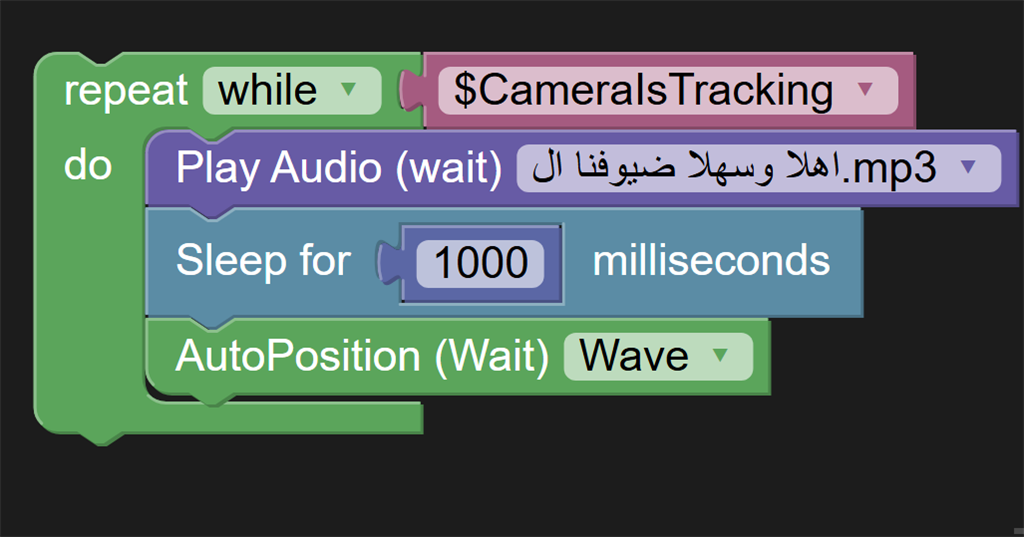
Could someone please help me figure out why the loop is not working as expected? Thank you!

Hello! I'm trying to create a loop in the Blockly programming environment, but it only executes the first statement and doesn't continue with the rest.
Could someone please help me figure out why the loop is not working as expected? Thank you!

Look in the debug window, and you will find messages. If there is an error, it will be displayed there.
Also, don't forget that you are using the WAIT commands, which means they must complete before moving to the next command. The word WAIT means wait for something to complete until instructed to continue. So in your code, you audio soundboard would WAIT until it has completely finished before moving to the next command.
If you do not want that, do not use the WAIT commands.