

Change Release Notes
ARCx v2026.10.26.00 is all about making powerful robotics technology easier to understand, safer to use, and faster to get started with.
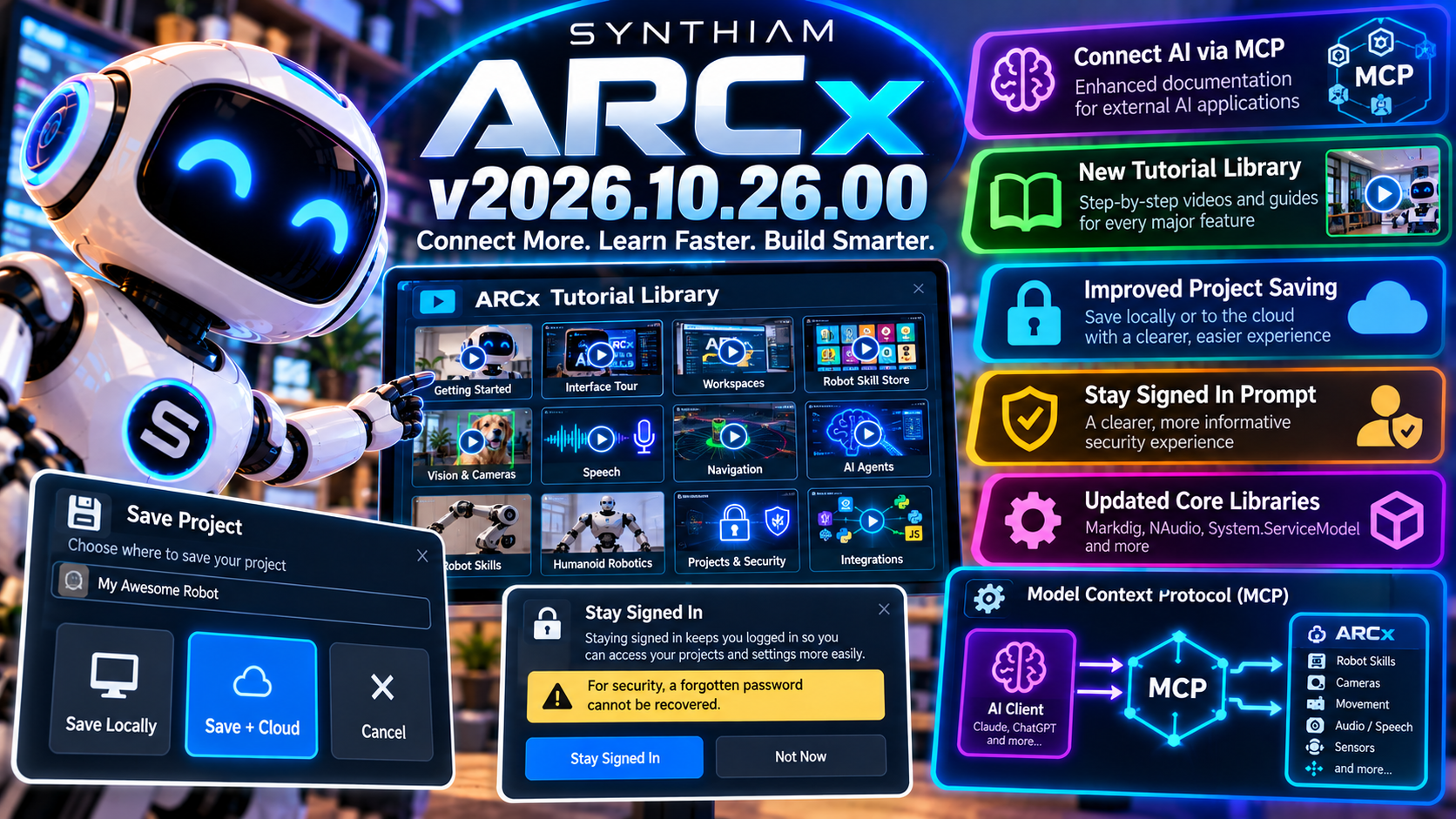
This release expands guidance for connecting external AI applications through MCP, adds an improved Stay Signed In security experience, makes project saving clearer, and introduces a huge new collection of tutorials covering everything from your first workspace to AI agents, navigation, humanoids, robot skill development, and more.
ARCx keeps getting more capable.
This release makes those capabilities easier to actually use.
Connect External AI Applications to ARCx
ARCx's Model Context Protocol (MCP) integration now has expanded onboarding and documentation to make it easier to connect external AI applications to your robot.
MCP provides a standardized way for AI clients to discover and interact with tools and resources exposed by ARCx.
That means the intelligence doesn't necessarily need to live inside the robot application.
An external AI can connect to ARCx, understand the capabilities you've made available, and use those capabilities to interact with the physical robot.
AI connects.
ARCx provides the tools.
Your robot does the work.
The updated help content walks users through these possibilities more clearly and makes the AI integration easier to discover.
A Smarter "Stay Signed In" Experience
ARCx now includes a dedicated Stay Signed In prompt instead of relying on a simple confirmation message.
Why does that matter?
Because a robot computer may be sitting on a trusted private network...
...or it might be somewhere very different.
The new dialog provides clearer information about what staying signed in means and helps users make a more informed decision based on their network environment.
It's a small interaction with an important purpose:
Convenience shouldn't come at the expense of understanding security.
Clearer Local + Cloud Project Saving
The project save experience has received a substantial usability upgrade.
ARCx now presents the available save options more clearly, including the ability to save your project locally and to the cloud.
The redesigned interface provides better visual cues, clearer labels, improved spacing, and more obvious save states.
That means less wondering what a button does and more confidence about where your project is actually going.
Save Locally or Save + Cloud
ARCx projects aren't limited to one storage strategy.
The updated save experience makes it easier to understand when you're:
Saving locally
or
Saving + Cloud
This is especially useful for robots that need to continue operating locally while also benefiting from cloud storage or backup.
Your robot shouldn't stop being your robot just because the internet took the afternoon off.
Better Password Guidance
Password-protected ARCx projects now provide a much clearer warning about password recovery.
If you protect a project with a password, ARCx explicitly reminds you that a forgotten password cannot be recovered.
That may not sound exciting...
...until the project contains three months of work and the password was apparently something "you'd definitely remember."
Better security also means making the consequences clear before you click Save.
A Huge New ARCx Tutorial Library
This release adds a substantial collection of new instructional media designed to help users go from opening ARCx to building increasingly sophisticated robots.
New tutorial content covers:
- ARCx introduction
- Welcome and onboarding
- Interface tour
- Workspaces
- Robot Skill Store
- Configuring Robot Skills
- Camera video sources
- Speech synthesis and recognition
- Virtual Robot
- Kinematics robot arms
- Lidar navigation
- Humanoid servo animation
- AI agents
- Task Manager
- Creating Robot Skills
- Projects and security
- Integrations
These aren't just quick-start instructions.
Together, they provide a path through a large portion of what ARCx can actually do.
From First Robot to AI Agents
One of the challenges with a mature robotics platform is that there's a lot you can do with it.
A new user may begin by asking:
How do I move my robot?
Then very quickly they're asking:
How do I add speech recognition?
How do I track objects?
How do I navigate with lidar?
How do I animate a humanoid?
How do I connect an AI agent?
The new learning content is designed to make that journey much easier.
Start simple.
Then keep building.
Narrated Learning Content
The new media system also includes narration and music resources, along with a structured system for managing narrated content.
That gives us a much better foundation for continuously expanding and updating ARCx educational material as the platform evolves.
Robot software changes quickly.
The documentation needs to keep up.
Better Responsive Text Input
Several interface details received additional polish in this release.
Text fields can now dynamically resize based on their content, helping reduce unnecessary scrolling and making forms feel more natural when working with larger values or descriptions.
It's the kind of improvement you may not consciously notice.
You just notice ARCx feels nicer to use.
Updated Core Dependencies
ARCx has also been updated with newer versions of several underlying libraries, including:
- Markdig
- NAudio.Core
- System.ServiceModel components
These updates keep ARCx's foundation current while bringing in the latest fixes and improvements from the libraries the platform depends on.
ARCx v2026.10.26.00
ARCx has been moving quickly....
- AI integration.
- Remote robotics.
- Computer vision.
- Navigation.
- Speech.
- Custom interfaces.
- New Robot Skills.
- Cross-platform hardware.
But powerful technology isn't useful if nobody knows where to start.
ARCx v2026.10.26.00 makes the path clearer.
Then build something nobody has built before.
Download ARCx
Install ARCx on the computer that runs your robot — from a first prototype to a commercial product or an industrial cell. Available for Windows 64-bit, Linux 64-bit and Linux ARM64 for Raspberry Pi (Ubuntu 24.04 LTS 64-bit).
Linux
Ubuntu, Debian & friends
64-bit (x64) (zip)
Raspberry Pi
Single board computers
Linux ARM64 (zip)
Requires Ubuntu 24.04 LTS (64-bit)
ARCx is always evolving. Follow along in the community for updates.
Follow ARCx development Download ARC today
Upgrade to ARC Pro
Experience early access to the latest features and updates. You'll have everything that is needed to unleash your robot's potential.