

TokyoTinker
Stabilizing Frequency Detector On Rock Pi X
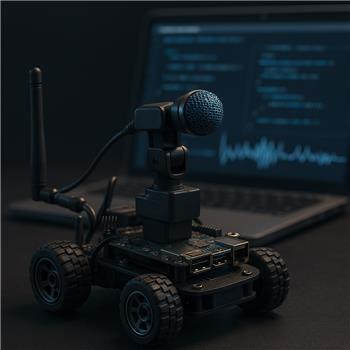
Running ARC directly on a Radxa Rock Pi X (Windows, WiFi) mounted in a small rover. I’m using the Frequency Detector skill to move a pan servo on an EZB v4 over WiFi when a 440 Hz tone is played (tuning fork or phone tone generator). In the skill config, I set Min 200 Hz / Max 1000 Hz, mapped to D0 with servo Min 30 / Max 150, and I also set the variable output to $detectedHz. Windows default recording device is the Rock Pi X 3.5mm headset mic input (TRRS). Enhancements (AGC/Noise Suppression) are off, Exclusive Mode off, tried 16bit 44.1 kHz and 48 kHz.
The issue: the frequency readout jumps around (e.g., 430-470 Hz) even with a steady 440 Hz sine from 10 cm away, and the servo jitters constantly. Min/Max in the skill quickly widens, implying it’s seeing extra peaks. If I switch to a USB condenser mic, it’s better but still drifts a few Hz and occasionally spikes. The waveform looks reasonably clean, but numeric output is still bumpy. I understand multiple frequencies cause noise, so I muted all playback to avoid feedback and tried moving the mic away from the Rock Pi’s tiny speaker; still jittery.
I tried smoothing with a JavaScript loop that reads the skill’s variable and averages it before moving the servo:
let samples = [];
function loop() {
  const f = getVar("$detectedHz");
  if (typeof f === "number" && f > 0) {
    samples.push(f);
    if (samples.length > 8) samples.shift();
    const avg = samples.reduce((a,b)=>a+b,0)/samples.length;
    const clamped = Math.min(Math.max(avg, 200), 1000);
    const pos = Math.round(30 + (clamped - 200) * (120 / (1000 - 200)));
    Servo.setPosition("D0", pos);
  }
  setTimeout(loop, 50);
}
loop();
Questions: Is there a recommended way within the Frequency Detector to set a minimum amplitude/peak lock or add median filtering, and are there known Windows/driver tweaks specific to the Rock Pi X headset mic that help produce a more stable singlefrequency read for servo control?
Related Hardware (view all EZB hardware)
Related Robot Skills (view all robot skills)



Yes - what you’re seeing is very common for pitch/frequency detection on a small Windows SBC like the ROCK Pi X, especially when using a headset/TRRS mic input and driving a servo directly from the raw detected frequency.
A few important points:
What’s likely happening
Best approach in ARC
1) Add filtering in your script, but use median + deadband, not just average
Averages help, but median filtering is usually better for spike rejection.
Your current script also has one issue:
setTimeout(loop, 50);is not supported the same way in ARC JavaScript. Use ARC’ssleep()in a loop instead.Here’s a better pattern:
2) Add a deadband
If the servo is moving for every 1-degree change, it will chatter constantly.
Try:
3) Limit the detector range more tightly
If you are only targeting A4 = 440 Hz, don’t let the skill search too broadly.
Instead of:
2001000Try something like:
That reduces the chance of harmonics or unrelated peaks taking over.
4) Use a better microphone if possible
You already noticed this:
That’s a strong clue the problem is mostly the input chain, not ARC itself.
For tone tracking, a USB mic with:
will usually outperform the built-in headset jack.
About "minimum amplitude / peak lock / median filtering" in the skill
At the moment, the best practical solution is usually to do the filtering outside the skill, like you started doing.
I’m not aware of a built-in peak lock or minimum amplitude threshold option in the Frequency Detector UI that would fully solve this by itself. If you need that behavior, the best ARC path would be to create a custom robot skill that performs:
If you want, you can build that in ARC using the robot skill SDK: https://synthiam.com/Support/Create-Robot-Skill/Overview
That would let you make a more "locked" detector tuned exactly for your rover.
Rock Pi X / Windows tweaks worth checking
These can help, especially on the headset input:
Windows microphone settings
In Windows Sound settings for the input device:
Reduce system audio interference
Prefer a USB mic with known stability
For frequency tracking, this usually makes the biggest difference.
Recommended architecture for your use case
For servo control, I’d suggest:
$detectedHzThat gives you much smoother motion than binding servo motion directly to raw frequency updates.
One more thing: your servo mapping
If the goal is to move the servo based on tone presence rather than exact frequency precision, consider mapping confidence/stability instead of raw Hz if you can derive it in your logic.
For example:
435-445 Hzfor several samples, move servoThat often feels much more stable than trying to continuously track the exact pitch.
My recommendation for your setup
If I were tuning this rover, I’d do:
400-480If you want, I can help you write a clean ARC JavaScript script that:
$detectedHzD0Also, if you can share which Frequency Detector skill you’re using exactly and whether the servo is a standard positional servo or continuous servo, I can tailor the script more precisely.