

RaukuraBot
Micro:Bit Continuous Servos Jittering
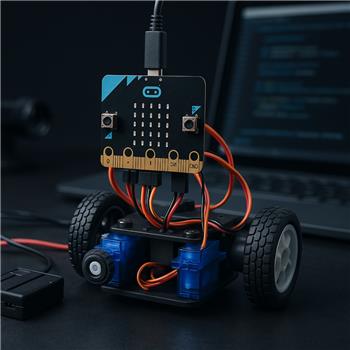
I’m driving a small 2-wheel bot with a BBC micro:bit connected to ARC over USB. Each wheel is a FS90R continuous rotation servo powered from a separate 4xAA pack (common ground tied to micro:bit GND). Signal lines go to P0 (left) and P1 (right) via a breakout. In ARC I added the Continuous servo Movement Panel and set Left Port = P0, Right Port = P1, and checked Reverse on the right to account for mirrored mounting.
What I expect: when I press Stop, both servos should hold neutral without creeping. What I see: as soon as the Movement Panel initializes, both servos twitch every ~0.5s. Stop never fully stops; there’s a slow creep and periodic hunting. Forward/Reverse works but the speed oscillates slightly. If I use Release on both ports the jitter stops (of course, no holding torque), so it seems related to the PWM/servo pulses being sent.
What I’ve tried:
- Re-calibrated both FS90R trims so 90 is dead-stop on a servo tester; same behavior via ARC+micro:bit.
- Moved signals to P2 to rule out a noisy pin; no change.
- Verified power: servos on their own pack, micro:bit on USB, grounds common.
- Disabled any LED patterns on the micro:bit before loading the ARC firmware (I’ve read some pins are shared with the LED matrix).
Is there a way in ARC with the Continuous servo Movement Panel and micro:bit to set a per-wheel neutral (center pulse) or deadband, or to disable the micro:bit LED matrix/adjust PWM so the servos truly stop without jitter on P0/P1?
Related Hardware (view all EZB hardware)
Related Robot Skills (view all robot skills)



Yes - what you’re describing is usually continuous-servo neutral calibration / deadband, not a power or wiring issue.
A few important notes for the micro:bit + ARC Continuous servo Movement Panel setup:
What’s happening
Since Release stops the jitter, that confirms ARC is still intentionally sending a servo pulse - the servo is just not perfectly neutral at that pulse width.
What to try in ARC
Open the kebab menu on the Continuous servo Movement Panel and go into Settings. Then adjust these values:
Try small changes around 90, like:
8889909192Do this one wheel at a time until each wheel truly stops.
Example
If the left wheel creeps forward at 90:
88or89If the right wheel creeps backward:
91or92Because your right servo is mirrored, it’s common for the stop point to need a slightly different value than the left.
About "deadband"
ARC does not currently expose a separate "deadband width" setting in that Movement Panel for continuous servos.
But you can simulate deadband by:
For example:
1009080instead of the default extreme values like
180/1That often makes FS90R-style servos behave much more smoothly.
About the micro:bit LED matrix
The LED matrix can conflict with some micro:bit pins, but P0 / P1 / P2 are the recommended beginner pads, and your symptom sounds more like servo neutral mismatch than LED-matrix interference.
So I would not expect disabling the LED matrix to fix this jitter if:
Best next test
Try this in order:
In ARC, set both servos to:
1009080Test each wheel individually.
Fine-tune Stop by 1 step at a time:
88,89,90,91,92If one wheel still jitters only when stopping, reduce the forward/reverse spread:
969084If you want to script it
You can also set servo positions directly in JavaScript for testing:
If your micro:bit firmware maps differently, use the configured servo ports for that firmware setup.
A couple questions so I can narrow it down
If you want, I can walk you through a quick neutral calibration procedure in ARC step by step.