


hi
am looking for to let a script keep running whithout stopping. cant find it
anyone thank you
 Bing Speech Recognition
— Accurate Bing cloud speech-to-text for ARC: wake-word, programmable control, $BingSpeech output, Windows language support, headset compatible
Try it →
Bing Speech Recognition
— Accurate Bing cloud speech-to-text for ARC: wake-word, programmable control, $BingSpeech output, Windows language support, headset compatible
Try it →

ah thanks david.
Or in blocky, use the LOOP command titled LOOP FOREVER
It generates this code...
dj
is that only in the begin ? loop forever or is there at the end also a command.
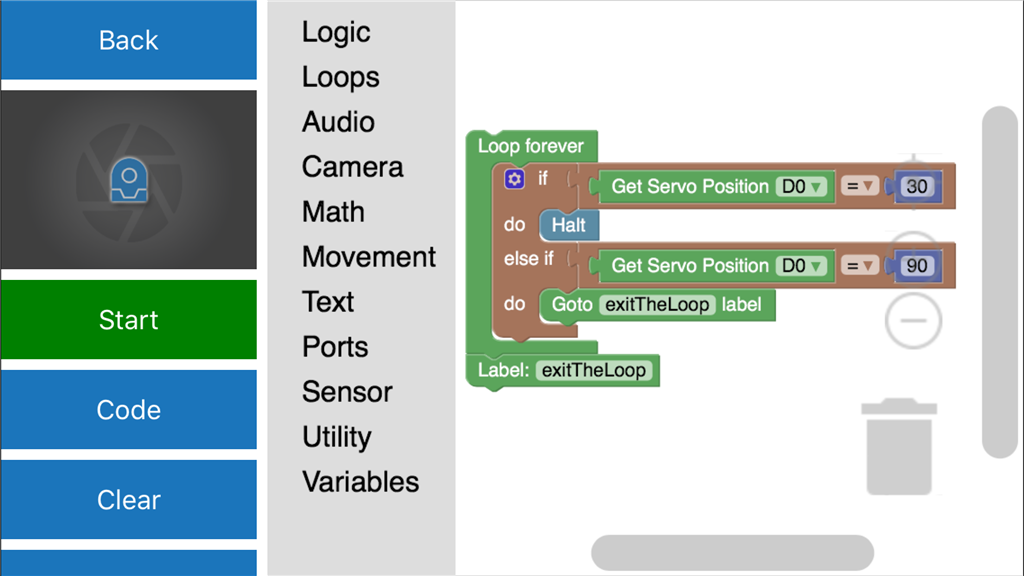
The above code loops forever... If you want to stop the script use the command below or to just exit the loop but stay in the script you can use a different "Goto/Label" command to put you outside the loop...
thanks averyone.
This demonstrates both ways to exit the loop or script in blockly.
Use Blockly to learn how to program