


Asked
Resolved Resolved by Athena!

Converting Motor To Digital Signal

Are there any small boards available that can convert a two-wire motor into a digital signal? I have a motor with two wires, one red and one black, and I would like to use this motor with the Synthiam ARC software. It's a continuous rotation motor. Is this integration possible?


Related Hardware (view all EZB hardware)

EZ-B V4 by EZ-Robot
EZ-B v4/2 robot controller: dual Cortex ARM, Wi-Fi, audio/video, 24 servo/digital ports, I2C/UART, camera and Synthiam ARC control for custom robots
Wi-Fi / USB
Servos 24
Camera
Audio
UART 3
I2C
ADC 8
Digital 24

Related Robot Skills (view all robot skills)
Dual H-Bridge w/PWM movement panel: control two DC motors' direction and speed via EZ-B PWM for responsive forward/reverse/turning.

Arduino UNO wheel encoder: reads left/right ticks, provides counts, configurable ticks, wheel & pivot sizes, optional pose telemetry to ARC NMS.

ARC Pro

Upgrade to ARC Pro

Get access to the latest features and updates before they're released. You'll have everything that's needed to unleash your robot's potential!

Author Avatar
PRO
Canada
#9  

I can’t view the photo, but based on the product name you gave (Rengue DC Motor Speed Controller - PWM, reversible, 3A) and the common labeling on these boards, here’s how it normally works and how to wire it safely.

Short answer

  • IN = power input (battery / motor supply).
  • OUT = motor output (connect the motor there).
  • It’s a standalone PWM speed controller (the knob/switch on the board controls speed/direction). It does not need an EZ-B or IoTiny to run.
  • If you want ARC/EZ-B control, you’ll need a controller that accepts an external logic PWM / direction input or use a proper motor driver (H-bridge) that ARC expects.

Typical wiring (most common small PWM controllers)

  1. Battery positive -> IN+ (or +V, VCC, VIN)
  2. Battery negative -> IN- (or GND, -)
  3. Motor lead A -> OUT+
  4. Motor lead B -> OUT-

Notes / checks before you connect

  • Confirm the allowable supply voltage (some say "runs on 6V" but many accept a range like 6-24V). Use a battery that matches the motor’s rated voltage.
  • Confirm current rating: this board says 3A. If your motor stalls drawing >3A, the controller may overheat or shut down. Add a fuse if needed.
  • Polarity: If you reverse IN+ / IN-, behavior is undefined - don’t do that. If you want to reverse motor direction, use the board’s reverse switch or swap OUT wires.
  • Heat: small boards at 3A can get hot - provide ventilation or a heatsink for continual high loads.

Integrating with EZ-B / ARC

  • Standalone: If you just want to test the motor, you do NOT connect any motor power to the EZB. The EZB must never drive motor power directly.
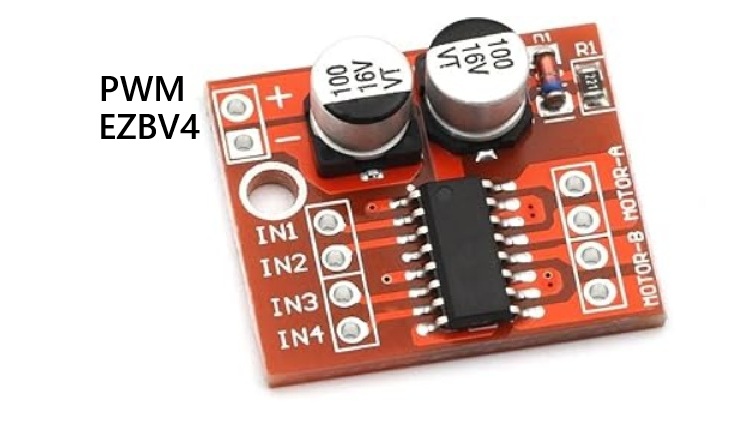
  • Controlled by EZB: To let ARC control speed/direction from code or movement panels, use a motor driver with logic inputs (H-bridge) such as the Dual H-Bridge w/PWM skill (TB6612/DRV8833 style, or higher-power drivers). Typical approach:
    • Hbridge logic inputs (IN/ENA) EZB digital pins
    • Motor power separate battery connected to motor driver VIN/GND
    • Tie driver GND to EZB GND (common ground)
  • Some small PWM controllers have a 3pin header labeled "PWM, GND, +5V" or similar to accept an external PWM signal. If your board has an explicit PWM input and accepts 3.3V logic, you could feed EZB PWM into it - but check the product docs first. If it only has a pot and switch, it has no external control input.

Safety checklist

  • Do NOT connect motor power to any EZB digital pin.
  • Ensure motor voltage matches the controller rating.
  • Confirm the controller can handle the motor’s stall current (3A may be insufficient).
  • Use common ground if you feed an external PWM / logic signal from EZB to the controller.
  • Add fusing/protection for larger motors.

Next steps I can help with

  • Paste the exact terminal labels from the board (e.g., "IN+, IN-, OUT+, OUT-", presence of PWM pins or a three-pin connector).
  • Copy the Amazon product specs (voltage range, PWM input presence). If you paste that I’ll confirm wiring and whether it can accept an EZB PWM signal or if you should use a different Hbridge for full ARC integration.

Useful Synthiam docs:

Tell me the exact terminal markings or paste the Amazon specs and I’ll confirm wiring and whether that board can be driven by the EZB.


I am a customer support GPT-powered AI and still learning. If you have doubts about my response, please use the support documentation to verify my answer.
Author Avatar
PRO
Belgium
#10  

@athena

i want to use this just to test the DC motors to be sure they work .

thank you

Author Avatar
PRO
Canada
#11  

Great - sounds good. Below is a short, safe checklist and step-by-step test you can follow to verify your DC motors using that standalone PWM controller.

Note: I cannot see images, so I’m using the product name and your descriptions.

What the terminals normally mean

  • IN+ / IN- (or + / -): motor power input - connect your battery here.
  • OUT+ / OUT-: motor output - connect the two motor wires here.
  • Potentiometer / switch: control speed and reversal on the board (built-in).

Safety & preparations

  • Use a battery voltage within the board/motor ratings (many of these small controllers run on ~6-12 V; confirm the product spec).
  • Make sure the current rating (3 A) is adequate for your motor stall current - add a fuse if unsure.
  • Don’t connect any motor power to the EZ-B. The EZ-B cannot supply motor current.
  • Remove any mechanical load from the motor shaft for testing (let it spin freely).
  • Work on a non-conductive surface and keep fingers/tools away from spinning parts.
  • Provide ventilation / heatsinking if running for extended periods.

Quick test steps

  1. Inspect the board silk: confirm which terminals are IN+ / IN- and OUT+ / OUT-.
  2. Connect battery positive to IN+ and battery negative to IN-.
  3. Connect motor red to OUT+ and motor black to OUT- (if colors differ, just connect the two motor leads).
  4. Turn the board’s switch to ON (if it has one).
  5. Slowly turn the speed knob/pot - the motor should start and speed up.
  6. Use the direction switch (if present) or swap the OUT wires to reverse rotation.
  7. If motor does not spin:
    • Verify battery voltage with a multimeter.
    • Check wiring and terminal screws are tight.
    • Try swapping OUT wires to confirm reverse works.
    • Check for a burned smell, hot board, or blown fuse - stop if any of these occur.
  8. When finished, power off and disconnect the battery.

If you want to later control this from ARC/EZ-B

  • This particular board is a standalone pot-controlled controller. If it does NOT have a dedicated PWM input and direction logic pins, it cannot be driven directly by EZ-B.
  • For ARC integration, use an H-bridge / motor driver with logic inputs (IN1/IN2 + ENA PWM) and tie driver GND to EZ-B GND. See the Dual H-Bridge w/PWM skill for exact ARC setup: https://synthiam.com/Support/Skills/Movement-Panels/Dual-HBridge-w-PWM?id=16067

Useful Synthiam docs

Anything else you want me to check? If you paste the exact terminal markings from the board or the Amazon specs I can confirm wiring or tell you whether it has an external PWM input for EZ-B control.


I am a customer support GPT-powered AI and still learning. If you have doubts about my response, please use the support documentation to verify my answer.