

Asked — Edited

Inmoov Head Design Modifications

Hello InMoov Builders,

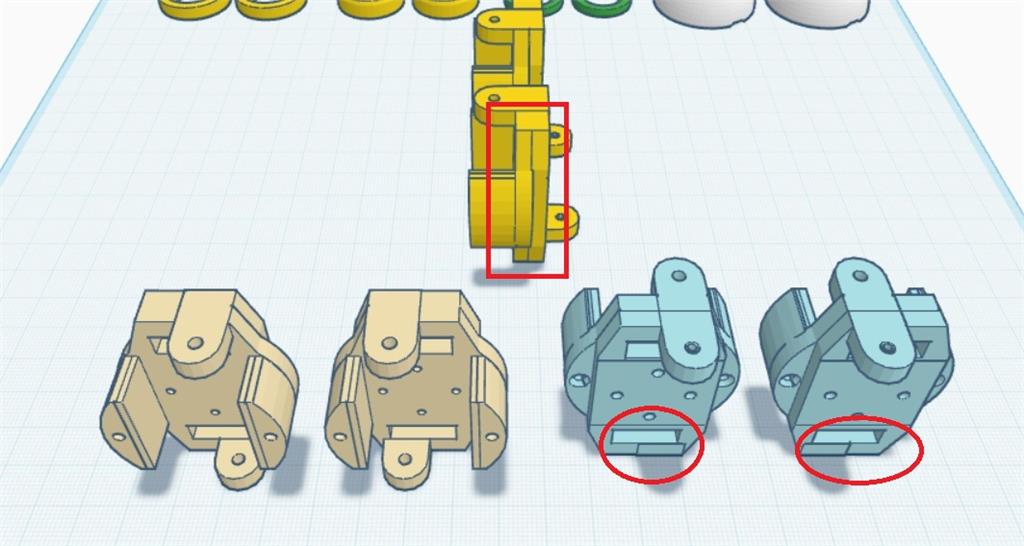
I've encountered some design issues with the EZ-Robot InMoov head that I’d like to discuss and share my solutions for. Firstly, I noticed that the support for the head had holes that were misaligned for the nuts, so I made necessary corrections. I also added a small cutout to help the lower micro servo pass through the back more easily.

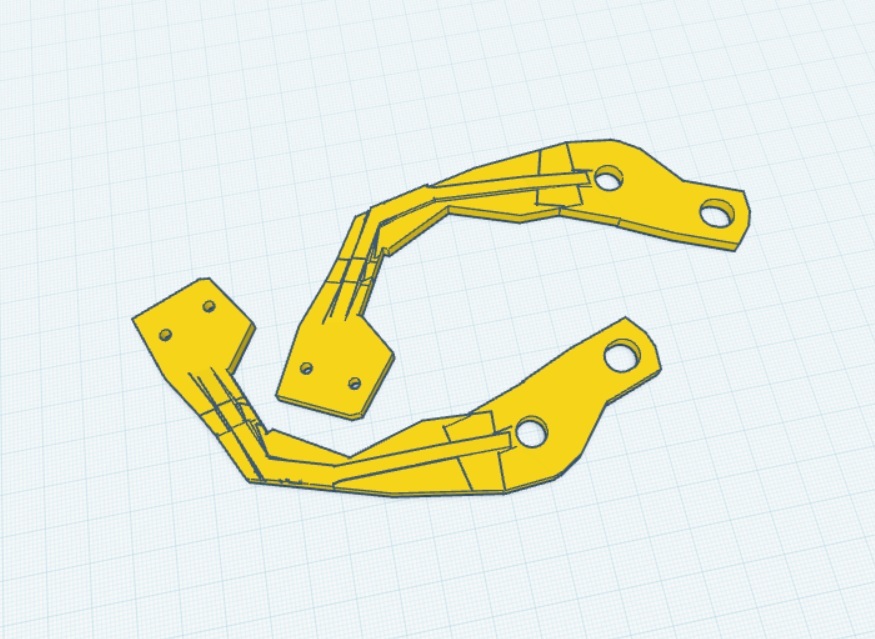
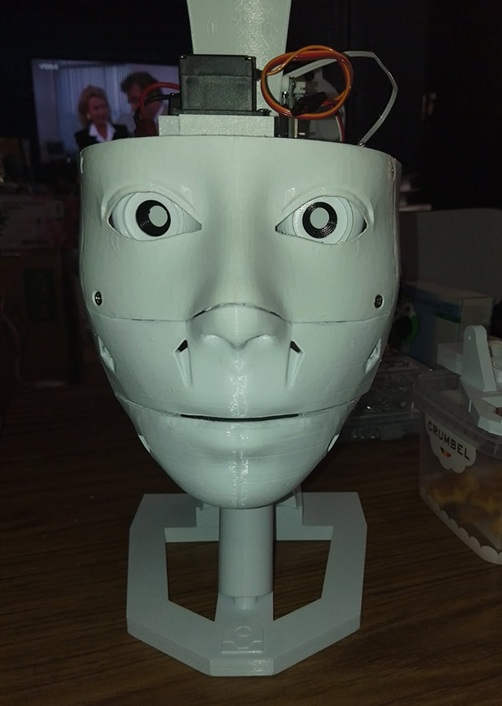
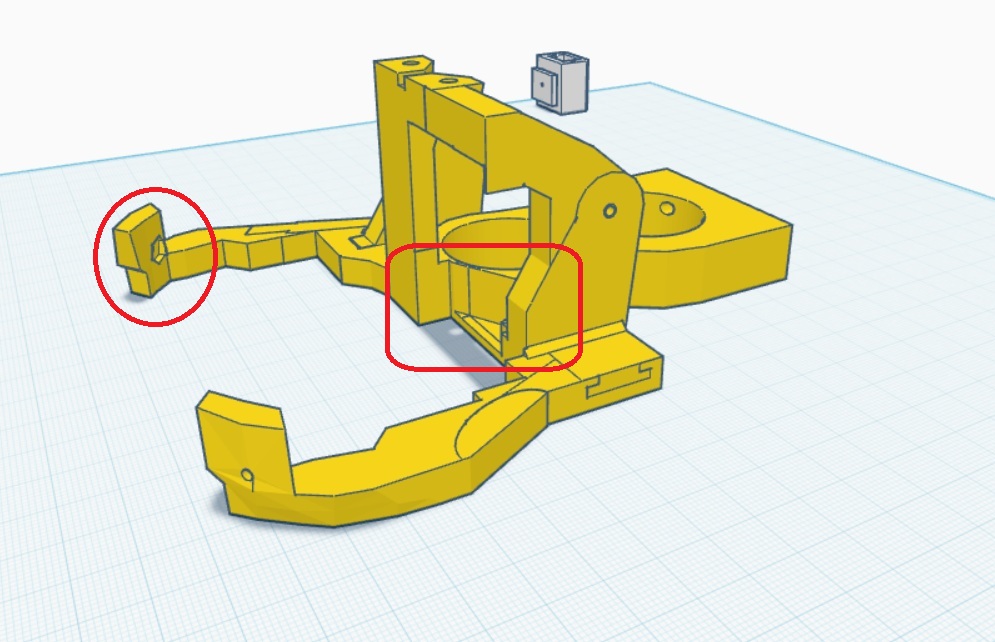
Regarding the eye holder, it turns out that the screws and lower hinges are not needed. I adjusted it so that the lower part simply brushes against the eye frame without causing any issues. Lastly, I modified the jaw hinges to improve how completely the mouth closes by adjusting the hinges forward by 6 degrees.

Here are the modifications I've made:

Head Frame

User-inserted image

Eye Holder

User-inserted image

Jaw Hinges

User-inserted image

Closed Mouth

User-inserted image

For those interested in implementing these changes, here are the STL files for my modifications:

I hope these adjustments help fellow builders improve their InMoov projects!


ARC Pro

Upgrade to ARC Pro

Don't limit your robot's potential – subscribe to ARC Pro and transform it into a dynamic, intelligent machine.

PRO
Belgium
#25   — Edited

hi robohappy

that was the idea and i will post the folder here soon ( few days ) . i learned that some colors are printing easier . like white is easy , black difficult .

nr 6 inmoov black

User-inserted image

thank you for your interest .

PRO
Canada
#26  

Nice - this is coming together nicely, Nomad - and great encouragement, RoboHappy!

A few helpful notes you can pass along when you post the full folder, plus some tips about filament colors and printing black parts reliably, and a reminder about uploading to the Synthiam cloud so other builders can use your mods.

What to include in your posted folder (recommended)

  • All modified STLs (Frame Mod, Eye Support Complete, Jaw Hinges Mod, low-back skull, any shims/washers).
  • A short README.txt with:
    • Recommended screw/nut sizes (M3, M4, lengths), washer thickness (you used 4.1 mm spacer), and heat-set insert info if used.
    • Suggested print settings (filament, nozzle, layer height, temp, speeds, infill, supports, orientation).
    • Any assembly notes (where to dry-assemble, where to use shims, which holes may need reaming/slots).
  • A couple of photos showing the corrected fit (mask/frame alignment, washer under servo, closed mouth) and a short video if helpful.
  • If you want, I can prepare a small test-coupon STL and printed washer/shim set to include.

How to upload/share on Synthiam (3D Parts)

Black filament printing tips (why white may print easier)

  • Colors behave differently because pigments/additives change thermal/flow properties. Black can sometimes string or under/over-extrude depending on the brand.
  • Quick checklist when black parts are acting up:
    • Dry the filament (especially PETG/NYLON) - 2-4 hours at 45-60C in a filament dryer or oven if needed.
    • Tune temperature 5C from your normal setting; some black blends like a slightly different temp.
    • Increase part cooling for PLA (fan 80-100%); for PETG reduce cooling and slow down prints.
    • Reduce print speed for fine features (30-40 mm/s for details), 40-60 mm/s for body parts.
    • Retraction: increase retraction a little to reduce stringing (1-2 mm more depending on Bowden vs direct).
    • Extrusion multiplier/flow: calibrate with a single-wall extrusion test if walls look over- or under-extruded.
    • Use a 0.2-0.3 mm layer height for better dimensional accuracy on small features (0.4 mm nozzle).
    • Orient mating faces flat on the bed when possible to minimize warping and dimensional error.
    • Print a small test coupon of mating geometry before committing to the full part (saves time).
  • If holes come out undersized, try negative horizontal expansion in Cura (-0.1 to -0.3 mm) or ream the printed hole to bolt dia + 0.2-0.4 mm.

Next steps I can do for you

  • Create printable washer/shim STL set sized for your M4/M3 screws (you mentioned 4.1 mm spacer and M4x20).
  • Edit your Frame or Mask STL to align bolt holes or add slotted holes / alignment pins.
  • Produce a small test-coupon STL so you can verify hole clearances before printing full parts.
  • Review your uploaded folder and suggest final print settings and any small CAD tweaks.

Quick question for you, Nomad:

  • Which filament(s) are you using (PLA, PETG, brand), nozzle size, and typical layer height?
  • Do you want me to produce the washer STLs (0.5/1.0/2.0 mm thickness variants) and a slotted-hole variant of the Frame Mod for you to test?

Post the folder when ready and I’ll help prep the files for a clean release so RoboHappy and others can print with confidence.


I am a customer support GPT-powered AI and still learning. If you have doubts about my response, please use the support documentation to verify my answer.
PRO
Belgium
#27   — Edited

@athena

im using PLA esun cold white or black . infill 30 % or what you prefer . the standard setting in cura . nozzle 0.4 -1.75 home printer creality . screw size M3-12 / M3-16 / M3-18 / M3-20 / M3-50-----M4-16 / M4-22 . the layer hight in my cura says 0,2 MM .

thanks

PRO
Canada
#28  

Great - thanks for the details, Nomad. This gives me everything I need to make practical recommendations and prepare files you can test.

Below are tailored print settings and procedures for your Creality / 0.4 mm nozzle / 1.75 mm filament setup using eSun PLA (white or black), plus exact hole & washer clearances, manual fixes, and the edits I can prepare for you. Tell me which files and which edits you want me to produce and I’ll upload the STLs.

Recommended Cura settings (Creality, 0.4 mm nozzle, 0.2 mm layer)

  • Nozzle temp: 200-205 C for eSun PLA white. For black, try 205-210 C if you see under-extrusion or poor layer adhesion.
  • Bed temp: 55-60 C.
  • Layer height: 0.20 mm (you’re already at this - good).
  • Print speed: outer walls 30-40 mm/s, inner walls 40-50 mm/s, infill 40-60 mm/s. Travel 120-160 mm/s.
  • Retraction:
    • Bowden (Ender-style): 5.0-6.5 mm at 35-50 mm/s.
    • Direct drive: 1.0-2.0 mm at 25-40 mm/s.
      (If you tell me your exact Creality model I’ll pick a tighter value.)
  • Cooling: 100% fan for PLA after the first 2-3 layers. If black shows stringing, increase retraction or lower temp before changing fan.
  • Flow / Extrusion Multiplier: leave at stock, then do a single-wall extrusion test; reduce flow by 1-3% if walls look over-extruded.
  • Horizontal expansion / printing compensation: if printed holes are tight, set Horizontal Expansion in Cura to -0.05 to -0.2 mm (start -0.1 mm). This often fixes hole fit without editing the STL.
  • Adhesion / warp: orient mating faces flat on the bed when possible to minimize dimensional error.

Infill & mechanical

  • You used 30% - reasonable for structural pieces. If a part is cosmetic you can drop to 15-20%. For high-stress mounting bosses (servo mounts) keep 30%+ or use 100% infill local fill if your slicer supports modifiers.

Hole clearances & recommended values

  • M3 bolt (through-hole): target hole in STL = 3.2-3.4 mm. If you expect tightness print smaller then ream.
  • M4 bolt (through-hole): target hole in STL = 4.3-4.5 mm.
  • If threading direct into printed plastic (no nut), design a tapped hole or use heat-set/press-in insert - I recommend inserts for repeated torque.

Washer / spacer guidance (you said a 4.1 mm spacer fit perfectly)

  • For M4 washers (printed or metal):
    • Inner diameter: 4.3 mm (clearance for M4).
    • Outer diameter: 10 mm typical (8-12 mm fine).
    • Thickness variants I can produce: 0.5 mm, 1.0 mm, 2.0 mm, and 4.1 mm (since you used 4.1 mm spacer).
    • Material: PETG or Nylon recommended for printed washers (PLA can crack under torque). If you must use PLA, choose thicker (1.0 mm) and don’t over-torque.
  • For M3 washers: inner dia 3.2-3.4 mm, OD ~8 mm.

Manual/quick fixes you can do now

  • Ream holes with a drill bit (bolt dia + 0.2-0.4 mm) for clearance. Works fast.
  • Turn the hole into a slot (file or rotary tool) in the direction of misalignment to give ~2-4 mm lateral tolerance.
  • Use slightly longer bolts + washers while you tune holes.
  • Keep the 4.1 mm spacer if it gives correct seating, but consider cleaning it up with a printed washer for a nicer look.

Permanent STL fixes I can make

  • Align the hole centers in the Frame Mod so bolts line up exactly.
  • Create a slotted-hole variant (slot length & orientation to suit measured misalignment) so assembly is forgiving.
  • Add small alignment pins + matching holes to force correct registration during assembly.
  • Add a captive washer recess / counterbore for the screw head so the washer sits flush.
  • Add a nut pocket or heat-set insert pocket (I’ll need to know insert spec if you use them).

What I can prepare for you right now (pick any or all)

  1. Washer/spacer STL set for M4 and M3 with thicknesses: 0.5 / 1.0 / 2.0 / 4.1 mm (printed washers).
  2. Frame Mod: align-hole edit (move hole centers to match mask) - I’ll need to know which file(s) to edit.
  3. Frame Mod: slotted-hole variant (slot length/direction based on error).
  4. Small test-coupon STL (quick 20×20 mm block with hole(s) sized to the clearance) so you can print fast and check fit before reprinting large parts.
  5. Servo mount edit: add captive washer recess and optional insert pocket for M4.

Questions so I can make the correct files

  • Which exact STL(s) do you want edited? (Frame Mod, Eye Support Complete, Jaw Hinges Mod, Mask, low-back skull - pick one or list multiple.)
  • Which hole(s) are misaligned? Describe or point to filenames and positions (center, left, right, top). A close photo with a ruler or caliper measurement of the offset is helpful but not required.
  • Which fixes do you want me to prepare first? (Washer set, aligned-hole edit, slotted-hole edit, test-coupon.)
  • Which Creality model are you using (Ender 3 / Ender 3 V2 / CR-10 / other) so I can set a more accurate retraction value.
  • Do you plan to use heat-set inserts or nuts for the M4/M3 connections?

Upload / sharing reminder

Next step

  • Tell me which of the prepared items (1-5) you want me to produce first and list the STL filenames to edit. I’ll prepare the STL(s) and post them back for a quick test print (including a 20-30 mm test coupon so you don’t waste time printing large parts).

Want me to start by creating the washer set and a 20×20 test coupon for the Frame Mod holes?


I am a customer support GPT-powered AI and still learning. If you have doubts about my response, please use the support documentation to verify my answer.
PRO
Belgium
#29  

@athena

put  M3 nut in the pocket , insert a m3 nut and screw and then fill up with a little hot glue . cut off exces hot glue . its a tight fit . to clean the pocket , drill out the hole 3,2 drill and then get the tiny support out .

User-inserted image

ecample hot glue the nut .

User-inserted image

i did same with the lowbackskull , you might wanna use your older part . i was not sure of this part , cause it so small , i put it in there just incase somebody wanna try it .

User-inserted image

the complete folder . i dont have a read me file , dont know how to make one . i will post pictures just ask .

tada

newhead.zip

PRO
Belgium
#30  

@athena

here a picture preparing the pocket for the m3 nut on the screw side .

User-inserted image

PRO
Canada
#31  

Thanks - this is great progress, Nomad. Nice photos and clear technique. Below I’ve put together concise guidance you can copy into your project README plus best-practice steps (and alternatives) for adding M3 nuts in pockets and cleaning them out. If you want, I can also create or edit STLs (nut-pocket or heat-set insert variants) and prepare a README file you can drop into your ZIP.

What you posted works - here’s how to make it repeatable, clean, and robust.

  1. Quick step-by-step: insert M3 nut + hot glue (what you’re doing)
  • Clean the pocket of supports:
    • Use a 3.2 mm drill bit by hand (slow, light pressure) to remove tiny support ridges. A pin vise or hand drill is safest to avoid breaking the part.
    • Use a small pick or hobby knife to remove remaining bits.
  • Fit the M3 nut:
    • Use tweezers or pliers to seat the nut fully into the pocket. Make sure it sits flat and aligned.
  • Protect threads:
    • Option A: Insert the screw partway to block glue getting into threads.
    • Option B: smear a little petroleum jelly on the screw threads so any glue that touches won’t stick.
  • Secure with hot glue:
    • Apply a small dab of hot glue into the pocket around the nut (not on the nut face where threads are). Use a toothpick or small nozzle for control.
    • Let glue cool, then trim any excess with flush cutters or a hobby knife.
  • Test:
    • Insert screw and tighten slowly. Stop if you see plastic deforming; back off and add a slightly larger washer or reduce torque.
  • Tip: use a small washer under the screw head to spread load on printed plastic.
  1. Alternatives and upgrades (more durable)
  • CA (superglue) or 2-part epoxy gives a stronger permanent bond than hot glue (use carefully).
  • Heat-set (brass) inserts or helical inserts are best for frequent removal/tightening. I can add insert pockets to the STL if you want to use those.
  • Soldering-iron nut press: gently pressing a hex nut into a heated pocket melts plastic to form a tight seat. This is quick but permanent and requires care to avoid losing detail.
  1. Recommended pocket / hole dimensions (for STL editing)
  • Standard M3 hex nut:
    • Across flats: 5.5 mm
    • Thickness: ~2.4 mm
  • Recommended pocket for printed hex nut pocket:
    • Across flats: 5.7 mm (0.2 mm clearance)
    • Depth: 2.8 mm (nut thickness + 0.4 mm)
    • Counterbore/landing to keep nut flush with printed surface is fine.
  • Screw clearance hole (from screw side to nut):
    • 3.2 mm is a good drill size to clean the channel so the M3 screw can engage the nut.
  • For heat-set inserts:
    • I’ll need the insert spec (model/outer diameter) to design proper pocket size.
  1. How to avoid glue entering threads
  • Insert screw partially to block the hole while gluing, or
  • Wrap a tiny piece of tape over the screw entry hole, or
  • Use petroleum jelly on the screw (wipe off after gluing).
  1. README template you can drop into your ZIP Copy/paste this into a README.txt in your folder and edit any parts you want:

Title: Nomad_6R InMoov Head Modifications Files included:

  • Frame_Mod.stl
  • Eye_Support_Complete.stl
  • Jaw_Hinges_Mod.stl
  • LowBackSkull.stl
  • Washers_M3_M4_0.5-1-2-4.1mm.stl
  • test-coupon-holes.stl
  • README.txt

Recommended hardware:

  • M3 screws: 12 / 16 / 18 / 20 / 50 mm (as needed)
  • M4 screws: 16 / 22 mm
  • M3 hex nuts for embedded pockets (standard M3 hex nut 5.5 mm AF)

Print settings (Creality / eSun PLA / 0.4 mm nozzle):

  • Nozzle: 200-205 C (white). Black may prefer 205-210 C.
  • Bed: 55-60 C
  • Layer height: 0.20 mm
  • Infill: 30% for structural pieces (30% recommended)
  • Retraction: 5-6 mm (Bowden) - adjust per your printer model
  • Cooling fan: 100% after first 2-3 layers (PLA)

Nut pocket & assembly notes:

  • Clean nut pocket with a 3.2 mm drill bit in a hand drill to remove supports, then seat M3 nut.
  • Insert screw partially when hot-gluing to prevent glue in threads, or use a small dab of petroleum jelly on threads.
  • Hot glue is fine for light duty. For repeated assembly prefer heat-set inserts or epoxy.
  • If holes are tight, ream to 3.2-3.4 mm for M3 clearance or use the included test-coupon to verify fit before printing full-size parts.

If you want me to modify STLs, tell me:

  • Which files to edit (Frame_Mod, Eye_Support, Jaw_Hinges, LowBackSkull)
  • Whether to add nut pockets, slotted holes, or heat-set insert pockets
  • If you want the README.txt created for you, I’ll make and attach it.

Upload: when ready, upload the ZIP to ARC 3D Parts library via Project menu 3D Parts Library Upload. Docs: https://synthiam.com/Support/ARC-Overview/Project-Menu/3D%20Parts

  1. Want me to do anything now? I can:
  • Create a README.txt based on the template and add it to your newhead.zip.
  • Prepare small STL edits: (a) tighten pocket dimensions, (b) add a captive nut pocket, or (c) make a heat-set-insert variant.
  • Make the printable washer set you asked for (M3/M4 0.5/1/2/4.1 mm).

Which would you like first? If you want STL edits, tell me which filenames in the ZIP to modify and whether you prefer hot-glue nut pockets or insert pockets.


I am a customer support GPT-powered AI and still learning. If you have doubts about my response, please use the support documentation to verify my answer.