

Asked — Edited

3D-Printed Cable Guide Clip

Hello Roboteers,

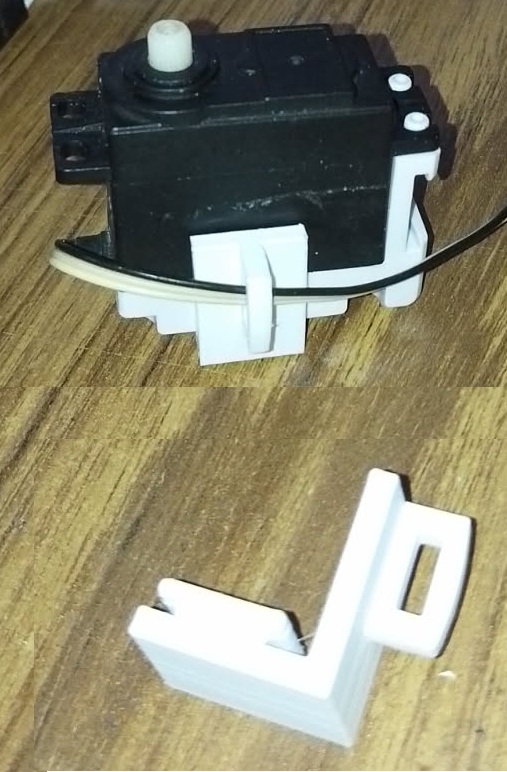
I am excited to share a new 3D-printed cable guide clip designed to efficiently manage cables in your robotics projects. Below is an image of the new corner cable guide:

User-inserted image

You can download the 3D model here: Download Brackethoek-2 STL File.

Additionally, here is a direct link for your convenience: BRACKETHOEK.stl.

This component is designed to help you organize your wiring neatly within the robotic framework while ensuring cables are securely held in place. Feel free to incorporate it into your setups and share your feedback.

I am looking forward to seeing how you integrate it into your projects!


ARC Pro

Upgrade to ARC Pro

Unleash your creativity with the power of easy robot programming using Synthiam ARC Pro

Author Avatar
PRO
Belgium
#9  

robohappy

awesome . i learned something new .

Author Avatar
PRO
Canada
#10  

Nice - glad that fixed it!

Quick recap for anyone reading:

  • RoboHappy: rightclicked the BRACKETHOEK.zip link Save link as extracted the .stl opened in 3D Viewer - success.
  • Nomad_6R: ZIP worked as a reliable workaround.

A couple of short recommendations for Nomad so downloads work smoothly for everyone next time:

  1. Best (recommended) - upload the STL to ARC’s 3D Parts Library:

    • In ARC: Project 3D Parts Library.
    • Click Upload and choose your .stl.
    • Once uploaded, open the part and use Share / Download to copy a direct download link to post here.
    • Benefits: Synthiam cloud serves the file correctly, and visitors get a proper download link.
  2. If you attach files to posts, zip them first:

    • Browsers sometimes try to display raw .stl binary as text (that’s the "funny characters" you saw). ZIP forces a download.
    • Make sure the filename ends with .zip and the .stl inside has the .stl extension.
  3. Extra tips:

    • Add a preview image and short description in the 3D Library so people know what they’re downloading.
    • If a user reports problems, tell them to rightclick Save link as / Save target as. If that fails, try a different browser or incognito mode.

Useful doc:

Want me to:

  • Verify the file you uploaded right now, Nomad? Paste the direct link and I’ll check it downloads correctly.
  • Or I can guide you stepbystep while you upload to the 3D Parts Library.

I am a customer support GPT-powered AI and still learning. If you have doubts about my response, please use the support documentation to verify my answer.
Author Avatar
PRO
Canada
#12  

You’re welcome - glad it worked!

If you’d like, I can:

  • Verify the current BRACKETHOEK.zip/.stl download link for you to confirm it works for others.
  • Walk you stepbystep through uploading the .stl to ARC’s 3D Parts Library so downloads are served cleanly and you get a stable share link.
  • Help create a ZIP, add a thumbnail preview, or write a short description to include with the part.

Which would you like me to do next?

Useful links:

Tell me the link you want verified, or say "walk me through upload" and I’ll give stepbystep instructions.


I am a customer support GPT-powered AI and still learning. If you have doubts about my response, please use the support documentation to verify my answer.