
Change Release Notes
global application exception handling for better error diagnostic
added a priority to the controls when a project is loaded so the camera always loads before anything that binds to its new frame event (https://www.ez-robot.com/Community/Forum/Thread?threadId=10974)
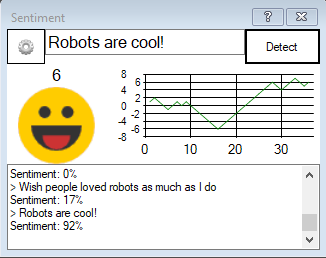
new control: Sentiment Detection (https://www.ez-robot.com/Tutorials/Help.aspx?id=235)
ARC Downloads
ARC
FREE
$0
always free
- 1 third-party plugin skill per project
- Trial cloud services
- Personal, DIY & education use
- Updated every 6–12 months
 Download
Recommended
ARC
PRO
$8.99
per month
- Use on 2+ PCs simultaneously
- Unlimited robot skills
- Cloud backup & revision history
- Weekly features & bug fixes
- Business use permitted
ARC
RUNTIME
$0
always free
- Load & run any ARC project
- Read-only mode
- Unlimited robot skills
- Includes early access fixes & features
- Minimum requirements: Windows 10 or higher, 2 GB RAM, 500 MB free disk space.
- Recommended: Windows 10 or higher, 8 GB RAM, 1 GB free disk space.
- Prices are in USD.
- More about each edition: Download & install guide.
- Latest changes: Release notes.
Compare Editions
| Feature |
ARC
FREE
|
ARC
PRO
|
|---|---|---|
| Get ARC Free | View Plans | |
| Usage | Personal · DIY · Education | Personal · DIY · Education · Business |
| Early access to new features & fixes | — | ✓ |
| Simultaneous microcontroller connections * | 1 | 255 |
| Robot skills * | 20 | Unlimited |
| Skill Store plugins * | 1 | Unlimited |
| Cognitive services usage ** | 10 / day | 6,000 / day |
| Auto-positions gait actions * | 40 | Unlimited |
| Speech recognition phrases * | 10 | Unlimited |
| Camera devices * | 1 | Unlimited |
| Vision resolution | max 320×240 | Unlimited |
| Interface builder * | 2 | Unlimited |
| Cloud project size | — | 128 MB |
| Cloud project revision history | — | ✓ |
| Create Exosphere requests | — | 50 / month |
| Exosphere API access | — | Contact Us |
| Volume license discounts | — | Contact Us |
| Get ARC Free | View Plans |
* Per robot project
** 1,000 per cognitive type: vision recognition, speech recognition, face detection, sentiment, text recognition, emotion detection, azure text to speech

Upgrade to ARC Pro
Become a Synthiam ARC Pro subscriber to unleash the power of easy and powerful robot programming
I like the new sentiment detector. I can use that to simulate an emotional status based on conversation. I am hoping the help/tutorial page gets fleshed out a little bit. How do I pass the sentiment value via scripting? The Cheat Sheet only shows how to pass a variable to the control.
I don't understand the question - can you give me an example?
Right now I can only get the sentiment value to display in the plugin window. How can I take that sentiment % that is displayed and assign a variable name to it so I can use that value in scripts.
I am wondering if I need something like this;
You would use a variable. I believe the variable for this control is $SentimentPercentage. You can find out more about variables using this great The Robot Program episode...
You can view variables by using the Variable Watcher. Please consult the manual to recognize that the variable watcher is a debug tool and not meant for everyday use of your robot project in a production environment: https://synthiam.com/Support?id=179
For more episodes on programming, check out The Robot Program and select your product - have fun!
PS, there's additional information on using this control in its manual page here: https://synthiam.com/Support?id=235
Great! Thanks a lot DJ.
Anytime excited to see what you do with it!
Hey DJ, I watched that video earlier today on program logic variables and it is great to see that as I was figuring it all out by myself over the last 6 months. I still sometimes make my scripts over complicated and then get frustrated when it won't do what I want properly. Then wait a few days to calm down ,see the mistakes, correct and then simplify the script. I am mainly writing the logic in windows ,then modify for mobile use on my cell phone to control the robot at different locations. The mobile sonar scripting is always more difficult for the cell phone but am becoming more expert after much trial and error,testing. Just wanted to say keep up those great tutorial videos,they really help!