
Change Release Notes
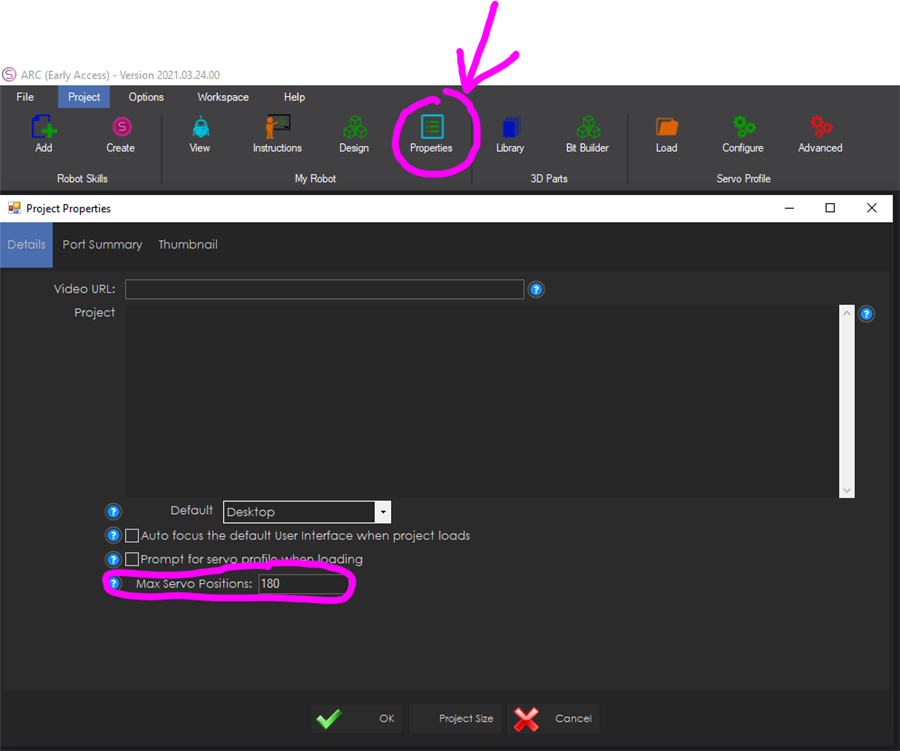
Project properties allow selecting the maximum number of servo position range. By default, it is 180, but can be increased to any number to accommodate servo controllers with higher resolution (i.e. dynamixel, ssc-32, etc)
Display connection diagnostic when failed ezb connection is attempted. Assist with identifying why the connection failed and provide links to the respective tutorial.
ARC Downloads
ARC
FREE
$0
always free
- 1 third-party plugin skill per project
- Trial cloud services
- Personal, DIY & education use
- Updated every 6–12 months
 Download
Recommended
ARC
PRO
$8.99
per month
- Use on 2+ PCs simultaneously
- Unlimited robot skills
- Cloud backup & revision history
- Weekly features & bug fixes
- Business use permitted
ARC
RUNTIME
$0
always free
- Load & run any ARC project
- Read-only mode
- Unlimited robot skills
- Includes early access fixes & features
- Minimum requirements: Windows 10 or higher, 2 GB RAM, 500 MB free disk space.
- Recommended: Windows 10 or higher, 8 GB RAM, 1 GB free disk space.
- Prices are in USD.
- More about each edition: Download & install guide.
- Latest changes: Release notes.
Compare Editions
| Feature |
ARC
FREE
|
ARC
PRO
|
|---|---|---|
| Get ARC Free | View Plans | |
| Usage | Personal · DIY · Education | Personal · DIY · Education · Business |
| Early access to new features & fixes | — | ✓ |
| Simultaneous microcontroller connections * | 1 | 255 |
| Robot skills * | 20 | Unlimited |
| Skill Store plugins * | 1 | Unlimited |
| Cognitive services usage ** | 10 / day | 6,000 / day |
| Auto-positions gait actions * | 40 | Unlimited |
| Speech recognition phrases * | 10 | Unlimited |
| Camera devices * | 1 | Unlimited |
| Vision resolution | max 320×240 | Unlimited |
| Interface builder * | 2 | Unlimited |
| Cloud project size | — | 128 MB |
| Cloud project revision history | — | ✓ |
| Create Exosphere requests | — | 50 / month |
| Exosphere API access | — | Contact Us |
| Volume license discounts | — | Contact Us |
| Get ARC Free | View Plans |
* Per robot project
** 1,000 per cognitive type: vision recognition, speech recognition, face detection, sentiment, text recognition, emotion detection, azure text to speech

Upgrade to ARC Pro
ARC Pro is more than a tool; it's a creative playground for robot enthusiasts, where you can turn your wildest ideas into reality.
Thanks DJ! It just keeps getting better.
Big thanks DJ...testing today!
You bet guys! Glad it'll come in handy
I just was able to use the new properties that allow selecting the maximum number of servo position range. WOW! What a nice feature. I was amazes at how smooth my servo's move now. I increased the positions from 180 to 1024 and they are as smooth as ice. Of course I had to change all my servo max/min settings and positions but it was so simple to do and understand.
I'm using EZ Robot HDD servos from an EZB control (of course) by ARC. I was a little disappointed with the smoothness of these servos. Maybe it was the way I was using and had them mounted but this setting let me control that. I plan to play some more with the number of servo position range setting to see what kind of changes I can get in the smoothness of these servos.
Thanks so much!!
Good to know Dave. I have to get rid of some of the ratcheting I have with my servos.
This seems to really smooth the ratchet. If i really pay attention I can still notice it but it's hard to see. Very fast.
Great feature, thanks