

Programming With Pictures icon Programming With Pictures Use camera-detected printed cue cards (direction, pause, start) to record and run stored movement sequences for ARC robots. Try it →
Tutorial
Published — Updated

The Robot Program Episode 022: Detect Face And Wave - EZ-Script

Step 20 of 27
Step 19

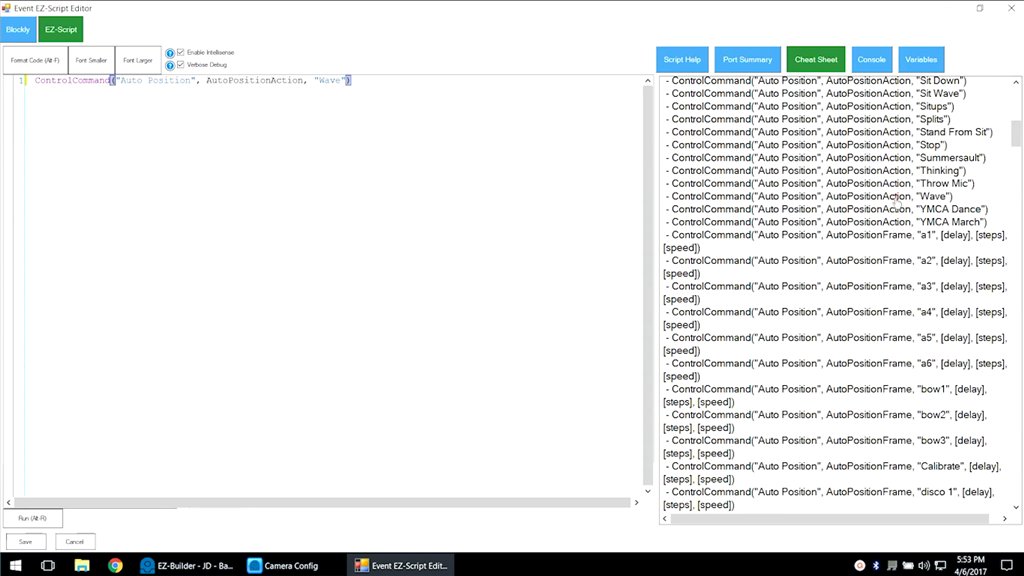
The Cheat Sheet can also be used to add code. Scroll and click on ControlCommand("Auto Position", AutoPositionAction, "Wave). This line of code will tell the AutoPosition control to run the Wave action.

User-inserted image


ARC Pro

Upgrade to ARC Pro

Experience the transformation – subscribe to Synthiam ARC Pro and watch your robot evolve into a marvel of innovation and intelligence.