


Asked
— Edited
 Resolved by DJ Sures!
Error Playing Sound Files
hi
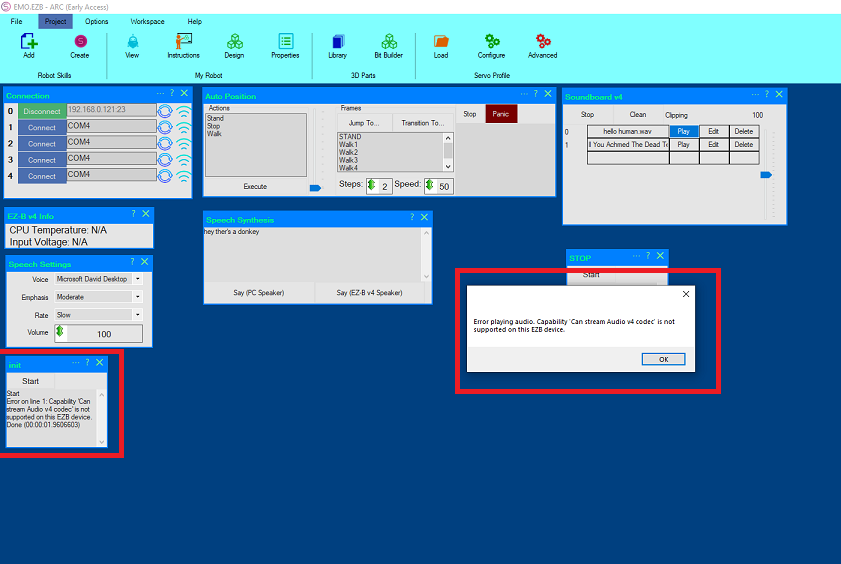
i downloaded the latest version ARC and now i cant play sound files ? also notest the window ezbv4 info is not showing ? also notest the Auto Position doesn work ?
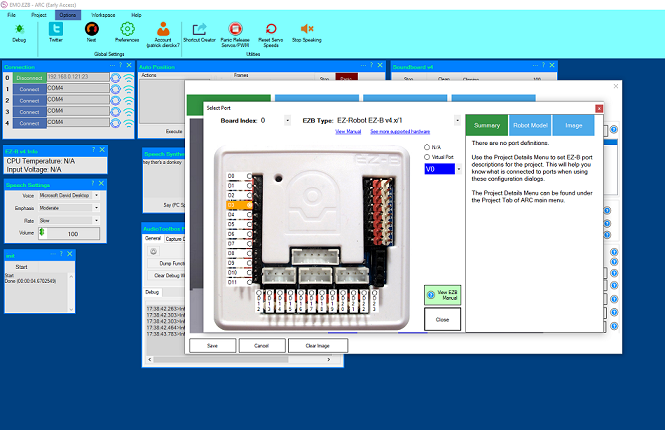
when i choose the ezbv4 in the Auto Position .it doesn save it .
Related Hardware (view all EZB hardware)

EZ-B V4
by EZ-Robot
EZ-B v4/2 robot controller: dual Cortex ARM, Wi-Fi, audio/video, 24 servo/digital ports, I2C/UART, camera and Synthiam ARC control for custom robots
Wi-Fi / USB
Servos
24
Camera
Audio
UART
3
I2C
ADC
8
Digital
24

I think you need to check your code because there are no issues with playing audio. Perhaps you're attempting to play audio before a successful connection to an EZB that supports an audio codec.
hi dj
as you can see the ezb is connected in the picture above . it seems that ARC or Auto Position dont recognize my ezb . i use this one for many years . the previous version no problems . it started the last update .
Make sure your soundboard is on ezb index #0
it is on index #0 .when i choose in Auto Position my ezbv4/1 it doesn save .
Hmmmm - i'll have to take a look and see if I can reproduce it.
also the rgb seems to work in the window but not the rgb itself . the standard rgb lids up thats all .
i deleted all ARC and redowloaded .now its changed .it says connected. still same errors .
could it be possible that there is no save button on the page where you choose your device ? ( unknow )