





Asked
— Edited
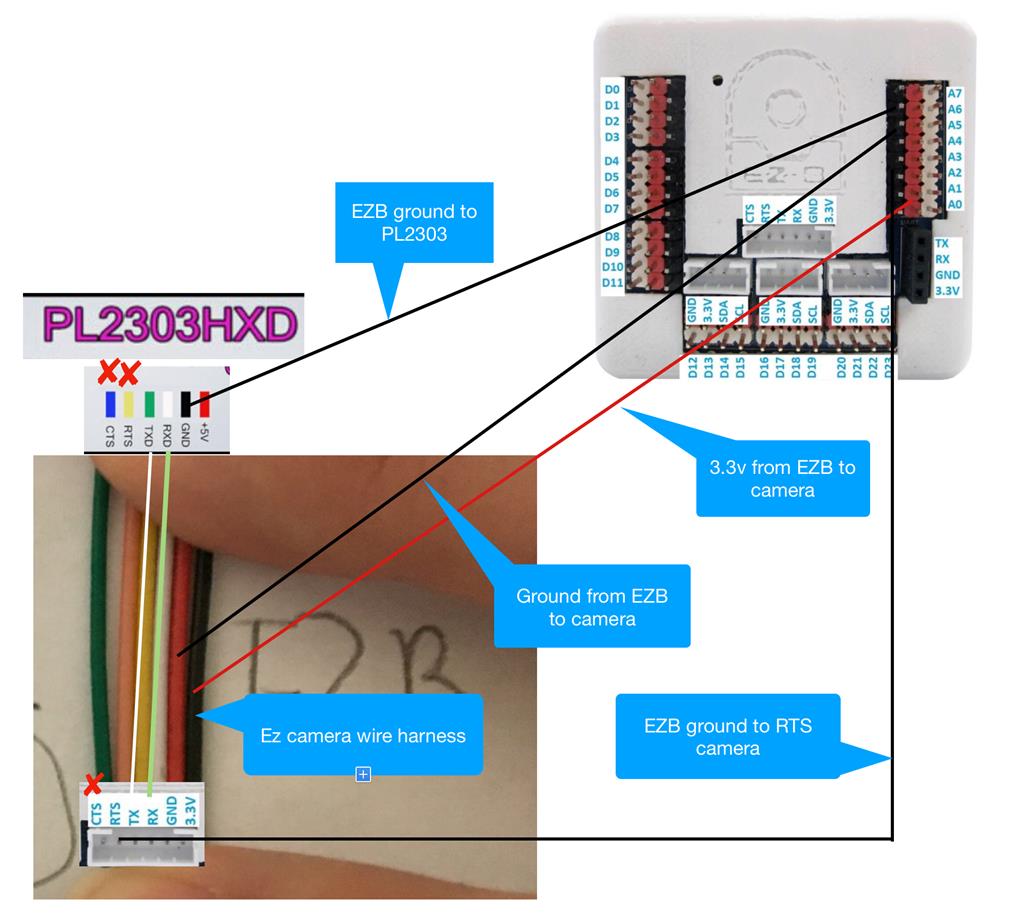
Usb To Serial Connection Camera Option
With the option to use the EZB in serial to USB you lose the option for the camera since the connections use the camera port. Is it possible to add another EZB like the IO Tiny to connect the camera too, then hard wire both EZBs together? I can't use Wi-Fi on either EZB.
There is a very specific reason I want to use the EZB camera and not a usb webcam, but i still need the EZB wired to the computer.
Edit: Please visit post #37 for the update on the usb/serial cable I used, new wiring diagram and notes

I've been trying to get an EZ-B Camera (v1, v2, and ESP32) to work over USB-UART with the ARC camera skill for a little while now.
@fxrtst can you (or anyone else) confirm if this still works with the modern Camera Skill? I know I had it working back in 2017, but it no longer seems to work for me.
I have tried 3 different adapters that can handle 3.33 Mbaud or higher (PL2303HXD, PL2303GS, and CH343) I've made sure that I've got a solid 3.3V and GNDs are connected. I've tried every variation of connecting and removing RTS/CTS, and swapping TX/RX, and just using the camera TX. I've made sure to refresh the COM ports and select the right one in the skill. I've only tried 320x340. I haven't tried frame skipping in the Advanced settings. I'm not sure if it would help or not. There are a few more variations of things I could try, but I'm starting to feel like I'm scraping the bottom of the barrel.
The error I keep getting is this (when I hit the start button):
Since the error suggests it can't resolve to a valid serial port, maybe there's an issue with the skill?That error does look out of place. Nothing should have changed in that parser because it's ancient code, but it does look okay now. I'll have to test it.
But something interesting is that you can specify the baud rate after the COM port. I see the code for it... for example,
COM2:115200So that means you won't need a 3,333,333 Mbps uart to USB adapter. Technically, you can use anything at all.
But let me first figure out what's up with the parser.
Ha, and it's documented in the manual
I did find an issue with the parser and fixed it. I updated the build but didn't update the version because it's not a big enough fix push a whole update. So you can use it now but you must uninstall your current version before installing the new one
if you don't uninstall first, it won't install because version numbers are the same
Thanks DJ, I appreciate you looking into it. I didn’t want to bother you with it since it’s not a feature that’s used very often. I’m glad you figured it out so quickly. I’ll try it out later tonight.
Can't believe that baudrate option has always been there and it's in the manual and i never noticed or thought about it. doing this discussion anyone can use any usb uart adapter for their custom camera. not an ezrobot camera, mind you. but there's an esp32 firmware and you can change the baudrate of it for anything you want like 1 fps 115,200 haha
Tested and it works now! Thanks again DJ!
PL2303HXD worked with the default baud rate, didn't work at COM9:115200 or 9600 baud - no output in the debug console (waited 2 minutes) - 6ft of wire length
PL2303GS worked with the default baud rate, didn't work at COM8:115200 or 9600 baud - no output in the debug console (waited 2 minutes) - 3.5ft of wire length
CH343G didn't work with the default and it didn't work at 115200 or 9600 baud either. Not sure if this adapter is logic level sensitive or what. It does have many transistors on board. I might look further into it in the future but I don't have time at the moment. It could also be a wire length issue, I am using 3.5ft of wire length.
I can do a few more tests if you'd like me to but at this point I'm happy with the results!
No testing necessary because those baud tests won’t work for you. I might not have been clear in my last message. Your camera has to send at the baudrate that you receive - which is why I linked the esp32cam uart firmware.
the ezrobot ezb v4 camera transmits at 3,333,333 baud - therefore you have absolutely no choice but to receive at 3,333,333 baud. The only way to change that is to reprogram the firmware of the camera.
the baudrate selection is for custom cameras - such as the esp32cam uart firmware.