

robo rad
Canada
Asked
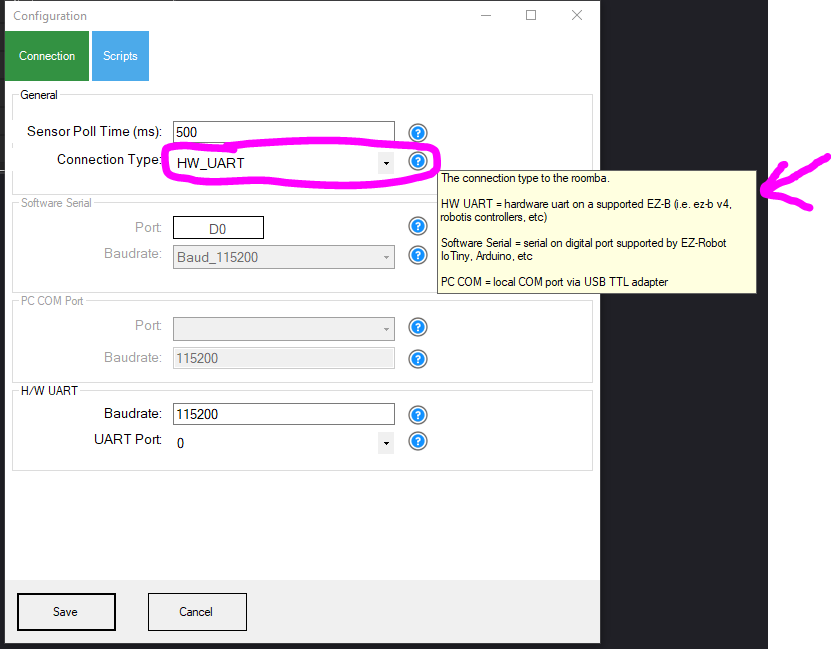
UART TX On Iotiny
Hmm the Tx pin not the same on Tiny? I had working to roomba with EZBv4 but on tiny it saying the tx not supported on this device,Tiny.Try a different signal pin?
Related Hardware (view all EZB hardware)

EZ-B Iotiny
by EZ-Robot
Control IoTiny with Synthiam ARC: 100MHz Cortex‑M4 Wi‑Fi IoT/robot controller-camera, servos, ADC, I2C and digital I/O for easy internet automation
Wi-Fi / USB
Servos
8
Camera
Audio
UART
✕
I2C
ADC
✕
Digital
✕
Related Robot Skill (view all robot skills)

Irobot Roomba Movement Panel
by iRobot
Control Roomba/Create via ARC: drive, stream sensors, read encoders, configure COM/HW UART, and send pose to NMS for mapping/navigation.
Requires ARC
v22

It is what ever port you have selected for software serial in the irobot roomba movement panel
Oh I didn't know you could change that port number,I just used it there anyway,working great,turns out if you just drive around it is super Quiet with no brush or vacuum motors on,did a nice little test all running off the power from Roomba serial cable/battery.Yay!
Right on. You can use the movement joystick and get nice smooth cornering and such: https://synthiam.com/Support/Skills/Navigation/Movement-Joystick?id=19388
IM Gonna try using my generic PS3 game pad with that other game pad plug in. Thanks again DJ, clink of the beer can!
I expect the beer in the mail