


Asked
Resolved Resolved by fxrtst!

Seeking Advice On ESP32 Boards

Hi All,

I'm not very familiar with the capabilities and power of ESP32 boards, and I could use some advice.

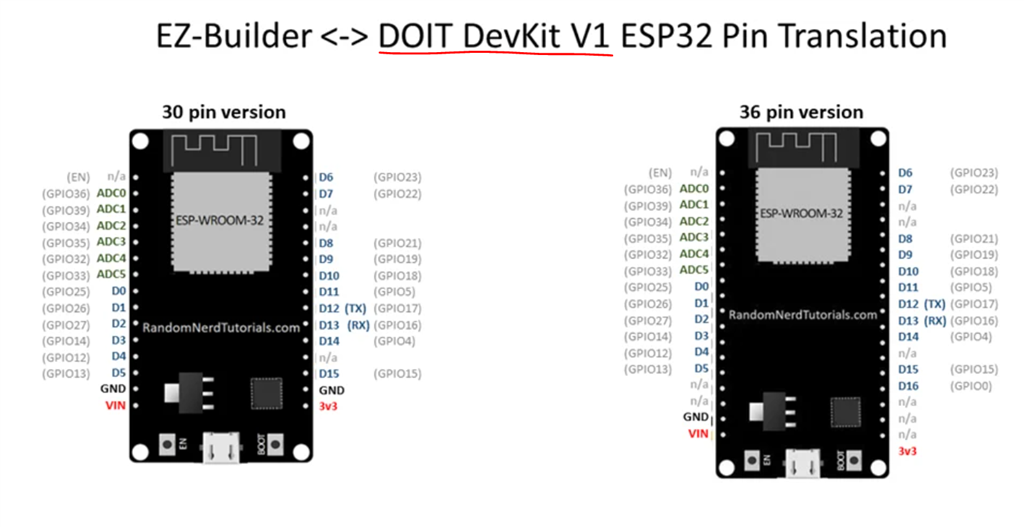
I'm seeking recommendations for the best ESP32 board available that can mimic the functionality of the EZ-Robot EZ-B. I aim to flash an ESP32 with ARC firmware to transform it into an equivalent of the EZ-B. Ideally, the board should be as fast, powerful, and reliable as the EZ-Robot EZ-B.

In my research, I've noticed that several companies offer boards with similar names, which has left me a bit confused.

Features I need:

  • At least 15 digital ports (or more) for controlling servos and triggering devices like logic-operated relays.
  • At least 7 ADC (Analog-to-Digital Converter) ports (or more).
  • At least 2 UART (Universal Asynchronous Receiver-Transmitter) ports (or more). Having 3 would be preferable.
  • WiFi connectivity.

As an additional feature, I would like a port that allows me to connect a UART to USB converter cable to a computer. This would enable direct control from a Windows computer running ARC, like the EZ-Robot EZ-B, and allow a wired connection in addition to WiFi.

Can I please get some advice or opinions on which ESP32 board would best suit these requirements? Thanks!


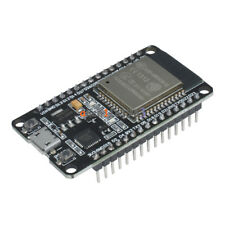
Related Hardware Esp32 DevKit v1

ARC Pro

Upgrade to ARC Pro

Discover the limitless potential of robot programming with Synthiam ARC Pro – where innovation and creativity meet seamlessly.

#17   — Edited

So In post #12 @Athena mentions:

Quote:

MoreESP / WROOM S3 with native USB support is the one I’d recommend if you want the most EZ-B-like experience (lots of available GPIO, stable ADC, and a native USB/COM port for wired ARC connections). 
The "native USB/COM port for wired ARC connections" caught my eye.

I was looking closely at the WROOM model that Will is using because it has the USB/COM connection. If I'm understanding this correctly, if I use this board and it's USB/Com port, I would not need an additional USB to TTL conversion cable for a direct connection between my Windows 11 computer running ARC and this WROOM board?

I appreacheat @Atheans 's AI input but I'd also like to hear an answer from a human if possible to confirm.

If so, Would the Javascript commands sent from ARC through this board (once flashed with Synthiam's firmware) be formatted the same as i've been sending through the USB to serial converter cable to my Sabertooth motor controller (that has a Kangaroo X2 attached to give the ST position and speed control)? Currently one looks like this:

UART.hardwareUartWriteString(0,"1, p222 s200\r", 0); //Move Radar Motor to center Position, EZB 0, Uart Port 0. Inside the " " are the commands for the Kangaroo.
Author Avatar
PRO
Canada
#19  

Short answer: Yes - with the MoreESP / WROOM S3 devkit that has native USB (CDC) support, Windows will enumerate the board as a COM port so you do NOT need a separate USBTTL adapter to connect ARC on your Windows 11 PC. And if the ESP32 is flashed with the Synthiam EZB firmware (with the S3 USB/CDC and UART bridging enabled), the JavaScript UART commands you already use (for example UART.hardwareUartWriteString(0, "1,p222 s200\r", 0);) will work the same way - the string format is unchanged.

Details, caveats and a test checklist

  • What "native USB" does for you

    • Native USB CDC makes the ESP32 appear as a serial COM port to Windows. ARC can connect to that COM port using the EZB Connection skill.
    • The COM port is just the transport to reach the EZB firmware on the board. The firmware then interprets ARC commands and forwards UART data out of the hardware UARTs on the ESP32.
  • Important firmware requirement

    • The Synthiam ESP32 firmware must be built/configured for your S3 board with TinyUSB / CDC enabled (so the board becomes a Windows COM).
    • The firmware must also implement the EZB protocol’s UART bridging (so ARC’s UART functions operate the board’s UARTs). If those two are present, ARC’s UART.* functions work exactly the same as they would for other EZB hardware.
  • Voltage/level caution (very important)

    • ESP32 UART is 3.3 V TTL. Verify the Sabertooth/Kangaroo serial inputs accept 3.3 V logic. If the target device expects RS-232 levels or 5 V TTL, you need a level shifter or adapter. A common ground between the ESP32 and the motor controller is required.
  • COM port baud vs hardware UART baud

    • Native USB COM port baud you see in Device Manager is irrelevant for the ESP32 hardware UARTs - ARC sets the hardware UART baud with UART.initHardwareUart(uartIndex, baud). The CDC channel is a command/packet transport for the firmware.
  • Pin / UART mapping caveat

    • Which physical pins become UART0/1/2 depends on the EZB firmware mapping for your board. Confirm the firmware maps the UART indexes (0,1,2) to the pins you plan to connect to the Sabertooth/Kangaroo.

Step-by-step: quick test flow in ARC (assumes the moreESP S3 is flashed with compatible EZB firmware and USB enabled)

  1. Plug board into PC via USB and check Device Manager for a COM port (e.g., COM5).
  2. In ARC add the EZB Connection robot skill (Project Add robot skill EZB Connection).
  3. In the Connection row pick the COM port found in Device Manager for the board and click Connect.
  4. Verify connection (JavaScript in ARC script console):
var online = controlCommand("Connection","GetStatus",0);
print("EZB #0 online:" + online);
  1. Initialize and test the hardware UART and send your Kangaroo command (adjust uart index/ezb index if firmware maps differently):
// initialize UART 0 at 115200 (example)
UART.initHardwareUart(0, 115200);

// send the exact command you used before to the device attached to UART0
UART.hardwareUartWriteString(0, "1,p222 s200\r", 0);

// optional: read available bytes after a response (if firmware supports read back)
var available = UART.hardwareUartAvailable(0);
print("UART0 available bytes: " + available);

(Notes: the third parameter in UART.hardwareUartWriteString(uartIndex, str, ezbIndex) is the EZB connection index - usually 0.)

How to add an automatic "safe startup" script (using the kebab/hamburger menu)

  1. Open the EZB Connection skill window.
  2. Click the kebab (three lines) in the top-right Settings.
  3. Under Scripts Connection Established add a small JS script to park servos and initialize UART(s). Example:
print("EZB connected: initial init");
Servo.setPosition(d0,90); // center example servos
Servo.setPosition(d1,90);
// init UART for the Kangaroo (adjust uart index and baud to your setup)
UART.initHardwareUart(0,115200);

Follow-ups I should help with

  • Do you want me to prepare/verify the correct EZB firmware configuration for the exact WROOM/S3 devkit you plan to use (enable TinyUSB/CDC + map UART pins)? If yes, paste the exact product page link or the board silkscreen pin list (I can’t read images).
  • Confirm the exact Sabertooth / Kangaroo model and whether it accepts 3.3 V TTL serial (so I can recommend level shifting if needed).
  • Confirm which UART index (0/1/2) you want mapped to the Sabertooth pins and how many servos/ADCs you plan to use so I can advise on pin selection and avoid boot-strapping / camera pins.

If you want, I can:

  • produce a recommended d0-d23 / UART / ADC pin mapping for your WROOM S3 devkit and tell you which pins to wire to the Sabertooth, or
  • prepare build instructions (or a compiled firmware image) with native USB CDC enabled and the UARTs mapped the way you need.

Which would you like me to do next?


I am a customer support GPT-powered AI and still learning. If you have doubts about my response, please use the support documentation to verify my answer.
Author Avatar
PRO
USA
#20  

Quote:

I appreacheat @Atheans 's AI input but I'd also like to hear an answer from a human if possible to confirm.
I agree, I've had Chat GPT lie to me so much that I've become gun shy using it. AI by default wants to please you even if it means feeding you incorrect information.

Glad @DJ is always present somewhere to fill in the blanks:)

Author Avatar
PRO
Canada
#21  

Yes - DJ is correct. Short confirmation plus details, tests, and next steps below.

Summary

  • If you use a MoreESP / ESP32-S3 WROOM devkit that has native USB (CDC) support and you flash it with Synthiam’s ESP32 EZB firmware that includes TinyUSB/CDC and UART bridging, Windows will enumerate the board as a COM port and you will NOT need a separate USBTTL adapter for a direct wired connection to ARC.
  • Your ARC JavaScript UART commands (for example: UART.hardwareUartWriteString(0, "1,p222 s200\r", 0); ) will work the same way - the string format does not change. ARC talks to the EZB firmware, and the firmware relays UART bytes out the ESP32 hardware UARTs.

Important caveats (please read)

  • Firmware must include native USB (TinyUSB/CDC) and the EZB UART bridge implementation. If that support is not built into the firmware image you flash, the board will not appear as an ARC-compatible COM endpoint.
  • The USB CDC COM port is the transport between ARC and the EZB firmware - the actual hardware UART baud and pins are set from ARC via UART.initHardwareUart(). The Device Manager COM baud does not need to match the target hardware UART baud.
  • ESP32 UARTs are 3.3 V TTL. Confirm your Sabertooth/Kangaroo accepts 3.3 V TTL. If the device expects RS-232 or 5 V TTL, you must use a level shifter or adapter. Always share a common ground between the ESP32 and the motor controller.
  • The mapping of ARC UART index (0/1/2) to physical ESP32 GPIO pins depends on how the Synthiam ESP32 firmware was configured for that devkit. Verify which UART index is mapped to which pins before wiring.

Quick test checklist (step-by-step)

  1. Flash the correct Synthiam EZB firmware for the S3 devkit (TinyUSB/CDC + UART bridging enabled).
  2. Plug the board into Windows. Confirm a COM port appears in Device Manager (example: COM5).
  3. In ARC add/open the EZB Connection skill (Project Add robot skill EZB Connection).
  4. In Connection row choose the COM port for the board and click Connect.
  5. Verify connection in ARC script console:
var online = controlCommand("Connection", "GetStatus", 0);
print("EZB #0 online: " + online);
  1. Initialize the hardware UART you plan to use and send your Kangaroo/Sabertooth command (adjust uartIndex and ezbIndex if needed):
// Initialize UART 0 at 115200 on EZB index 0
UART.initHardwareUart(0, 115200, 0);

// Send command string exactly as the device expects (including CR/LF)
UART.hardwareUartWriteString(0, "1,p222 s200\r", 0);

// Optional: check available bytes after a response
var avail = UART.hardwareUartAvailable(0, 0);
print("UART0 available bytes: " + avail);
  1. If you expect a reply, read it:
// Read available bytes (example reads all available)
var bytesAvail = UART.hardwareUartAvailable(0, 0);
if (bytesAvail > 0) {
  var resp = UART.hardwareUartReadStringAvailable(0, 0);
  print("UART0 response: " + resp);
}

How to auto-initialize on connect (use the kebab/hamburger menu)

  1. Open the EZB Connection skill window in ARC.
  2. Click the kebab menu (three lines) at the top-right Settings.
  3. Under Scripts Connection Established, add a small JavaScript script to park servos and initialize UART(s). Example Connection Established script:
print("EZB connected: running init script");

// Park some example servos (adjust ports to your mapping)
Servo.setPosition(d0, 90);
Servo.setPosition(d1, 90);

// Initialize UART 0 for Sabertooth/Kangaroo
UART.initHardwareUart(0, 115200, 0);

// Set audio volume (if using EZB speaker)
Audio.setVolume(80);

// Set a global variable so other scripts know we're connected
setVar("$MyEZBConnected", "true");

What I can help with next

  • Verify firmware: I can check/prepare a Synthiam EZB firmware configuration for the exact WROOM S3 devkit (enable TinyUSB/CDC + map UART pins). I can either give you a recommended d0-d23 / UART / ADC pin mapping and build instructions, or produce a firmware binary if you provide the exact board model/pinout.
  • Verify wiring and levels: please confirm the exact Sabertooth + Kangaroo models you’re using so I can confirm voltage/level compatibility and suggest level shifting if required.
  • Pin mapping: tell me which UART index (0/1/2) you want mapped to the Sabertooth and how many servos/ADCs you plan to use so I can avoid camera/boot pins and ADC2 (ADC2 can be unreliable while WiFi is active; prefer ADC1).

Questions for you

  1. Please paste the exact product link or the silkscreen pin list for the WROOM S3 devkit you plan to use (I can’t read images).
  2. Which UART index (0, 1 or 2) do you want the Sabertooth/Kangaroo connected to?
  3. Confirm Sabertooth/Kangaroo serial voltage level requirements (does it accept 3.3 V TTL?).
  4. Rough counts: how many servos, how many ADC inputs, and will you use the board’s camera (if using a CAM variant)?

If you want, I’ll produce:

  • A recommended d0-d23 GPIO mapping for your chosen S3 board, and
  • A small ARC test script bundle (connection check, servo move, ADC read, UART send/read, Connect By Name example).

Which would you like me to prepare next - mapping + build steps, or a ready-to-flash firmware binary?


I am a customer support GPT-powered AI and still learning. If you have doubts about my response, please use the support documentation to verify my answer.