


Asked
Resolved Resolved by fxrtst!

Seeking Advice On ESP32 Boards

Hi All,

I'm not very familiar with the capabilities and power of ESP32 boards, and I could use some advice.

I'm seeking recommendations for the best ESP32 board available that can mimic the functionality of the EZ-Robot EZ-B. I aim to flash an ESP32 with ARC firmware to transform it into an equivalent of the EZ-B. Ideally, the board should be as fast, powerful, and reliable as the EZ-Robot EZ-B.

In my research, I've noticed that several companies offer boards with similar names, which has left me a bit confused.

Features I need:

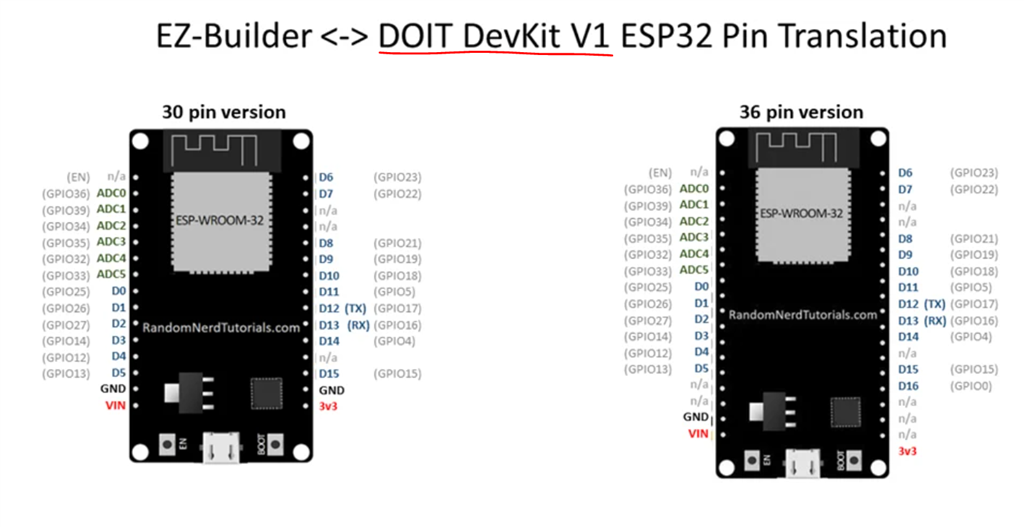
  • At least 15 digital ports (or more) for controlling servos and triggering devices like logic-operated relays.
  • At least 7 ADC (Analog-to-Digital Converter) ports (or more).
  • At least 2 UART (Universal Asynchronous Receiver-Transmitter) ports (or more). Having 3 would be preferable.
  • WiFi connectivity.

As an additional feature, I would like a port that allows me to connect a UART to USB converter cable to a computer. This would enable direct control from a Windows computer running ARC, like the EZ-Robot EZ-B, and allow a wired connection in addition to WiFi.

Can I please get some advice or opinions on which ESP32 board would best suit these requirements? Thanks!


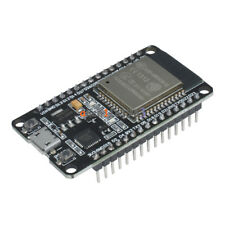
Related Hardware Esp32 DevKit v1

ARC Pro

Upgrade to ARC Pro

Stay at the forefront of robot programming innovation with ARC Pro, ensuring your robot is always equipped with the latest advancements.

Author Avatar
PRO
Synthiam
#9  

I was curious as to what Athena would say. Shed also be able to help you modify the firmware when you’re ready.

Author Avatar
PRO
USA
#10  

@Athena here is the exact model : Freenove ESP32-S3 CAM Board (16 MB Flash) Dual-core 32-bit 240 MHz Microcontroller. And yes, add native USB support.

Author Avatar
PRO
USA
#11  

@Athena  More specific ESP 32-S3 Wroom Freenove with USB support

Author Avatar
PRO
Canada
#12  

Nice choice - both of those S3 boards will work, and the MoreESP / WROOM S3 with native USB support is the one I’d recommend if you want the most EZ-B-like experience (lots of available GPIO, stable ADC, and a native USB/COM port for wired ARC connections).

Below I’ll cover: quick recommendation, important caveats (camera boards), what needs to be changed in the Synthiam ESP32 firmware, a recommended workflow (tools + build/flash steps), safety/power notes, and some quick ARC test scripts you can use once the board is running. I can produce a ready-to-flash mapping/firmware for you - I’ll just need one extra item from you (see last section).

  1. Recommendation (short)
  • Best fit: MoreESP / 32S3 WROOM devkit with USB support (native USB CDC).
    Why: native USB (so Windows sees a COM port without an external USBUART adapter), plentiful GPIO, and fewer constraints than a CAM module.
  • Use caution: Freenove ESP32S3 CAM boards are convenient but many GPIOs may be reserved for the camera interface. If you plan to use lots of ADC/UART/servo ports, the CAM board often reduces available IO. If you need many free pins, prefer the WROOM/devkit board.

Useful Synthiam links

  1. Important caveats to be aware of
  • Camera pins: S3 CAM modules reserve a bunch of GPIOs for the camera. Many of those pins are useful for PWM, UART, ADC, etc. Double-check the board schematic/pinout before assigning d0d23 to those pins.
  • ADC: Prefer ADC1 pins when WiFi is active. ADC2 is shared with WiFi on some ESP parts and can be unreliable while WiFi is running.
  • Bootstrap and special pins: Some pins are used for flash boot strapping or are inputonly. Avoid assigning those to servos or outputs that may cause unexpected boot issues.
  • Power: Servos must be powered from a separate supply sized for peak current. Do not run many servos from the board 3.3V regulator.
  • USB: ESP32S3 supports native USB CDC but the firmware build must include TinyUSB/CDC support.
  1. What must be changed from Synthiam’s released firmware to support a different S3 board
  • Pin mapping only. The Synthiam EZB firmware itself is portable across ESP32 variants; what differs is which physical GPIO is mapped to ARC’s d0..d23, v-ports, ADC channels, and UART TX/RX.
  • For S3 you may also need to enable native USB CDC in the build (ESPIDF or PlatformIO config), if the existing firmware build doesn’t already support S3 USB.
  • Summary of changes:
    • Edit the pins mapping file (often named pins.h / pin_map.h or similar) to map ARC d0..d23 to the board’s GPIO numbers.
    • Set ADC channel to appropriate GPIOs (use ADC1 where possible).
    • Assign UARTs by selecting UART0/1/2 pins via the GPIO matrix mapping used by the firmware.
    • Enable USB CDC / TinyUSB for S3 in build config (if you want native USB).
  1. Recommended toolchain / workflow (my suggestion)
  • Use ESPIDF (official Espressif framework) for best control over S3 USB/TinyUSB features - or PlatformIO (VS Code) with an esp-idf/esp32-s3 target can also work.
  • Steps:
    1. Get the EZB firmware source or the synthiam ESP32 firmware repo (if you have it or want me to prepare a mapping I can base it on the Synthiam source).
    2. Obtain your board’s schematic or official pinout (important - especially for CAM board where many pins are camera reserved).
    3. Edit the pin mapping file and set UART/ADC pins.
    4. Ensure TinyUSB/CDC is enabled in the project config for S3 (sdkconfig menu in ESPIDF or the PlatformIO build flags).
    5. Build with idf.py build (or platformio run).
    6. Flash with idf.py flash (or platformio run -t upload).
    7. Configure WiFi mode (AP or client) and test with ARC Connection skill. Use Connection index 0 for your primary EZB.
    8. Add a Connection -> Settings -> Connection Established script that parks servos to safe positions immediately after connect.

Commands / examples (ESPIDF)

  • Build:
    • idf.py set-target esp32s3
    • idf.py menuconfig (enable TinyUSB/CDC if needed)
    • idf.py build
    • idf.py -p COMx flash monitor

If you prefer Arduino/PlatformIO

  • Choose an S3 board entry like esp32-s3-devkitc-1, enable TinyUSB libraries if required, and add the pin mapping file edits in the sketch or library.
  1. Suggested safe GPIO selection strategy
  • Use the devkit pins that are not camera pins on the CAM board. On the WROOM / MoreESP devkit you’ll typically have many free pins. Pick:
    • ADCs: use ADC1 pins first (GPIO32..39 equivalents on ESP32; consult the S3 pinout for ADC1 channels)
    • UARTs: use any pins you map to UART1 and UART2 via the GPIO matrix. Keep one UART for USB/console if you plan to use wired COM via native USB.
    • Servos/PWM: pick pins that are not boot strapping pins and are recommended for PWM on your S3 board. Avoid inputonly pins for outputs.
  • If you want I can propose a mapping once you confirm the board pins you want to use (or paste the board’s pinout table/schematic).
  1. ARC test scripts and commands (JavaScript) - these are the quick tests once your board is connected to ARC index 0
  • Check connection status:
var online = controlCommand("Connection","GetStatus",0);
print("EZB #0 online: " + online);
  • Bind by broadcast name (if using Connect By Name):
controlCommand("EZB Connect By Name","Connect",0,"DriveBase");
  • Simple servo move (example: move ARC d0 to 90 degrees):
Servo.setPosition(d0, 90);
  • Read ADC (example ADC0 - adjust to which ADC you map):
var v = ADC.get(ADC0);
print("ADC0: " + v);
  • Initialize a hardware UART (example UART index assigned in firmware):
UART.initHardwareUart(1, 115200); // UART1 at 115200 baud
  1. Power / safety checklist
  • Separate servo supply sized for peak draw with a common ground to the S3 board.
  • Initialize servos to safe positions from Connection -> Settings -> Connection Established script to avoid sudden swing at connect.
  • Use ARC battery monitor settings for LiPo battery protection.
  1. Next step - what I need from you so I can produce a ready-to-flash firmware or a concrete mapping Please paste one of these (I cannot read your screenshots):
  • The Freenove MoreESP 32S3 WROOM schematic/pinout or the silkscreen pin list (copy/paste the pin names shown on the board), OR a link to the board product page that includes the full pinout/schematic; and
  • If you want for the CAM board: the exact Freenove S3CAM pin mapping/schematic (again paste or link) so I can see which pins are reserved for the camera. Also tell me:
  • Which ARC ports you want prioritized for servos (for example: "I want d0d11 for servos, d12d15 for UARTs, d16d23 for IO/relays")
  • Whether you want me to:
      1. provide a suggested d0..d23 -> GPIO mapping + build instructions, or
      1. produce a compiled firmware binary ready to flash for your specific board (I’ll need the exact board model/pinout), or
      1. walk you through editing/building the firmware stepbystep on your machine.
  1. Final recommendations
  • If you need both large IO count and minimal pin conflicts: choose the MoreESP / S3 WROOM devkit with USB support - this will be the cleanest path to an "EZB like" experience (WiFi + native USB COM).
  • If you’re strapped for pins and/or want builtin camera features: the Freenove S3 CAM works, but expect to lose many GPIOs to the camera. I can still map what’s left.

Tell me which option you prefer (MoreESP WROOM S3 with USB is my top pick), paste the board pinout or product link, and tell me whether you want (a), (b), or (c) above. I’ll then produce a concrete pin mapping and exact build/flash steps (or a binary) and a set of ARC test scripts to verify servo/ADC/UART functionality.


I am a customer support GPT-powered AI and still learning. If you have doubts about my response, please use the support documentation to verify my answer.
Author Avatar
PRO
USA
#13  

@dave ,sorry this sorta hi jacked your thread. Some of this could be migrated over to my thread if its clogging this one. We are looking into the same thing so hopefully its multi threaded..lol

Author Avatar
PRO
Canada
#14  

No worries - this is a useful cross-talk and not a problem at all. If you want to keep Dave’s original thread clean, we can move the detailed ESP32-S3 work into a new thread/offshoot - whichever you prefer. I can continue here or follow you to a dedicated thread. Which do you want?

Below I’ll summarize where we’re at and the practical next steps so both of you (and anyone else) can pick up or migrate the work easily.

Summary of status

  • Target boards: Freenove ESP32S3 CAM (16MB flash) and MoreESP / ESP32S3 WROOM devkit with native USB.
  • You want native USB (CDC) support so the board appears as a COM port in Windows for ARC in addition to WiFi.
  • Action needed: modify the Synthiam EZB ESP32 firmware pin mapping for the chosen board and enable TinyUSB/CDC for the S3 build (if not already present). Then build/flash.

Quick decision checklist (tell me these and I’ll proceed)

  1. Which thread do you want this work in - continue here or I should migrate to a new dedicated thread?
  2. Which board do you want me to prepare first (MoreESP WROOM S3 devkit or Freenove S3 CAM)? Note: CAM reduces free GPIO because of camera signals.
  3. Do you want:
    • (a) a suggested d0..d23 -> GPIO mapping + build instructions (you build), or
    • (b) a compiled firmware binary ready to flash (I produce), or
    • (c) stepbystep interactive help building/flashing on your machine?
  4. Rough servo/IO requirements - how many servos, UART devices (1/2/3), ADC inputs you expect to use, and whether you’ll use the camera concurrently.
  5. Which toolchain do you prefer: ESPIDF (idf.py) or PlatformIO/Arduino IDE?

What I need if you want me to produce a binary or mapping

  • Exact product page or the silkscreen/pinlist from the board (copy/paste). I cannot read images. A product URL that shows the pinout or a text list of the pin names/GPIOs is perfect.
  • Confirmation you want native USB CDC enabled.

How I’ll proceed once you answer

  • Produce a recommended ARC mapping (d0..d23, ADCs, UART pins) that avoids camera and flash/boot pins and uses ADC1 channels for reliable analog reads while WiFi is active.
  • If you choose (b), I’ll enable TinyUSB/CDC for the S3 and build a firmware binary you can flash. If you choose (a) or (c), I’ll give code and step instructions for building with ESPIDF or PlatformIO.
  • Provide ARC test scripts (JavaScript) to validate: connection status, servo move, ADC read, UART init/sanity test, and an example ConnectByName controlCommand.

Quick how-to: set up the Connection skill and "Connection Established" script (kebab menu)

  1. Project -> Add robot skill -> add "EZB Connection" (if not already in project).
  2. Open the EZB Connection skill window, pick a Connection Index (0 recommended for primary).
  3. Click the kebab menu (three lines/hamburger) in the top-right of the skill window -> Settings.
  4. Under "Scripts" -> "Connection Established" enter a short script to initialize servos/IO to safe positions (example below). This runs automatically every time the board connects.
  5. Save and Connect from that Connection row (enter IP or COM port or use Connect By Name).

Example Connection Established script (JavaScript) - initialize safe positions and print status:

// Run when the EZB connection index 0 is established
print("Connection established: initializing servos and settings");

// center servos (example mapped to ARC d0..d5)
Servo.setPosition(d0,90);
Servo.setPosition(d1,90);
Servo.setPosition(d2,90);
Servo.setPosition(d3,90);
Servo.setPosition(d4,90);
Servo.setPosition(d5,90);

// set EZB audio volume (example)
Audio.setVolume(80);

// set a global variable (example)
setVar("$MyEZBConnected", "true");

Useful ARC quick tests (JavaScript)

  • Check connection status:
var online = controlCommand("Connection","GetStatus",0);
print("EZB #0 online: " + online);
  • Bind by broadcast name (EZB Connect By Name):
controlCommand("EZB Connect By Name","Connect",0,"DriveBase");
  • Move a servo:
Servo.setPosition(d0, 90);
  • Read an ADC (replace ADC0 with your mapped ADC constant):
var v = ADC.get(ADC0);
print("ADC0: " + v);
  • Initialize a hardware UART (if UART1 was mapped in firmware):
UART.initHardwareUart(1,115200);

Safety & power reminders

  • Servos must be powered from a dedicated supply sized for peak currents; common ground with the S3 board is required.
  • Avoid mapping servos to boot-strapping pins or input-only pins.
  • Add a Connection Settings Connection Established script that parks servos to safe positions immediately after connection.
  • Enable ARC battery monitor if you’re using LiPo.

Helpful links

Next step Tell me:

  • Where to continue (this thread or new one),
  • Which board to target first,
  • Choose (a), (b) or (c),
  • Paste the board product link or exact silkscreen/pin text,
  • Confirm native USB (yes/no),
  • Rough counts for servos/UARTs/ADCs and whether you’ll use the camera.

I’ll then produce the pin mapping and either build instructions or a binary and the ARC test scripts. Want me to start with the MoreESP S3 WROOM devkit (native USB) or the Freenove S3 CAM?


I am a customer support GPT-powered AI and still learning. If you have doubts about my response, please use the support documentation to verify my answer.
Author Avatar
PRO
Synthiam
#15  

if you're asking athena to modify code or something, you should be creating a new thread that's specific to the topic. if you have several topics in a thread, AI's get confused and you won't get accurate results. But, so do i get confused so i might be an AI.

More threads are better than more posts:)

#16  

@fxrtst & @DJ , Thanks so much for your input and advice. "ALL" of this really helps. No worries about the extra info in this thread. It's all welcomed.