


 Resolved by Rich!
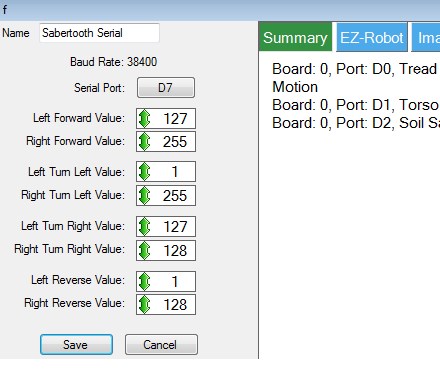
Movement Scripting Help Please?>
Can anyone help with scripting? I need to be able to have the speed of the G-Bot be ramped up and down rather than full on/off or there is a serious risk it will topple.
Right now I have the sabertooth control set up as in the attached photo. I have joystick 1 of the joystick control controlling it but I only get full on or off or full clockwise or counterclockwise rotation. Also, the joystick is 90 degrees off what I'd like( '3 o'clock' = forward, '9 o'clock' = reverse, '12 o'clock' = clockwise in place, '6 o'clock' = counterclockwise in place - but I can live with that for now if I have too).
I've been reading and watching tutorials and it seems like the movement scripting control is designed to do this but the input lines are different between the movement script control and the sabertooth control(stop, forward, reverse, left right versus 'left forward', 'right forward', 'left turn left', 'right turn left', 'left turn right', 'right turn right', 'left reverse', 'right reverse') and I have no idea how to write a script command to appropriately include a variable to do what I'm trying to do (OMG, that high school curse had come true! It comes down to algebra! doesn't it? Oh noooo!)
Can anyone take mercy on us and our Halloween plans and suggest some script to try and tell me which lines should go where?
PLEASE, PLEASE, PLEASE?
Thank you, Gwen

@pacowang.... EZ Robot did that too.... Yes, it's that good....
@Rich Had a chance to try your mods to the code. Works great as far as slowing to a stop sooner. Its definitely an improvement.
Not sure if its the code or com or my cpu but sometimes there is a long lag, like several seconds before the robot begins to move again.
either way its definitely an improvement and its ingestion merged into the rest of the Halloween routine!
Thanks again Rich!
Oops maybe not, just got the error in the screencapture bellow. The console is scrolling the message ; "Control named 'Motor 2 speed' does not exist; Cannot send command 'SetValue'
Have no idea what the script is doing. After reloading after the bug, the joystick seems to do nothing for a long time (15 20 seconds or more) then after a while it will briefly begin to move then no response then it begins to respond...
I think it doesn't like multiple joystick inputs. Seems to paralyze it. Not really sure though.
Just remove the graphs and graph script, take the ControlCommand for the hraph our of the on connection script. You dont need the graphs.
I would do it but I'm away now until the end of the weekend.
I think if you hit the start buttons in the two scripts in the "movement controls" object, it will set up the missing variables (I know you need the first one, I think the second one).
Alan
I didn't know to initialize both. Works great now! Thanks!
Gwen, I'm glad you have this working to your liking. These guys are wonderful with helping to find a way to get ezb to work for you. I'm sure the script they provided is the way to go to get the controller to work. However as far as the ramping issue I really believe that you are going to have to use the DESCRIBE software and use it to get into the Sabertooth to change some settings. Sabertooth has built in ramping control that you can adjust and fine tune. You can also set it to respond to either RC or analog signal. I think you'll get better and smoother control if you can figure out how to make these adjustments work for you.