


 Resolved by Rich!
Movement Scripting Help Please?>
Can anyone help with scripting? I need to be able to have the speed of the G-Bot be ramped up and down rather than full on/off or there is a serious risk it will topple.
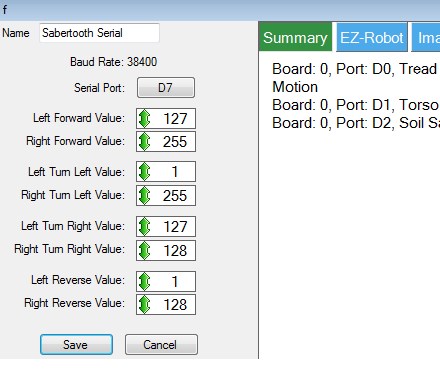
Right now I have the sabertooth control set up as in the attached photo. I have joystick 1 of the joystick control controlling it but I only get full on or off or full clockwise or counterclockwise rotation. Also, the joystick is 90 degrees off what I'd like( '3 o'clock' = forward, '9 o'clock' = reverse, '12 o'clock' = clockwise in place, '6 o'clock' = counterclockwise in place - but I can live with that for now if I have too).
I've been reading and watching tutorials and it seems like the movement scripting control is designed to do this but the input lines are different between the movement script control and the sabertooth control(stop, forward, reverse, left right versus 'left forward', 'right forward', 'left turn left', 'right turn left', 'left turn right', 'right turn right', 'left reverse', 'right reverse') and I have no idea how to write a script command to appropriately include a variable to do what I'm trying to do (OMG, that high school curse had come true! It comes down to algebra! doesn't it? Oh noooo!)
Can anyone take mercy on us and our Halloween plans and suggest some script to try and tell me which lines should go where?
PLEASE, PLEASE, PLEASE?
Thank you, Gwen

Following on Rich's comment, it is important that you still have connection for power to go back to your battery from the Sabertooth. Dave S has a circuit with a diode in one of the Sabertooth discussions (not sure if you were involved in that conversation or not, it was recent).
edit: here is the thread: sabertooth one-way cutoff
The Sabertooth has regenerative charging, so if you are pushing the bot around so that the motors spin, they will act like generators, that the Sabertooth will push voltage back to the batteries. If there is no where for that voltage to go, the Sabertooth can be damaged.
So, absolutely need an emergency cutoff, but should be designed so that it only stops flow from battery to sabertooth, but not from sabertooth to the battery.
Alan
I need a sabertooth, there's much I don't know about it
So a relay which switches between straight through connection to the motors from the battery (for normal operation) and switches to the same but with diodes to only allow flow from sabertooth to battery to happen for when emergency shut off?
Quick and dirty schematic time
When energised it works as normal. When power is cut it allows current flow in only one direction (i.e. regenerative) I realise I have the relay backwards and I may even have the diode backwards, it's not meant as a proper schematic but an aid to my description above Honest...
P.S. Don't judge me on the schematic, I did say it was quick and dirty
If you are short of discretionary cash, but are serious about wanting to get one, I have two thoughts for you.
The 2x12 is functionally identical to the 2x25 but costs about 1/3 less.
If you want either, and still have copious EZ-Robot credit, you could order me some EZ bits that I need and I'll order you a Sabertooth, so you get the Sabertooth as a thank you for answering so many questions, and I still get the bits I would be buying anyway.
Alan
It's not so much the lack of funds, there are a few things holding me off (the main one being the sabertooth would mean I need decent motors, then encoders, then the kangaroo, then a robot to put it all in... it's a vicious cycle, kind of like drugs lol)
I also have a large pile of things I have been wanting to get through for a while now and it's getting bigger. BlinkM, TellyMate (all variants), LCD displays, I2C communication with other controllers, JD, Six, a bunch of EZ-Bits... I think I need to clear at least some of that pile before I add more to it
Thanks for the offers and advice as always though.
OMG, took him outside for the first time with him full built up... Nerve racking to say the least...
The bad new: He ended up off the driveway in a ditch tipping JUUUUSSSST shy of going over... wheww... The control is a bit unnatural due to the lag and the way the ramping seems to continue for a time after input stops. Add to that my driveway is uneven and mildly inclined plus, my notebook seemed to be working hard. There seemed to be a com delay too.
Note to self: Do not wear flip flops while experimenting with a 300 lb robot and NEVER get the front of one under a tread...
Note to self two: Get a wireless game controller and NEVER let the cord of the current one get under a tread... Very bad...
It was much better when I got him into our street which is level. One of my neighbors drove by and stopped next to him. The G-Bot escorted him down the street for a short bit... very cool.
The good news: He DIDN'T go over and my and my neighbors had some great fun!
I'll do some more practice with him tomorrow when my Son will be home. That should be fun and hopefully we'll figure out enough to get a few Trick or Treaters going on Friday...
I'll put up a short vid later tonight
Very exciting. Looking forward to seeing the video.
Alan
Fell asleep last night...
Here is the video from yesterday's testing... @thetechguru @rich @Richard @Richard R
More next week after the dust from Halloween settles...
Enjoy
Thanks for all your help guys!
:D


What's more impressive than that amazing b9 is the way you casually dematerialized at the 10:19 mark. Forget EZ-Robot, how'd you do that