


 Resolved by Rich!
Movement Scripting Help Please?>
Can anyone help with scripting? I need to be able to have the speed of the G-Bot be ramped up and down rather than full on/off or there is a serious risk it will topple.
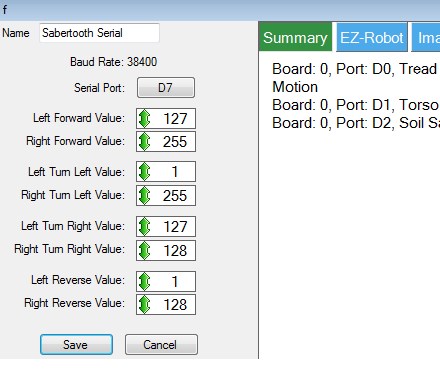
Right now I have the sabertooth control set up as in the attached photo. I have joystick 1 of the joystick control controlling it but I only get full on or off or full clockwise or counterclockwise rotation. Also, the joystick is 90 degrees off what I'd like( '3 o'clock' = forward, '9 o'clock' = reverse, '12 o'clock' = clockwise in place, '6 o'clock' = counterclockwise in place - but I can live with that for now if I have too).
I've been reading and watching tutorials and it seems like the movement scripting control is designed to do this but the input lines are different between the movement script control and the sabertooth control(stop, forward, reverse, left right versus 'left forward', 'right forward', 'left turn left', 'right turn left', 'left turn right', 'right turn right', 'left reverse', 'right reverse') and I have no idea how to write a script command to appropriately include a variable to do what I'm trying to do (OMG, that high school curse had come true! It comes down to algebra! doesn't it? Oh noooo!)
Can anyone take mercy on us and our Halloween plans and suggest some script to try and tell me which lines should go where?
PLEASE, PLEASE, PLEASE?
Thank you, Gwen

AWESOMENESS ABOUNDS!
@Rich, I can't thank you enough!
:)
First time I have ever corrected @Rich LOL.... Although, I think you erred on purpose...
Motor 1 full forwards the value is 1 Motor 1 stop the value is 64 Motor 1 full reverse the value is 127 Motor 2 full forwards the value is 255 Motor 2 stop the value is 192 Motor 2 full reverse the value is 129 needs to be 128 not 129*
Great work Rich. I'll be using this in my dog robot too. I wasn't looking forward to figuring it all out myself. I had the right direction, but mine would have been needlessly more complex.
Alan
Found this BTW...
@Richard, I had my suspicions that something was wrong with the values as 128 wasn't assigned to either motor in my example however knowing you know the values from memory it was easier to let you correct me than for me to look it up (yes, I am lazy).
@Alan, funnily enough when I started the script I over complicated it. It's amazingly simple how it works which is great however it did take me 3 attempts to get it right (and I suspect there are one or two things that could be written better).
@Gwen, I'm happy to help out. Writing scripts is an escape and despite me claiming I was going to stop spoon feeding and force people to get the end result themselves it's always good to get stuck in to a useful script
Anyone have any ideas on a way to have the robot automatically stop if the EZB controling it looses its connection? Right now, i think i have a setup for a runaway robot? Hmmmm.
Im thinking an e switch on the power to the sabertooth but am not sure how to make it cut out in the event of a disconnect. The e switch might have to flip a relay too beacause of the current. I don't have an amp meter but i know its drawing over 20 amps at startup...
Any thoughts?
Now that i think of it, it actually already happened when i did my first testing outdoors with only the lower half. Had to run after him and tackle his power switch... It would be really cool to be able to just grab his power pack but it only interupts the upper half
On disconnection you wont be able to send commands to the sabertooth so it will need to be some kind of auto disconnect/stop circuit such as a relay inline with the batteries supplying the motors.
The good news is, the digital ports on the EZ-B will go low on disconnection so you could use this to de-energize the relay. You would need to set the digital port to high/on in some kind of init script though otherwise the power to the motors will be cut until it's set high.