


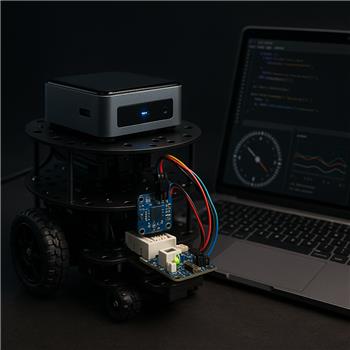
Running ARC on a Windows NUC mounted to a TurtleBot3 Burger. OpenCR is on USB for drive, and I added an EZ-B v4 over Wi-Fi just to handle I2C. I wired an external MPU-9150 breakout to the EZ-B v4 I2C port (SDA/SCL/GND, powered from a 3.3 V buck). The I2C Scan control sees the device at 0x68 and wiring looks clean on a scope. Added the "MPU9150 Accelerometer, Gyro, Temperature, Compass" skill, clicked Init, and I can get a single read with RunOnce; Variable Watcher shows compass and gyro values updating. Goal is to fuse yaw into my ARC JavaScript heading hold script for the TurtleBot3.
The issue is continuous polling. I’m calling RunOnce every 100 ms from a JavaScript control like this:
ControlCommand("MPU9150", "RunOnce");
var yaw = GetVariable("$imuCompass");
If I loop that at 10 Hz, after ~15-20 seconds ARC’s ping to the EZ-B v4 spikes and the IMU variables stop changing until I stop the loop. Dropping to 2 Hz helps but it still eventually stalls. Manually pressing RunOnce every few seconds is always fine. Wi-Fi RSSI is steady, CPU on the NUC is low, and other controls are idle. I’ve tried moving the loop to a separate Script control, checked for duplicate ControlCommand calls, and confirmed the I2C address/pull-ups; behavior is the same.
Is there a recommended polling pattern or configuration to get stable, continuous readings from the MPU9150 skill on an EZ-B v4 with ARC on a TurtleBot3, or should I instead plan to read the TurtleBot3’s OpenCR IMU over USB via a custom plugin or serial bridge?

Yes - for the MPU9150 skill on an EZ-B v4, the pattern you’re using (
RunOnceevery 100 ms from a tight loop) is very likely the source of the stall.What’s happening
The MPU9150 skill is designed for on-demand reads, not high-rate continuous polling from another script. Even though a single
RunOnceworks fine, repeatedly hammeringControlCommand(..., "RunOnce")can create a backlog of I2C requests and/or control messaging overhead. On Wi-Fi, that can show up as ping spikes and eventually the sensor values appear to stop updating until the loop is stopped.Because the skill itself does not stream automatically, the safest approach is to:
Recommended polling pattern
Instead of firing
RunOnceat 10 Hz indefinitely, try a timed loop with a longer interval, like 250-500 ms, and make sure the loop includes a sleep.JavaScript example
Even better: use a slower sensor update task
If your heading-hold loop needs fast motor correction, you usually do not need to read the IMU every cycle.
A better architecture is:
That keeps the robot responsive without overloading the I2C/control pipeline.
Why the OpenCR IMU may be a better long-term option
For a TurtleBot3, if the OpenCR already has the IMU wired into the platform, then reading the OpenCR side over USB/serial can be more stable for continuous sensor fusion than putting an extra IMU on the EZ-B v4 just for heading.
That said, whether you should switch depends on what you want:
Stay with EZ-B v4 IMU if:
Consider OpenCR IMU if:
I would not recommend
ControlCommand("RunOnce")loopRunOncecalls without pausesPractical next test
Try this first:
Initsleep(100-150)afterRunOnceIf that works, you can reduce the interval gradually until you find the highest stable rate.
One more thing to check
If you’re using the Variable Watcher heavily while looping, that can add a little overhead too. It usually isn’t the main cause, but for troubleshooting, test with it minimized or closed briefly to see if behavior changes.
Helpful links
MPU9150 skill info:
https://synthiam.com/Support/Skills/I2c/MPU9150-Accelerometer-Gyro-Temperature-Compass?id=16182
ControlCommand documentation:
https://synthiam.com/Support/Programming/control-command
TurtleBot3 support page:
https://synthiam.com/Support/Hardware/TurtleBot-3
My recommendation
For your current setup, I’d first try a slower, delayed polling loop before moving to a custom OpenCR plugin. If you need true continuous IMU fusion, then yes - reading the TurtleBot3/OpenCR IMU path is likely the better architecture.
If you want, I can help you build a stable ARC JavaScript heading-hold loop that: