


 Resolved by DJ Sures!
ARC Keeps Blocking Windows Shutdown
I'm having an occasional issue with Windows shutting down when using the Utility.shutdownPC(); command from an ARC script.
Background and setup:
- I have a looping JavaScript script in ARC that watches a button on my robot. The button is read by an EZ-B v4 ADC port and triggers the script when the voltage changes.
- The PC running ARC (Windows 11) is mounted on the robot and connected to three EZ-B v4 controllers via USB-to-Serial converter cables (EZ-Bs are connected to the PC via USB).
- The script sends ControlCommand calls to various Robot Skills (Soundboard v4, Bender, Head Section, Left Arm, Right Arm, etc.) and then calls Utility.shutdownPC(); to shut down the onboard Windows 11 PC.
Problem: This process has worked reliably for a long time, but within the past week or so I’ve started seeing intermittent failures. When the shutdown hangs, Windows shows a message saying something like "ARC is still running and keeping the PC from shutting down" and offers a button to end ARC. If I choose that option, ARC appears to terminate and Windows then completes the shutdown.
Notes on troubleshooting I’ve tried or considered:
- I do not allow Windows Update to update my Windows 11 OS, so I don’t think a Windows update is the cause.
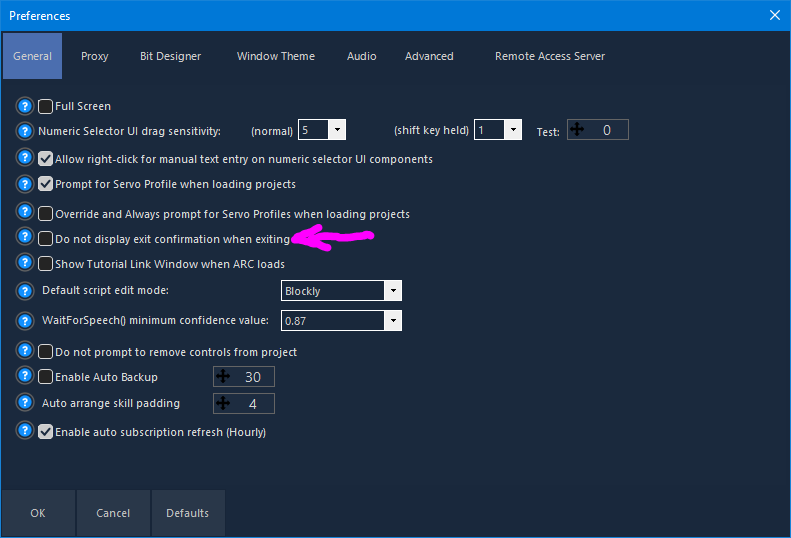
- I checked ARC’s settings and enabled "Do not display exit confirmation when exiting," but the same occasional hang still happens. I seem to recall that in the past I had that setting disabled and Utility.shutdownPC(); still shut down Windows without my intervention.
- I’ve read suggestions online (e.g., adding switches like /s /f /t 0 to the shutdown command and disabling Fast Startup). Fast Startup is currently enabled on my PC. I haven’t tried these Windows-level changes yet.
Here is the shutdown script I’m using (triggered by the EZ-B ADC port):
ControlCommand("Personality Generator", "PauseOn");
sleep(250);
ControlCommand("Head Section", "ScriptStart", "Bubble Full Up");
ControlCommand("Head Section", "ScriptStart", "Radar 1/4 Sweep");

var Goodbye = Utility.getRandomUnique(1, 12);
print("Goodbuy: " + Goodbye)

if (Goodbye == 1) {
ControlCommand("Soundboard v4", "Track_9");//say "Hasta La Vista"
sleep(2500);
}
else if (Goodbye == 2) {
ControlCommand("Soundboard v4", "Track_10");//say "Love Long & Prosper"
sleep(2750);
}
else if (Goodbye == 3) {
ControlCommand("Soundboard v4", "Track_36");//say "So it Goes"
sleep(2500);
}
else if (Goodbye == 4) {
ControlCommand("Soundboard v4", "Track_83");//say "Pleasure to Serve"
sleep(3500);
}
else if (Goodbye == 5) {
ControlCommand("Soundboard v4", "Track_84");//say "Goodby"
sleep(1750);
}
else if (Goodbye == 6) {
ControlCommand("Soundboard v4", "Track_91");//say "May the Force be with you"
sleep(2750);
}
else if (Goodbye == 7) {
ControlCommand("Soundboard 2", "Track_19");//say "My Power Pack needs charging"
sleep(4500);
}
else if (Goodbye == 8) {
ControlCommand("Bender", "Track_28");//Say "Shows Over"
sleep(3000);
}
else if (Goodbye == 9) {
ControlCommand("Bender", "Track_36");//Say "Wanna Kill All Humans?"
sleep(3500);
}
else if (Goodbye == 10) {
ControlCommand("Bender", "Track_30");//Say "So Long Coffin Stuffers"
sleep(3500);
}
else if (Goodbye == 11) {
ControlCommand("Bender", "Track_3");//Say "Bite My Shiny Ass"
sleep(3500);
}

ControlCommand("Head Section", "ScriptStart", "Bubble Full Down");
ControlCommand("Left Arm", "ScriptStart", "Left Claw Closed");
ControlCommand("Right Arm", "ScriptStart", "Right Claw Closed");
sleep( 1000 );

Utility.shutdownPC();
I’m totally open to suggestions or an updated script to resolve this intermittent shutdown issue where it appears ARC is preventing Windows from shutting down. Thanks!
Related Hardware (view all EZB hardware)

Related Robot Skills (view all robot skills)


Upgrade to ARC Pro
Synthiam ARC Pro is a new tool that will help unleash your creativity with programming robots in just seconds!
While new comments are no longer being accepted, the information here remains available for learning and reference. Check the most recent comment for additional details.
OK, it seems that stopping all looping scripts before sending the shutdown PC command solved my problem. I inserted "StopScript" commands in the shutdown PC script for the scripts I found that were looping (I had more than I remembered). I then did several power down / power up cycles of my robot using that script and Windows shutdown just fine each time.
Thanks again for the help. It's great when things run properly! cool