


Asked
— Edited
 Resolved by rb550f!
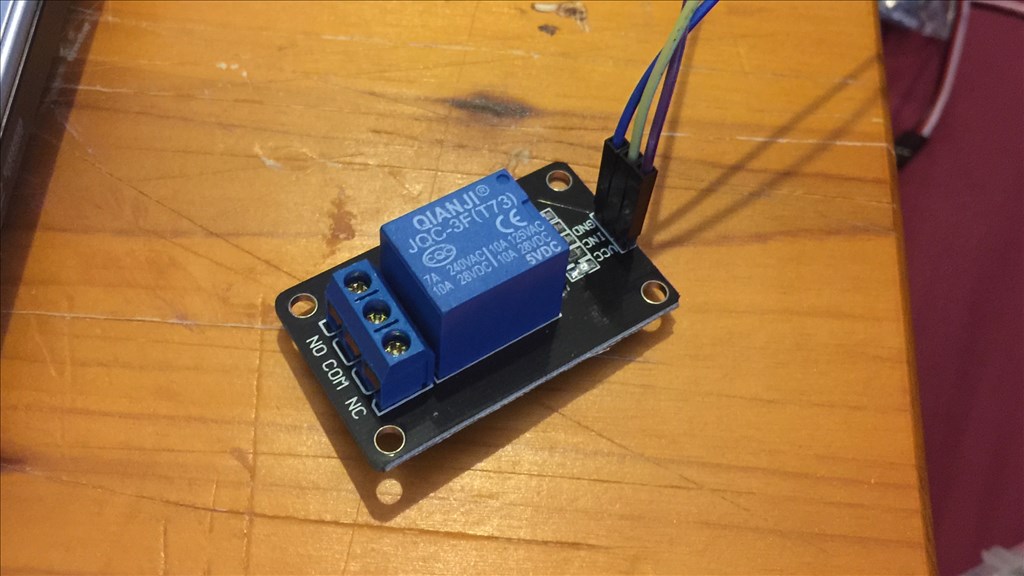
5V Relay Not Responding As It Should
So I've just been trying out a 5v relay (with 5v regulator) on port D0 but it's not working as expected. I first tried "Set(D0,on)" and it closed the relay switch. I then tried "Set(D0,off)" and it wouldn't open. I disconnect it from the EZ-B and it opens, plug it back in and it closes again but can't control it from then onwards. I even tried a combined script...
Set(D0,on)
Sleep(2000)
Set(D0,off)
but no change. I'm I missing something here or is there something else I can try?
Thanks.

@Steve... awesome... I promise those are plug in play with the ezb4... Andrew has one in his drive base.... You're welcome by the way....
Forgot to mention.. they are only rated at 2amps, but as I said I have ran more through them...
No problem. 2 amps will be more than enough for my needs. I'm still going to use the relay I have as well with a level converter that @rb550f mentioned. I've got it so might as well use it.
Thanks again for your input everyone.
Steve.
@Richard.
Quick and possibly silly question. The relay you linked to, how do you connect it? So far I have the G, V, S (three pin port on the relay) on port d0 via a 5v reg, and a separately powered LED with the break in one wire going through the Com and NC, but nothing's happening (except for a very faint LED that breifly flashes once when I run a "On, sleep, Off script").
@steve.... you don't need a regulator unless you are using more than 7.4V with you ezb... Plug it directly into the ezb port with 3 wires... G=ground V= Red pin S=signal pin
switching part.... com= common NO= normally open NC = Normally closed
simply set(D0,On) and set(D0,off) to operate... Plug and play dude...
@Richard.
Right. Reg was the problem. All good now. Cheers bud.
On second thought, maybe best to use with only 5V... I just tested it with 8.14V that my LIPO was reading.... It worked well enough, but can't vouch for the longevity of the relay at that voltage... I usually use them at 6V because most of my recent projects were using 6V niMh bats.... So just got used to plugging them directly into the ezb without a regulator....
So why wouldn't the 5v reg work with the relay then? It's connected correctly and it does work.
@Richard.
I found out what the problem was. The regulator I was using (not an EZ-Robot one, but a UBEC one) was labeled incorrectly. Output was input, and visa versa. It works now I have it back to front.
Thanks anyway. An unrelated question, can an ADC port be set to On and Off, and if so, how?