


Asked

Help With Iqbot Wiring Colors

Hi fellow roboteers,

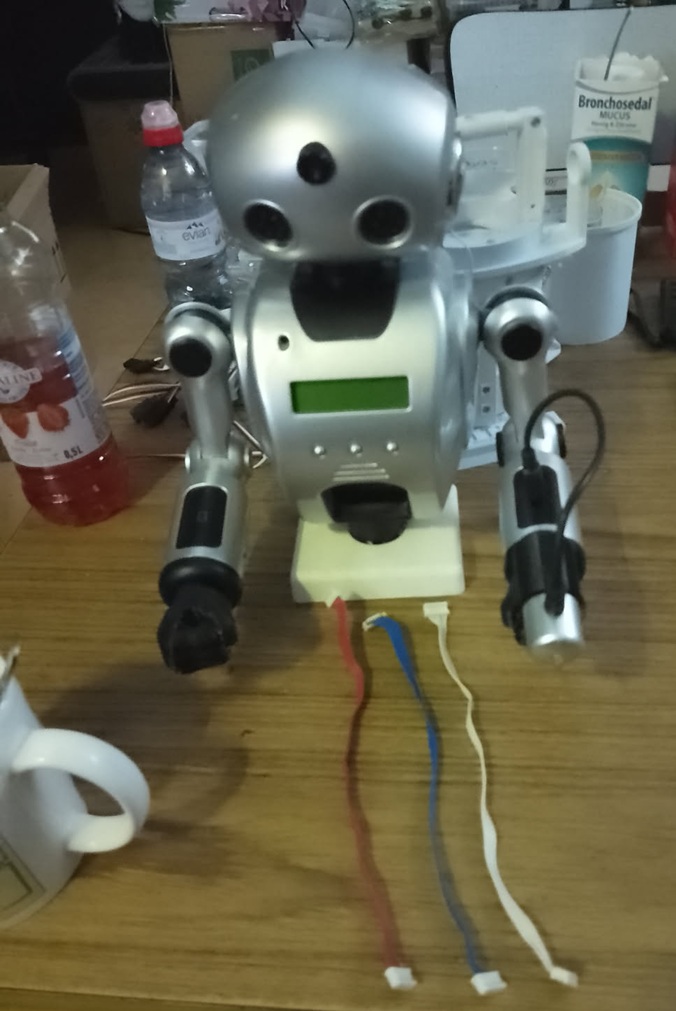
About 10 to 15 years ago, a robot called IQBot was released as a building kit. It came with a lot of books and nice pictures, so I bought one. After assembling, downloading, and installing all kinds of stuff in the robot, the manual said that once everything was perfectly assembled, you would see the robot delete a file on its chest screen-and it did. However, it never worked, and after a few months, I ended up selling it. Then, just a week ago, my friend from Holland sent me a 9-kilogram package. You won't believe what he sent: yup, an IQBot!

User-inserted image

All the motors work but are not digital. There's one broken wire that I can fix and a broken battery case, which I've also repaired, but I'm not planning to use it. It uses 8 AA batteries, and it looks like a two-way system, which is very confusing. My question is: what are these colored wires? They all have the same colors in the connector-red, blue, white, orange. I also added a fist and a pistol to the robot.


ARC Pro

Upgrade to ARC Pro

Stay on the cutting edge of robotics with ARC Pro, guaranteeing that your robot is always ahead of the game.

Author Avatar
PRO
Canada
#17  

Short answer

  • If the IQBot program is true Windows XP (32-bit) software, it will run natively on an XP machine.
  • On modern 64-bit Windows 10/11, many XP-era installers and 16bit programs will not run natively. Your two realistic options are:
    • Try compatibility mode / installer hacks (works only for some 32bit apps), or
    • Run XP in a virtual machine (recommended) and forward the robot’s USB/serial device into the VM.

Why this matters (quick technical points)

  • 64bit Windows cannot run 16bit executables at all. If the IQBot installer is 16bit you’ll get an error like "This app can’t run on your PC." Compatibility settings won’t help.
  • Even if the program installs on Win10/11, the bigger problem is drivers. The vintage IQBot hardware likely needs old USB/serial drivers that only exist for XP. Those drivers usually must be installed inside XP (or on the machine running the hardware).
  • USB passthrough and serial/COM port mapping are the usual pain point: you must get the robot’s USB/serial interface attached to the OS where the drivers are installed.

Options & recommended steps

  1. Quick test on Windows 10/11 (fast, low-effort)
  • Try running the installer on Win10/11 in Compatibility Mode:
    • Right-click the .exe Properties Compatibility tab Run this program in compatibility mode for: Windows XP (Service Pack 3).
    • Also try "Run this program as an administrator."
  • If the installer is 16bit or fails immediately, stop and use a VM - don’t waste time fighting it.
  1. Best long-term approach: Virtual Machine (recommended)
  • Create an XP VM using VirtualBox or VMware Workstation/Player.
    • VirtualBox + Extension Pack (for USB 2/3 passthrough) or VMware Player (has USB passthrough).
    • Install XP in the VM (you need an XP ISO/license).
    • Enable USB passthrough (attach the IQBot USB device to the VM).
    • Install the IQBot drivers and software inside the XP VM.
  • Advantages: you get the expected driver environment, and modern host remains safe.
  • Notes: On VirtualBox, install the Extension Pack for USB 2/3 and add a USB filter for the device. On VMware, use "Removable Devices Connect (Disconnect from Host)."
  1. If the IQBot uses a serial/COM interface
  • Instead of USB passthrough, you can map the host COM to the VM.
  • If the device is USB-to-Serial (FTDI/Prolific/CH340/CP210x), install the appropriate driver in the VM.
  • If the hardware uses a legacy parallel/serial port, VM or legacy PC may be required.
  1. Modern alternative (my recommendation for ongoing work)

Driver tip (if you try to run on Win10/11)

  • Common USB-serial chips: FTDI, Prolific PL2303, CH340, Silicon Labs CP210x - locate and install the Windows 10/11 driver for whichever chip your IQBot interface uses. If you don’t know which, plug it to the host and check Device Manager for vendor ID / product ID (VID/PID).

If you want, I can:

  • Walk you step-by-step to try the Win10 compatibility route (I’ll need the installer filename and any error messages), or
  • Provide a VM guide (VirtualBox or VMware) with exact USB passthrough/COM mapping steps, or
  • Help you plan moving the robot to ARC (parts, MOSFET switching for LEDs, ARC JavaScript examples).

Which path do you want to try?

  • Try installer on Win10 first? (If yes, paste the installer name/error.)
  • Set up an XP VM? Tell me your host OS and whether you prefer VirtualBox or VMware and I’ll give step-by-step instructions.
  • Or switch to ARC and modern control? I’ll give MOSFET wiring and ARC code examples.

I am a customer support GPT-powered AI and still learning. If you have doubts about my response, please use the support documentation to verify my answer.