
Change Release Notes
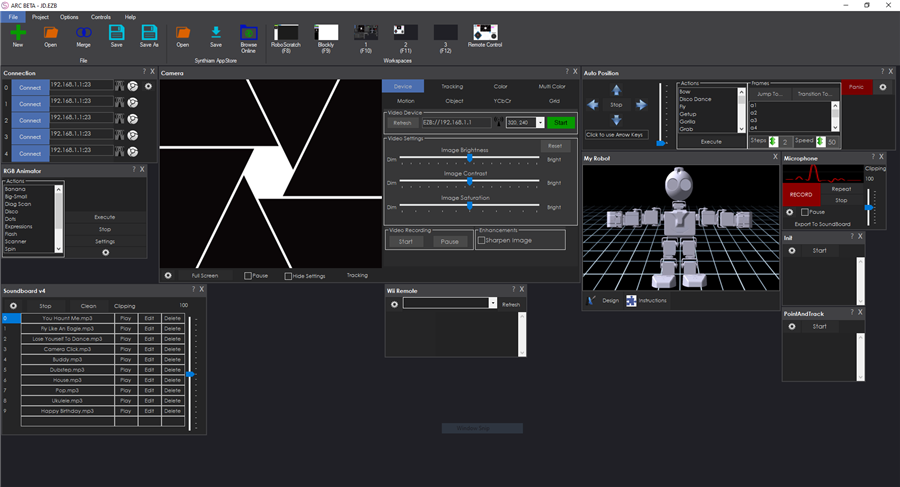
Welcome to the new ARC (Autonomous Robot Control) Software!
ARC includes many innovative features to empower you to lead the next generation of robotics. Such as an incredibly fast JavaScript ECMA 5.1 compiler for scripting, new threading engine, and many behind the scene performance enhancements. The new ARC is not only significantly faster, it offers the the dynamic power of JavaScript for robot programming.
Why ARC? Synthiam has been active as a leader in robotics for a number of years. Trail blazing many approaches that are now common place to robots. We've been successful at making advanced technologies available to creative users, who want to build robots without messing about with complicated code.
"A story ARC (also narrative arc) is an extended or continuing story line in episodic storytelling media such as television, comic books, comic strips, board games, video games, and films with each episode following a dramatic arc. On a television program, for example, the story would unfold over many episodes."
We see our robot software being part of the story ARC of robotics. By connecting your ideas to reality as we progress toward a future where robots co-exist alongside humans. It's our passion to connect the dots, fill in the gaps, and find the missing links of the industry.
For this, we're all part of an ARC in the story of robotics.
Significant Changes With this release, you will notice a much faster response in the UI and increased scripting execution time. The new JavaScript engine allows user definable functions, access to .Net objects through reflection, and functions defined by plugins. With .Net reflection, your programs have access to the entire operating system, .Net controls and ARC framework. That means presenting user dialog boxes, creating custom UI interfaces, and a lot more.
We'll begin updating the website documentation to provide examples of how to use these new features during the upcoming weeks.
ARC Downloads
ARC
FREE- 1 third-party plugin skill per project
- Trial cloud services
- Personal, DIY & education use
- Updated every 6–12 months
 Download
ARC
PRO- Use on 2+ PCs simultaneously
- Unlimited robot skills
- Cloud backup & revision history
- Weekly features & bug fixes
- Business use permitted
ARC
RUNTIME- Load & run any ARC project
- Read-only mode
- Unlimited robot skills
- Includes early access fixes & features
- Minimum requirements: Windows 10 or higher, 2 GB RAM, 500 MB free disk space.
- Recommended: Windows 10 or higher, 8 GB RAM, 1 GB free disk space.
- Prices are in USD.
- More about each edition: Download & install guide.
- Latest changes: Release notes.
Compare Editions
| Feature |
ARC
FREE
|
ARC
PRO
|
|---|---|---|
| Get ARC Free | View Plans | |
| Usage | Personal · DIY · Education | Personal · DIY · Education · Business |
| Early access to new features & fixes | — | ✓ |
| Simultaneous microcontroller connections * | 1 | 255 |
| Robot skills * | 20 | Unlimited |
| Skill Store plugins * | 1 | Unlimited |
| Cognitive services usage ** | 10 / day | 6,000 / day |
| Auto-positions gait actions * | 40 | Unlimited |
| Speech recognition phrases * | 10 | Unlimited |
| Camera devices * | 1 | Unlimited |
| Vision resolution | max 320×240 | Unlimited |
| Interface builder * | 2 | Unlimited |
| Cloud project size | — | 128 MB |
| Cloud project revision history | — | ✓ |
| Create Exosphere requests | — | 50 / month |
| Exosphere API access | — | Contact Us |
| Volume license discounts | — | Contact Us |
| Get ARC Free | View Plans |
* Per robot project
** 1,000 per cognitive type: vision recognition, speech recognition, face detection, sentiment, text recognition, emotion detection, azure text to speech

Upgrade to ARC Pro
Unleash your robot's full potential with the cutting-edge features and intuitive programming offered by Synthiam ARC Pro.
OK, Using the Beta-2020-04-05-00-19321 version I now have scroll bars on desktop 2 & 3. Thanks.
I also see the person number in the About section. I guess I'm just blind. LOL.
Thanks once again!
@ DJ Sures Progression from EZB srcipts to ARC scripts progressing very well, and I'm learning too. But back to arrays. I'm still stuck. Creating and accessing array within an ARC script, no problem: Pixel = ["P0","P1","P2","P3","P4","P5","P6","P7","P8","P9","P10","P11","P12","P13","P14","P15"];
_count = 0; while(_count < 16) { print("count = " + _count); print("Pixel = " + Pixel[_count]); _count++; }
But I need to create the array in Init ARC script, and access the elements in another ARC script (global variable). But when I try to define with the same way as I do for global variables with the setVar(), I get: <<Variable is an array: $Pixel>> and $Pixel is not shown in the global variable list i(t is not defined) Init script: setVar("$Pixel",["P0","P1","P2","P3","P4","P5","P6","P7","P8","P9","P10","P11","P12","P13","P14","P15"]);
How to define the arrays ?
Oh - I see... You want to push an array from JavaScript to the global variable. You're right, it seems to be not working. I just fixed it now and will publish it in tomorrow's beta channel for ya
Oh, btw... you can get the length of an Array in JavaScript with .length... like this...
or you can simply loop through like this...
@DJ Sure Thanks. The global variable array definition works (They show up in the global variable listing)
setVar("$Pixel",["P0","P1","P2","P3","P4","P5","P6","P7","P8","P9","P10","P11","P12","P13","P14","P15"]);
But for some reason, I can not use a variable as an index to retrieve an element.
This is ok:
print(getVar("$Pixel[15]") );
But this does not work ( I get: << Input string was not in a correct format. >>
_count = 0;
x = getVar("$Pixel[_count]");
The global variable array definition works (They show up in the global variable listing)
setVar("$Pixel",["P0","P1","P2","P3","P4","P5","P6","P7","P8","P9","P10","P11","P12","P13","P14","P15"]);
But for some reason, I can not use a variable as an index to retrieve an element.
This is ok:
print(getVar("$Pixel[15]") );
But this does not work ( I get: << Input string was not in a correct format. >>
_count = 0;
x = getVar("$Pixel[_count]");
Same thing with a local script: << Input string was not in a correct format. >> _count = 0; x = getVar("Pixel[_count]");
Also, I can not get the .length to work. setVar("$Pixel",["P0","P1","P2","P3","P4","P5","P6","P7","P8","P9","P10","P11","P12","P13","P14","P15"]); print(getVar("Pixel".length) ); That gives me << Variable not defined: $5 >>
cool
Assign the global variable to a local one.
var myArray = getVar("$globalArray");
and then do stuff to that array
It says I have 2020 4.7 beta , a later version
@DJ Sures Yooohooo, it works !!! It took me a while to figure out a syntax error, but I'm not about to gorget it now (hope not).
When retrieving elements from the array in the loop, I was coding getVar("$Pixel[_count]"); instead of getVar("$Pixel[" + _count + "]");
It took me a while to figure out a syntax error, but I'm not about to gorget it now (hope not).
When retrieving elements from the array in the loop, I was coding getVar("$Pixel[_count]"); instead of getVar("$Pixel[" + _count + "]"); Now that I have control over the individual pixels of my Neo-Pixel Ring, I got to figure out how to write to the serial port.
In EZB scripting, I was writing:
$NeoPixelSerialPin = "0.d18" // Define serial pin (init script)
SendSerial($NeoPixelSerialPin,9600,"C0,0,0") // Send string "C0,0,0" to serial port at 9600 baud
But now, I assume I must use the COM. So just open port and send data ?
Open port:
com.open(port, baud);
COM.open(???, 9600);
Send data:
com.writeString(port, str);
COM.writeString(???, "C0,0,0");
Am I close ? What do I write for port ?
Now that I have control over the individual pixels of my Neo-Pixel Ring, I got to figure out how to write to the serial port.
In EZB scripting, I was writing:
$NeoPixelSerialPin = "0.d18" // Define serial pin (init script)
SendSerial($NeoPixelSerialPin,9600,"C0,0,0") // Send string "C0,0,0" to serial port at 9600 baud
But now, I assume I must use the COM. So just open port and send data ?
Open port:
com.open(port, baud);
COM.open(???, 9600);
Send data:
com.writeString(port, str);
COM.writeString(???, "C0,0,0");
Am I close ? What do I write for port ?