


Camera Click Servo icon Camera Click Servo Interactive camera control for ARC: click-to-center and edge hotspots to pan/tilt servos, adjustable fine-tune and multi-camera support. Try it →
Tutorial
Published — Updated

The Robot Program Episode 020: Detect Face And Wave - Roboscratch

Step 15 of 20
Step 14

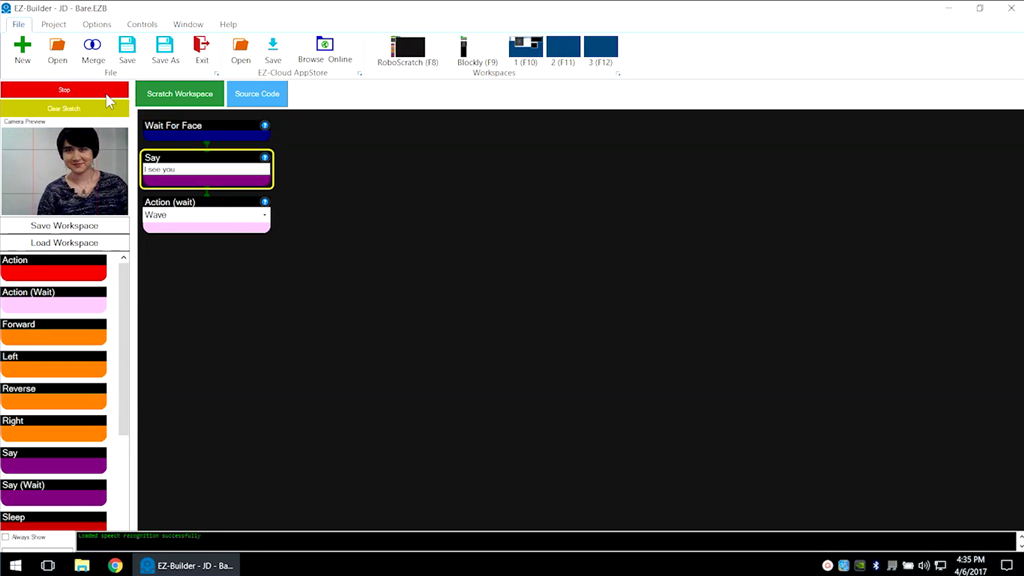
These three components will cause the robot to speak and wave once a face is detected.

Execute the program using the green Start button. Follow the green line and highlighting as the program runs.

User-inserted image


ARC Pro

Upgrade to ARC Pro

Stay at the forefront of robot programming innovation with ARC Pro, ensuring your robot is always equipped with the latest advancements.