

 Resolved by
, I am testing a USB webcam connected to my PC. The face tracking feature only works with a resolution of 320 x 240. If I choose a higher resolution, such as 640 x 480 or above, it does not track faces. Is this normal behavior?
Interestingly, object tracking works well at higher resolutions.




Because there was no mention of the robot skill being used, @Athena went on a bit of a tangent trying to understand the question. I deleted her response.
in the figure meeting the name of the robot skill. In this case, the robot skill is "camera device robot skill"
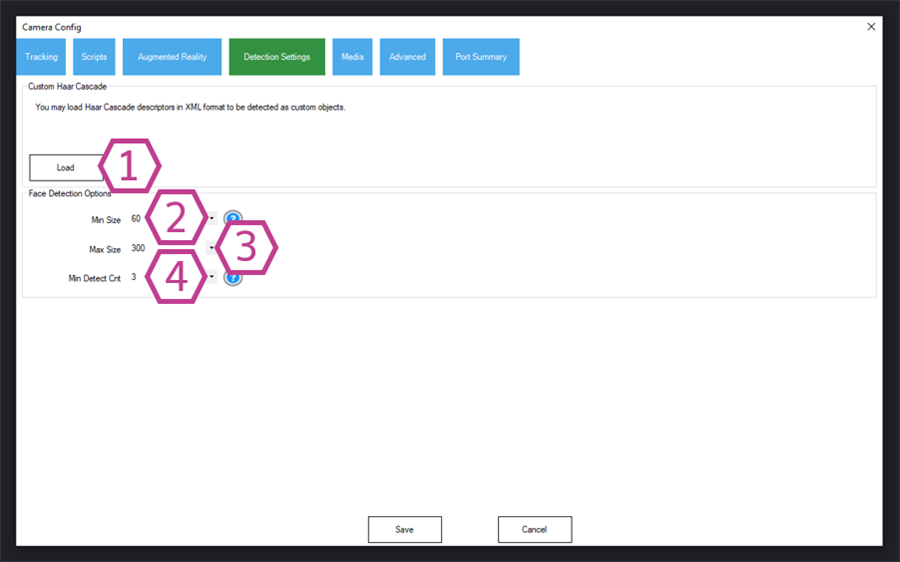
You’ll have to adjust the settings to fine tune for a different resolution in the camera device robot skill configuration.
Load Button This button loads custom haar cascades (in Open CV Haar v1 XML format). You can download custom cascades from OpenCV on github.
Minimum Size Drop-down This dropdown sets up the minimum size the detected face (in pixels) must be to register as a detection.
Maximum Size Drop-down This dropdown sets up the maximum size the detected face (in pixels) will have to be to register as a detection.
Minimum Detection Count Drop-down This dropdown sets the minimum of detected frames the face must present to register as a detection. There's more information on Face Tracking above.
This is from the camera device robot skill manual: https://synthiam.com/Support/Skills/Camera/Camera-Device?id=16120#advancedConfig
the face tracking uses the popular method of a haar cascade built into the camera device robot skill. Those settings help fine tune the haar identifier for cpu efficiency. But they need to be adjusted when a resolution changes.
all right, thanks
I don’t know the exact values but I’m sure you could just increase the default values by the ratio difference. So 640x480 is double so maybe just double the value
in the detection settings, the max value is 500. I gave a try yesterday , I tried the value and set up to 640x480, the face tracking has worked but it is very slow.. better to use 320x240.i think a face detection requires more data volumes as for an object. this small ezb camera is enough to capture movement with a good light. I mean it is a camera robot not an hd-cam to make a movie! An advantage of the 640x480 resolution is a wider view angle,possibly better to follow something:)