

I'd like to have apps like the conversation app be able to be pulled into a Blockly page. This would save a lot of room on the page and would help to keep things organized. Many different apps could be running simultaneously. Maybe it can already be done now but not quite sure how to do it.
Asked
 Resolved by Synthiam Support!
1 Participant
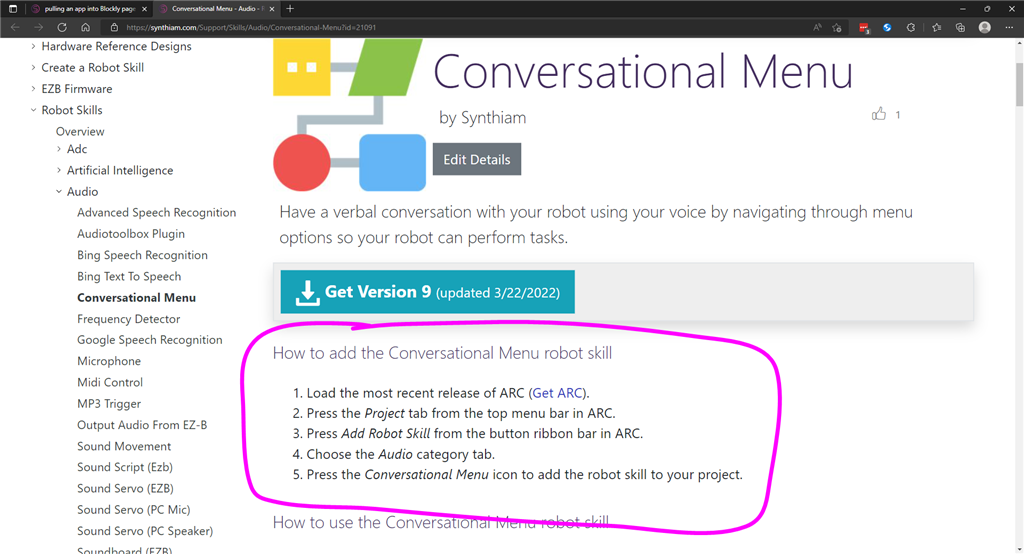

We believe you are asking how to integrate the Conversation Menu robot skill into your project - which is not an app. On the top of the manual for the conversation menu robot skill, you will find instructions on how to add the robot skill to your project: https://synthiam.com/Support/Skills/Audio/Conversational-Menu?id=21091
Once a robot skill is added to your project, it will have ControlCommand() that can be executed from other robot skills or scripts. Have a look at the manual for available control commands. If you're using blockly, there is a selection of control commands for robot skills in the Utility menu.
For more information on how robot skills work with ARC, here's a link to a support document: https://synthiam.com/Support/ARC-Overview/robot-skills/Skills-Intro
Be sure to read the support pages under the Robot Skills tab to learn more about how the ARC platform works.
*Note: this post was changed from a feature request to a question because it does not qualify as a feature request.
Yes, this is what I was looking for! This opens up many doorways to multiple events going on at once. Blockly sequences them in nice organized manner with proper timing delays in between them. Thanks again, Don.