
I am using
Ultrasonic Sensor to interface with EzIoTiny with ADC is it possible to write the code in Pyhton language to get it functional ?
EzIoTiny i need to use different sensors to interface with it
Your Suggestion would be very helpful
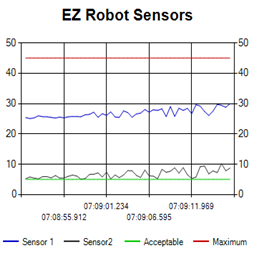 Ez Line Chart
— 4-series historical line chart to log and compare robot sensor values over time with customizable titles, colors, time axis and EZ-Script control
Try it →
Ez Line Chart
— 4-series historical line chart to log and compare robot sensor values over time with customizable titles, colors, time axis and EZ-Script control
Try it →

I am using
Ultrasonic Sensor to interface with EzIoTiny with ADC is it possible to write the code in Pyhton language to get it functional ?
EzIoTiny i need to use different sensors to interface with it
Your Suggestion would be very helpful

What sensor are you using? You have an ultra sonic sensor that uses analog? How are you controlling it over analog?
EZ-Robot Ultrasonic sensors work entirely on the digital ports, therefore trying to connect one to an analog port would prove to be futile. If you're trying to free up digital ports, consider purchasing an analog distance sensor.
After that is sorted, I'm sure you could write code to interface with it. The communication protocol is available.
Following the link, it seems the sensor he selected does use adc. This means the ezscript command getadc() will return the distance. Check the ezscript manual for usage examples. Otherwise, use Blockly because it is easier.
On which language Ez-Board works ? can i execute program in python language or not ?If yes Does it also supports the master slave protocol called I2C ?
Yes, the Ez-B v4 supports i2c master as documented. Discover more about the EZ-B v4/2 Wi-Fi Robot Controller by clicking that link. Additional programming information can be found in the Software tab of this website. Have fun!