


Asked
— Edited
Streaming Audio From Other Program Through ARC
Hi all,
Has anyone been able to Stream audio triggered from other programs through ARC over wifi to an EZB? I know the PC soundboard will play sound files located on your laptop. But what I want to do is play audio on an EZB that would normally play through my PC's speaker. For example maybe an internet radio show, a youtube video audio track, sound files triggered and used by another program on the laptop other then ARC.
Thanks in advance. 
Related Hardware (view all EZB hardware)

EZ-B V4
by EZ-Robot
EZ-B v4/2 robot controller: dual Cortex ARM, Wi-Fi, audio/video, 24 servo/digital ports, I2C/UART, camera and Synthiam ARC control for custom robots
Wi-Fi / USB
Servos
24
Camera
Audio
UART
3
I2C
ADC
8
Digital
24

Win 10
I have one of these USB sound board adapters on it's way from Amazon Prime. Wow, can't beat $6 USD and free 2 day shipping. Not to mention Sunday "free" delivery. Due to arrive tomorrow and I just ordered late last night.
This should work just fine. I plugged in a set of head phones into the laptop jack just so I couldn't hear the first stanza from the computer speaker before the 5 second buffering delay out of the EZB. Other then faintly hearing the Munchkin like voice out of the head phones it took care of the problem.
As for the 5 second delay; Did I mention I'm using Speech Recognition to trigger Scripts that run the Remote Mouse plugin so I can click on a phrase in an outside program to say the time and/or date in the robot's orignal Lost in Space TV voice? I'm using the I-B9 voice interaction program available through the B9 Robot Builders Club here: Craig Reinbrecht's I-B9 program I have that scripted now but there is that 5 second delay between when I ask for the time and date answers and the responce. What I've doe to deal with that is to place a command in the script to have the V4 Soundboard play a voice file or two while I wait; "Please Stand By", "Checking". and things like that.
Well, that's my setup so far. I only have hit one issue; often while this above process is happening the EZB will disconnect from ARC and the robot will lockup, turn on a lot of his motors and lights triggered from controls attached to EZB's Digital Ports. Also (and more annoying) the sound file will keep repeating a few words of the file like "Please Stand, Please Stand, Please Stand, Please Stand". Well you get the picture. I'll be troubleshooting this issue today hopefully. I'm pretty sure it's not a low power or WIFI signal strength issue. I have lots of other load on the system at other times with no issues and the WiFi signal strength is very strong.
I'll be looking at the script and what is being done at the time of disconnect. Really only a few things are happening; *The Audio Toolbox is turned on. *The V4 Soundboard runs a sound file or two and then stops. *The Remote Mouse plugin clicks on the I-B9 software icon on the Windows toolbar to switch over to that program and clicks on a phrase over there. *The Audio Toolbox plugin is running during this and is buffering, then speaks the phrase when it appears in the buffer. *The Remote Mouse then clicks on the icon on Windows 10 toolbar to switch back to ARC. *The Audio Toolbox plugin is turned off.
What stands out to me above are two things: *The V4 Soundboard is playing at the same time the Audio Toolbox plug is running (Conflict?). *The Mouse is clicking around all over the place (Com Port conflict like the old Window days? Don't know if this is still an issue now a days. If I recall the mouse and sound card or video display used to have issues with each other sometimes).
Anyway, just some rambling thoughts here to help me work through this. I'll report back later. Feel free to interject any advice. Thanks!
I've been working on this today and I think I've got most of the bugs worked out of my setup and scripts. I've got a stable connection now and have smooth transitions between switching programs and between streaming audio from the I-B9 software and ARC's V4 Soundboard. Seems seamless now.
I think the problem I had with ARC disconnecting from wifi had something to do with script timing of the sleep commands. I was not giving things enough time to process. Also it's possible I was not properly stopping the Capture and Listen processes before I tried to restart them again. After some testing I found that not giving commands enough time to execute and not stopping the capture and Listening before restarting them was the only things that caused disconnections.
Thanks to PTP, DJ and Alan for the plugins and help!
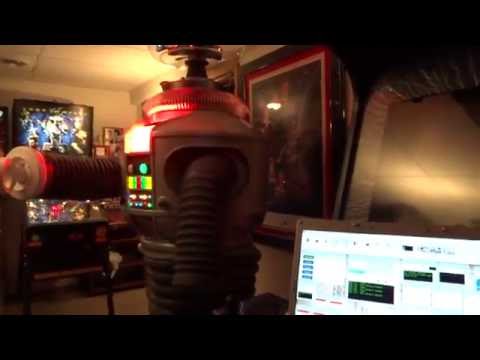
Here's a video I took of the end result (so far). It's a little low quality. Sorry but I hope you enjoy:
@Alan and @PTP,
Sadly the USB Sound card adapter doesn't solve the problem. I am able to get all the sound from the computer to channel through it and play. However the plugin PTP wrote doesn't seem to pick up the audio when running through the USB adapter. I did make sure all settings in windows 10 that I'm aware of point to this adapter for sound playback. Maybe I missed something. When I change back to the laptops default driver and laptop speakers the plugin works like I show in my video. I hear the phase played on the laptop speakers and then 5 seconds later when the buffering catches up I hear it through the EZB in the robot. I even tried using the default laptop driver with the USB Sound Card adapter but no go (Windows Sound Troubleshooter suggested I try this and did it for me).
So for now the way I've eliminated the double talking from the laptop and then from the robot is to attach a set of headphones with it's own volume control in it's cord. That works well. When I plug these headphones in to the laptop's jack the main speaker shuts off. I then just use it's adjustable volume switch to turn the volume all the way down. Walla! I can live with this.
@Dave,
1) Can you capture a screen shoot of the Device list i.e. Plugin's ComboBox, to see what's being list there.
Hi Dave,
As obvious as this probably sounds, plugging a 3.5mm jack which is not connected to anything into the audio socket would cause your laptop speakers to mute just as well, and you wouldn't have to fiddle with the volume control on your headphones.
If you don't have a spare 3.5mm jack laying around, they can be purchased for just a few cents from virtually any electronics or audio store.
Regards
Holy cow. Am I a dope. PTP, I never reconfigured the capture list to point to the new sound card. blush I'll go down to the lab and check that out now. Boy do I feel dumb. eyeroll
Aceboss, Thanks for that tip. I didn't even think about that. tired If pointing to the proper device in PTP's plug in doesn't work I'll just do that.
OK, After re-configuring the audio toolbox plug in to point to the new USB sound card all is well. It works as expected and without speakers plugged into the adapter I get no double talk.
Aceboss, I just may give your tip a try. Just a wire hanging off the side of the laptop seems much better then a dongle.
Thanks again for the help.