Community Robot Questions Linky linky PRO Nomad 6R Belgium Asked Dec 2018 Linky Linky Skip to comments Jump to end how do you name these places ( commands) ? is it place 1 ? or place 0.1 ? or just 1 ? a few more commands would be good like a wait command before the robot start the game. Jump to end Upgrade to ARC Pro Experience the transformation – subscribe to Synthiam ARC Pro and watch your robot evolve into a marvel of innovation and intelligence. Compare Pro Features View Subscription Plans DJ Sures PRO Synthiam #1 Dec 2018 — Edited Dec 2018 The example to view is on the page for the Tic Tac Toe control here: https://synthiam.com/Software/Manual/Tic-Tac-Toe-16206 I believe it is ControlCommands that do it. Look at the Cheat Sheet for the control Nomad 6R PRO Belgium #2 Dec 2018 — Edited Dec 2018 oh sorry.i think its like this.i can set any command in speech recog and ad the ControlCommand as for the robot. DJ Sures PRO Synthiam #3 Dec 2018 Yes - you can do that. Just add the ControlCommand for each speech recognition command Nomad 6R PRO Belgium #4 Dec 2018 — Edited Dec 2018 i cant put a script in the settings.also there are only 6 commands but you have 9 places to choose? only two out of 6 commands works. Login to post a comment
PRO Nomad 6R Belgium Asked Dec 2018 Linky Linky Skip to comments Jump to end how do you name these places ( commands) ? is it place 1 ? or place 0.1 ? or just 1 ? a few more commands would be good like a wait command before the robot start the game. Jump to end
DJ Sures PRO Synthiam #1 Dec 2018 — Edited Dec 2018 The example to view is on the page for the Tic Tac Toe control here: https://synthiam.com/Software/Manual/Tic-Tac-Toe-16206 I believe it is ControlCommands that do it. Look at the Cheat Sheet for the control
The example to view is on the page for the Tic Tac Toe control here: https://synthiam.com/Software/Manual/Tic-Tac-Toe-16206 I believe it is ControlCommands that do it. Look at the Cheat Sheet for the control
Nomad 6R PRO Belgium #2 Dec 2018 — Edited Dec 2018 oh sorry.i think its like this.i can set any command in speech recog and ad the ControlCommand as for the robot.
oh sorry.i think its like this.i can set any command in speech recog and ad the ControlCommand as for the robot.
DJ Sures PRO Synthiam #3 Dec 2018 Yes - you can do that. Just add the ControlCommand for each speech recognition command
Nomad 6R PRO Belgium #4 Dec 2018 — Edited Dec 2018 i cant put a script in the settings.also there are only 6 commands but you have 9 places to choose? only two out of 6 commands works.
i cant put a script in the settings.also there are only 6 commands but you have 9 places to choose? only two out of 6 commands works.



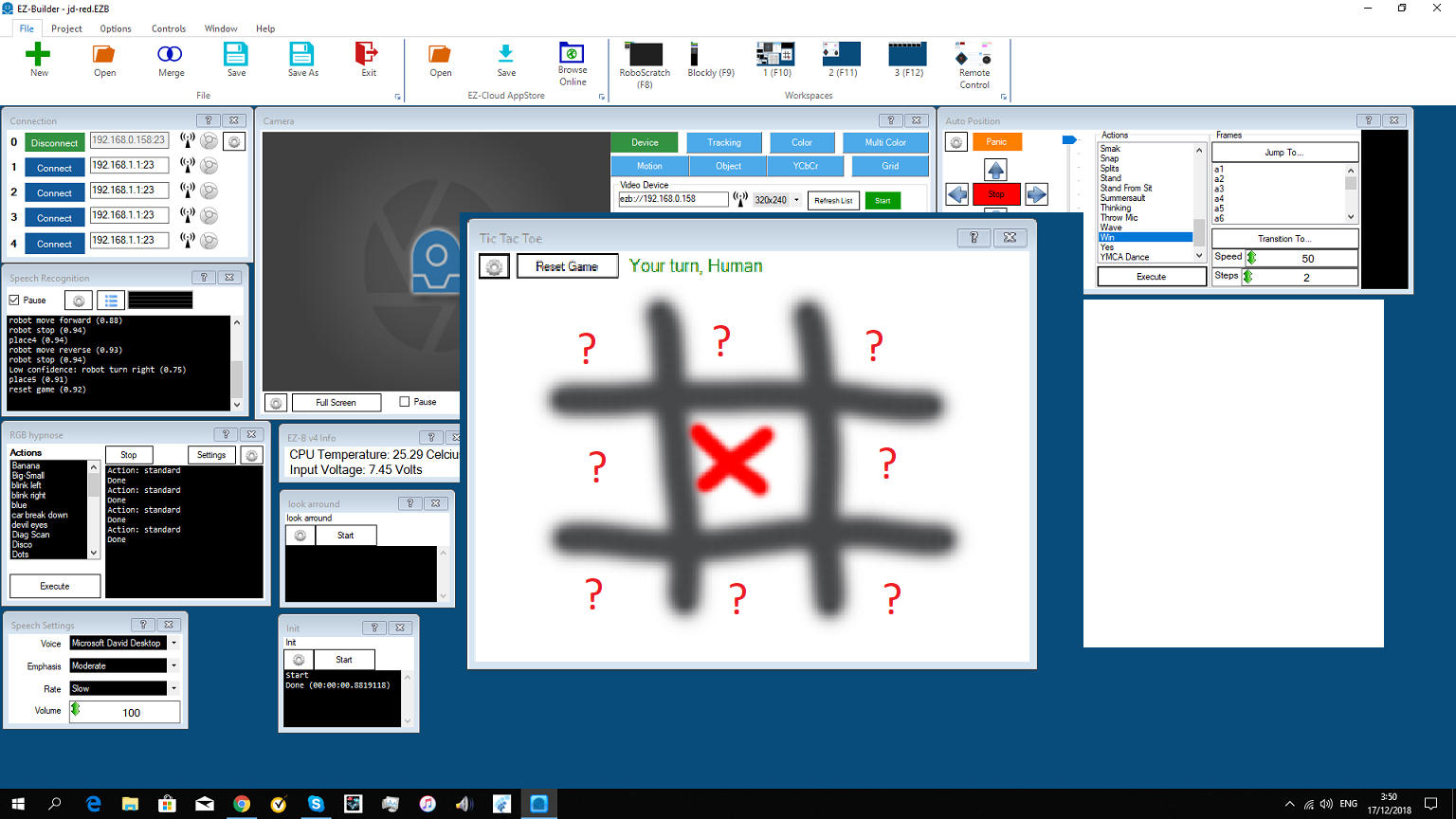

The example to view is on the page for the Tic Tac Toe control here: https://synthiam.com/Software/Manual/Tic-Tac-Toe-16206
I believe it is ControlCommands that do it. Look at the Cheat Sheet for the control
oh sorry.i think its like this.i can set any command in speech recog and ad the ControlCommand as for the robot.
Yes - you can do that. Just add the ControlCommand for each speech recognition command
i cant put a script in the settings.also there are only 6 commands but you have 9 places to choose? only two out of 6 commands works.