

mh_morhardt
Germany
Asked
Head Calibration Fail
I recently bought a EZ robot JD. When I calibrate him im not able to have th face looking to the front. It still remains looking to the side?
Related Hardware (view all EZB hardware)

JD Humanoid
by EZ-Robot
JD humanoid robot kit - WiFi-enabled, 16 DOF with metal-gear servos; easy, fun, educational, available from the EZ-Robot online store.
Wi-Fi / USB
Servos
24
Camera
Audio
UART
3
I2C
ADC
8
Digital
24
Related Robot Skill (view all robot skills)
Auto Position (Gait)
by Synthiam
Create servo frames and actions to animate gaits and gestures with automatic motion planning, software ramping, movement panel, import/export

mh_morhardt
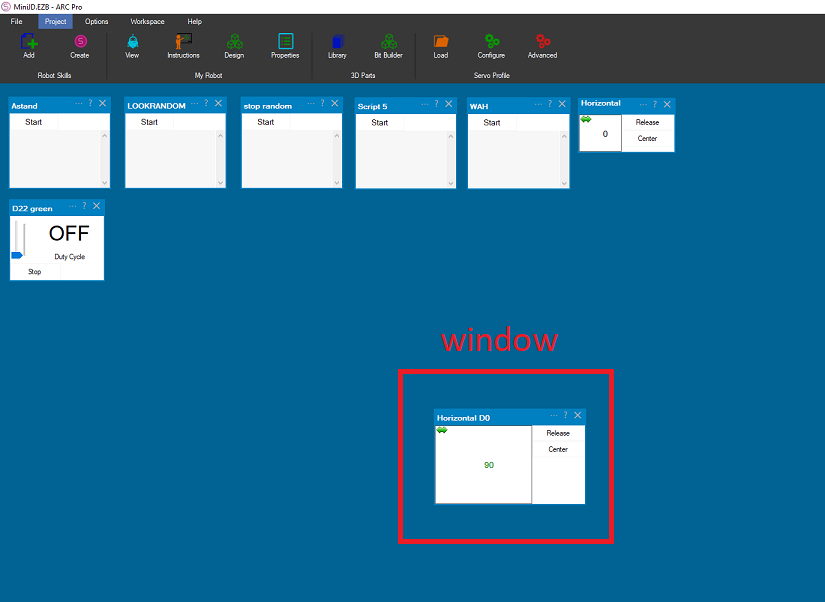
i gess i understand your question wrong . its the servo in the head D0 that is not calibrated . stil you need to unscrew the bracket from D1 too . then take out the wire from port D0 and go to the calibrating page . recalibrate the d0 servo again and then adjust the bracket . it also a good idea to delete your browser hystory . you can also test the servo D0 with a window to see if it actully works .
window
Kam skirtas atmintukas prie ez-roboto?
asta ferev
kokia pastaba?
Hallo Nomad, I recalibrated the head, after I detatched it from the bracket. Now it looks to the Front in the calibrating Position. But there is no response from the servo WhenI try to calibrate it. Also the head doesn't move sidewarts when I run the robot. So I think there is something wrong with the servo.
mh_morhardt
good testing . put the test on a video and send it to ez robotics . you will get another servo . its also a good idea to have some , spare micro servo's so you dont need to stop on your project.
also test servo D1 . also make sure all 3 pins are in the connector . i had many times were the black pin was not in the connector .
Thanks. servo D1 is working well.