




Asked
— Edited
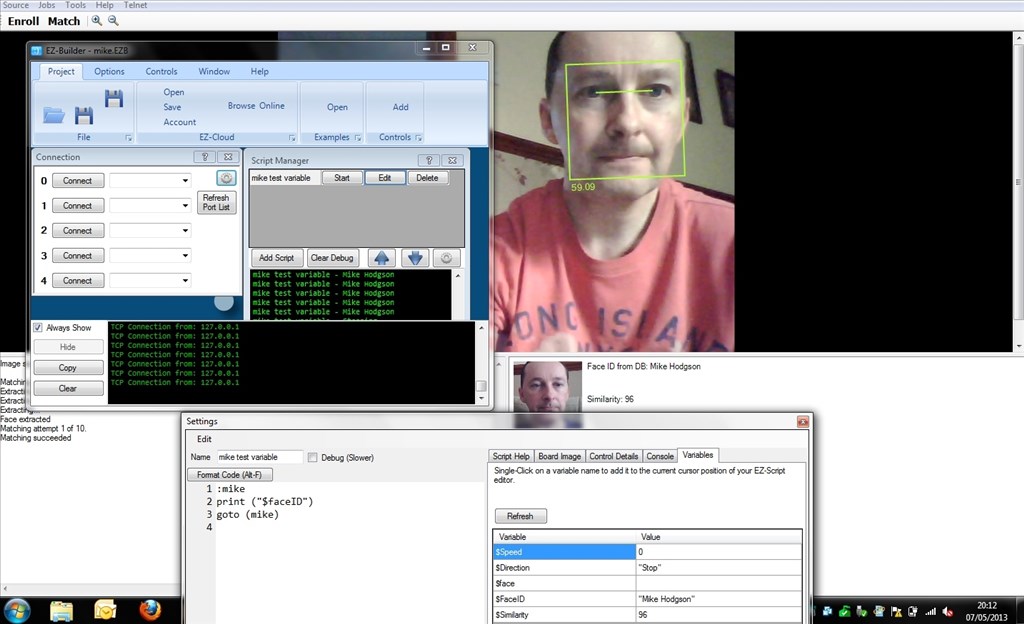
Face Recognition Working On ARC
Here is face recognition working on ARC shown by Mike our lead programmer.
 Servo Recorder
— Record and replay named servo movements with adjustable speed/direction (-5 to +5), multiple recordings, ControlCommand triggers and status var
Try it →
Servo Recorder
— Record and replay named servo movements with adjustable speed/direction (-5 to +5), multiple recordings, ControlCommand triggers and status var
Try it →
Here is face recognition working on ARC shown by Mike our lead programmer.

@shaimaabes Or you could take a loock at this thread: https://synthiam.com/Community/Questions/5267 Regards.
thanks alot to all of you
As sweet as Justin's EZ-Face is I think it's now obsolete. DJ implemented this into the ARC platform so it does much of the same thing. Justin, please correct me if I'm wrong.
@Dave, you are correct. This is the problem with reviving 2 year old threads without checking for current functionality first. Almost every time someone comes up with a good way to extend the functionality of ARC, DJ turns it into a feature within a few weeks to months.
Alan
@Alan, @Dave:
Slow down... Face Detection and Face Recognition are two different things.
ARC/EZ SDK has Face Detection, no Face Recognition
Toymaker, EZ-Face (Justin) are first Face Detection and then Face Recognition.
basically Face Detection is something like: Hey i found a Face in X,Y position.
check Face Detection thread to see a Face Detection (EZ SDK) picture.
OK ptp. Putting on the breaks. LOL
There are a few libraries like emgu (Opencv Wrapper) that can be used for Face Recognition, is very simple if you are familiar with Visual Studio and c#.
the rocket science is the opencv library....
emgu only implements a wrapper for .net managed/c# otherwise you will need to deep in c++
I'm curious why DJ never implemented the Face Recognition feature in ARC, i'm assuming is not a requested feature ?
@ptp, as I stated earlier in this thread - use the Object tracking type for face detection.
You can find out more about tracking types on the Camera Device ARC manual page here: https://synthiam.com/Tutorials/Help.aspx?id=80
In demos, i have taught the robot different expressions using the object tracking as well - it can tell if i'm happy or sad. Here's a copy/paste of the two tracking types in question...
Face The face tracking type will attempt to detect faces within the image. The Face tracking uses calculations to detect eyes and a mouth. This does require additional processing and will slow the framerate. Also, detecting images within a video stream with many complicated objects will return false positives. Use the Face Tracking against a white wall or non-complicated background. If you wish to detect specific faces, use the Object Tracking type, as you can train your face as an object.
Object This is an advanced computer vision learning tracking type that gives you the ability to teach the robot an object (such as a face, logo, etc.) and have it detect it. Computer vision learning is very experimental and requires patience and consistent lighting. The object training is done in the Object tab, which is settings for the object. Remember, settings for specific tracking types are configured within their tab in the Camera Control. Some tracking types have additional setting/parameters within the Camera Settings (gear icon).