

RotorKiwi

EZ-B V3 Set Digital Triggers Low-Level Relay On Co
I’m using an EZ-B v3 over Bluetooth with ARC on Windows to switch two LED strips via a common 2channel 5V optoisolated relay module (Songle SRD05VDCSLC type, LOWtrigger inputs). The relay board is powered from a separate 5V buck (shared ground to the EZ-B), and the inputs are wired D0->IN1 and D1->IN2. In ARC I added the Set Digital skill twice (one for each channel) so I can manually toggle them. With a meter, ON on Set Digital gives ~4.8V at the signal pin and the relay stays off (as expected for LOWtrigger), and OFF drops to 0V and the relay energizes. So far so good. The issue is that the moment ARC connects to the EZ-B v3 over Bluetooth, both relays click on briefly for a split second before my init scripts run. After that they behave normally. I assume the inputs float or go LOW during the handshake/reset. I tried different ports (D0/D1 vs D12/D13), adding 10k pullups on IN1/IN2 to 5V, powering the relay board a second or two after connection via a MOSFET on D2, and an ARC Connection Control init script:
# Project -> Connection -> Init
WaitForConnection(0)
Set(D0, ON)
Set(D1, ON)
Even when delaying the relay board’s 5V until after WaitForConnection, I still get one blip on connect. I’d prefer to keep the wiring simple and use Set Digital rather than add an inverter stage unless that’s the only robust fix. Is there a way in ARC to guarantee specific EZ-B v3 digital ports default HIGH before any transient on connect, or a recommended wiring pattern with EZ-B v3 and the Set Digital skill to prevent LOWtrigger relays from momentarily activating at connection time?
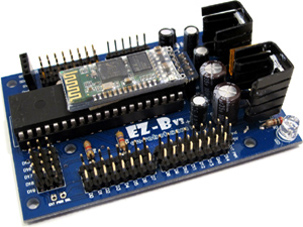
Related Hardware (view all EZB hardware)
Related Robot Skills (view all robot skills)



What you’re seeing is a very common behavior with LOW-trigger relay boards: during Bluetooth connection / EZ-B initialization, the digital pins can briefly be in an undefined state before ARC finishes applying your project settings. Because the relay board is active-low, even a short low pulse is enough to click the relay.
Short answer
There isn’t a reliable way in ARC to guarantee an EZ-B v3 digital port is already HIGH before the board’s startup/connection transient. If a relay is active on LOW, the safest fix is to make sure the relay input is held HIGH by hardware until ARC explicitly drives it low.
Why this happens
With the EZ-B v3 over Bluetooth, the connection handshake can briefly reset or reinitialize the I/O state. During that moment:
So even though your scripts set
D0/D1high afterward, the relay has already seen the pulse.Recommended fixes
1) Add strong pull-up resistors on each relay input
You tried 10k pullups, but for noisy/slow startup conditions, that may not be strong enough.
Try:
IN1to5VIN2to5VThis helps hold the inputs high more firmly during the connect transient.
2) Use a transistor or inverter stage
If you want the most robust solution, the best hardware pattern is:
This prevents the relay from responding to the EZ-B’s startup behavior.
If you want, I can sketch a simple 1-transistor or MOSFET wiring for each channel.
3) Power the relay module only after ARC is stable
You already tried delaying relay power, which is a good test. If the relay still clicks, that suggests the input may be getting into a state that the module interprets during power-up or the EZ-B port is transitioning as the board comes online.
A more reliable version of this is:
But even then, some modules will still behave unpredictably if inputs are not firmly biased.
ARC-side best practice
Use your init script to immediately set the ports high, but understand it cannot prevent the first transient.
For example, in ARC JavaScript, you’d want the equivalent of:
If you’re using a Connection skill init script, keep it as short as possible so the "safe" state is applied quickly.
Best practical recommendation
For LOW-trigger relays, the most reliable options are:
One other thing to check
You mentioned using:
In ARC, make sure you’re using the proper Digital command or the skill’s control command, not assuming the port is already configured as output by the time the relay sees it. Also, if you’re using the Set Digital skill, confirm its board/port settings through the skill’s kebab menu so each instance is explicitly tied to the correct EZ-B and port.
My recommendation for your exact setup
Given your goal of keeping wiring simple:
IN1andIN2That’s usually the point where the problem disappears entirely.
Useful ARC references
If you want, I can give you a very simple wiring diagram for a transistor-based relay buffer that works cleanly with the EZ-B v3 and LOW-trigger relay boards.