


Asked
— Edited
 Resolved by Athena!
Digitalwritefast And Arduino Sketch
Hi @Athena,
I have a question about the Arduino library "digitalWriteFast.h". Below is an Arduino sketch I would like to use that library with.
#include <Arduino.h>

static const uint8_t UART_HEADER = 0xA5;

// ARC -> Arduino
static const uint8_t CMD_STOP_MOTORS      = 0x01;
static const uint8_t CMD_MISSED_IR        = 0x02;
static const uint8_t CMD_ACTUAL_BEARING   = 0x03;
static const uint8_t CMD_RIGHT_PIVOT      = 0x04;
static const uint8_t CMD_LEFT_PIVOT       = 0x05;
static const uint8_t CMD_WAYPOINT_DATA    = 0x06;
static const uint8_t CMD_OBS_SCAN_COMPLETE = 0x07;

// Arduino -> ARC
static const uint8_t RSP_NAV_ACK          = 0x10;
static const uint8_t RSP_TOTAL_STEPS      = 0x11;
static const uint8_t RSP_DESIRED_BEARING  = 0x12;
static const uint8_t RSP_OBS_SCAN_REQUEST = 0x13;

enum ParserState {
  WAIT_HEADER,
  WAIT_CMD,
  WAIT_PAYLOAD
};

ParserState state = WAIT_HEADER;
uint8_t currentCmd = 0;
uint8_t payload[32];
uint8_t payloadIndex = 0;
uint8_t expectedLength = 0;

int RUN = 0; // 0 = setup / pivots / waypoint receive, 1 = forward navigation

uint32_t totalStepsTaken = 0;
uint16_t desiredBearing100 = 0;
uint16_t lastDesiredBearing100 = 1;
uint16_t actualBearing100 = 0;

uint32_t pathTotalDistance = 0;
uint32_t combinedStepsDesired = 0;
uint32_t oppositeDistance = 0;
uint8_t bearingAlignment = 0;
uint16_t reflectorBearing100 = 0;
uint8_t sensorPrime = 0;
uint16_t waypointDesiredBearing100 = 0;
uint16_t waypointActualBearing100 = 0;
uint8_t trackDir = 0;

uint16_t readUInt16LE(const uint8_t* data) {
  return (uint16_t)data[0] | ((uint16_t)data[1] << 8);
}

uint32_t readUInt32LE(const uint8_t* data) {
  return (uint32_t)data[0]
       | ((uint32_t)data[1] << 8)
       | ((uint32_t)data[2] << 16)
       | ((uint32_t)data[3] << 24);
}

void writeUInt16LE(uint16_t value) {
  Serial3.write((uint8_t)(value & 0xFF));
  Serial3.write((uint8_t)((value >> 8) & 0xFF));
}

void writeUInt32LE(uint32_t value) {
  Serial3.write((uint8_t)(value & 0xFF));
  Serial3.write((uint8_t)((value >> 8) & 0xFF));
  Serial3.write((uint8_t)((value >> 16) & 0xFF));
  Serial3.write((uint8_t)((value >> 24) & 0xFF));
}

void sendHeaderAndCmd(uint8_t cmd) {
  Serial3.write(UART_HEADER);
  Serial3.write(cmd);
}

void sendNavAck() {
  sendHeaderAndCmd(RSP_NAV_ACK);
  Serial.println("TX: NAV ACK");
}

void sendTotalSteps(uint32_t steps) {
  sendHeaderAndCmd(RSP_TOTAL_STEPS);
  writeUInt32LE(steps);
  Serial.print("TX: TOTAL STEPS = ");
  Serial.println(steps);
}

void sendDesiredBearing(uint16_t bearing100) {
  sendHeaderAndCmd(RSP_DESIRED_BEARING);
  writeUInt16LE(bearing100);
  Serial.print("TX: DESIRED BEARING x100 = ");
  Serial.println(bearing100);
}

void sendObstacleScanRequest() {
  sendHeaderAndCmd(RSP_OBS_SCAN_REQUEST);
  Serial.println("TX: OBSTACLE SCAN REQUEST");
}

void stopMotors() {
  Serial.println("Action: stopMotors()");
  // add your motor stop logic here
}

void pivotRight(uint16_t steps) {
  Serial.print("Action: pivotRight(");
  Serial.print(steps);
  Serial.println(")");
  // add your right pivot logic here
}

void pivotLeft(uint16_t steps) {
  Serial.print("Action: pivotLeft(");
  Serial.print(steps);
  Serial.println(")");
  // add your left pivot logic here
}

void beginForwardNavigation() {
  Serial.println("Action: beginForwardNavigation()");
  RUN = 1;
}

void handleWaypointPacket(const uint8_t* data, uint8_t len) {
  if (len != 21) {
    Serial.print("Waypoint length mismatch: ");
    Serial.println(len);
    return;
  }

  pathTotalDistance = readUInt32LE(&data[0]);
  combinedStepsDesired = readUInt32LE(&data[4]);
  oppositeDistance = readUInt32LE(&data[8]);
  bearingAlignment = data[12];
  reflectorBearing100 = readUInt16LE(&data[13]);
  sensorPrime = data[15];
  waypointDesiredBearing100 = readUInt16LE(&data[16]);
  waypointActualBearing100 = readUInt16LE(&data[18]);
  trackDir = data[20];

  desiredBearing100 = waypointDesiredBearing100;
  actualBearing100 = waypointActualBearing100;

  Serial.println("RX: WAYPOINT DATA received");
  Serial.print("pathTotalDistance = "); Serial.println(pathTotalDistance);
  Serial.print("combinedStepsDesired = "); Serial.println(combinedStepsDesired);
  Serial.print("oppositeDistance = "); Serial.println(oppositeDistance);
  Serial.print("bearingAlignment = "); Serial.println(bearingAlignment);
  Serial.print("reflectorBearing100 = "); Serial.println(reflectorBearing100);
  Serial.print("sensorPrime = "); Serial.println(sensorPrime);
  Serial.print("desiredBearing100 = "); Serial.println(desiredBearing100);
  Serial.print("actualBearing100 = "); Serial.println(actualBearing100);
  Serial.print("trackDir = "); Serial.println(trackDir);

  sendNavAck();
  beginForwardNavigation();
}

void handlePacket(uint8_t cmd, const uint8_t* data, uint8_t len) {
  switch (cmd) {
    case CMD_STOP_MOTORS:
      Serial.println("RX: STOP MOTORS");
      stopMotors();
      RUN = 0;
      sendTotalSteps(totalStepsTaken);
      break;

    case CMD_MISSED_IR:
      Serial.println("RX: MISSED IR");
      // add your missed-IR recovery logic here
      break;

    case CMD_ACTUAL_BEARING:
      if (len == 2) {
        actualBearing100 = readUInt16LE(data);
        Serial.print("RX: ACTUAL BEARING x100 = ");
        Serial.println(actualBearing100);
      }
      break;

    case CMD_RIGHT_PIVOT:
      if (len == 2 && RUN == 0) {
        uint16_t steps = readUInt16LE(data);
        Serial.print("RX: RIGHT PIVOT steps = ");
        Serial.println(steps);
        pivotRight(steps);
      }
      break;

    case CMD_LEFT_PIVOT:
      if (len == 2 && RUN == 0) {
        uint16_t steps = readUInt16LE(data);
        Serial.print("RX: LEFT PIVOT steps = ");
        Serial.println(steps);
        pivotLeft(steps);
      }
      break;

    case CMD_WAYPOINT_DATA:
      if (RUN == 0) {
        handleWaypointPacket(data, len);
      } else {
        Serial.println("RX: WAYPOINT ignored because RUN != 0");
      }
      break;

    case CMD_OBS_SCAN_COMPLETE:
      Serial.println("RX: OBSTACLE SCAN COMPLETE");
      // resume normal tracking behavior here
      break;

    default:
      Serial.print("RX: Unknown command 0x");
      Serial.println(cmd, HEX);
      break;
  }
}

uint8_t getExpectedLength(uint8_t cmd) {
  switch (cmd) {
    case CMD_STOP_MOTORS:       return 0;
    case CMD_MISSED_IR:         return 0;
    case CMD_ACTUAL_BEARING:    return 2;
    case CMD_RIGHT_PIVOT:       return 2;
    case CMD_LEFT_PIVOT:        return 2;
    case CMD_WAYPOINT_DATA:     return 21;
    case CMD_OBS_SCAN_COMPLETE: return 0;
    default:                    return 0xFF;
  }
}

void processIncomingByte(uint8_t b) {
  switch (state) {
    case WAIT_HEADER:
      if (b == UART_HEADER) {
        state = WAIT_CMD;
      }
      break;

    case WAIT_CMD:
      currentCmd = b;
      expectedLength = getExpectedLength(currentCmd);

      if (expectedLength == 0xFF) {
        state = WAIT_HEADER;
      } else if (expectedLength == 0) {
        handlePacket(currentCmd, nullptr, 0);
        state = WAIT_HEADER;
      } else {
        payloadIndex = 0;
        state = WAIT_PAYLOAD;
      }
      break;

    case WAIT_PAYLOAD:
      if (payloadIndex < sizeof(payload)) {
        payload[payloadIndex++] = b;
      }

      if (payloadIndex >= expectedLength) {
        handlePacket(currentCmd, payload, expectedLength);
        state = WAIT_HEADER;
      }
      break;
  }
}

void readIncomingUart() {
  while (Serial3.available() > 0) {
    uint8_t b = (uint8_t)Serial3.read();
    processIncomingByte(b);
  }
}

void setup() {
  Serial.begin(115200);
  Serial3.begin(115200);
  Serial.println("Arduino UART sketch v2 ready");
}

void loop() {
  readIncomingUart();

  if (RUN == 0) {
    // setup / pivot / waypoint receive phase
  } else if (RUN == 1) {
    // forward navigation phase
    // put your step counting / PWM correction / bearing logic here

    // TEST ARDU TX FUNCTIONS

    if (desiredBearing100 >= lastDesiredBearing100+15) {
  sendDesiredBearing(desiredBearing100);
  delay(100);
  sendObstacleScanRequest();
  lastDesiredBearing100 = desiredBearing100;
}

desiredBearing100 +=5;

delay(100);

  }

  // optional small yield
  // delay(1);
}
Notes / clarifications:
- The sketch uses Serial3 at 115200 for UART communications.
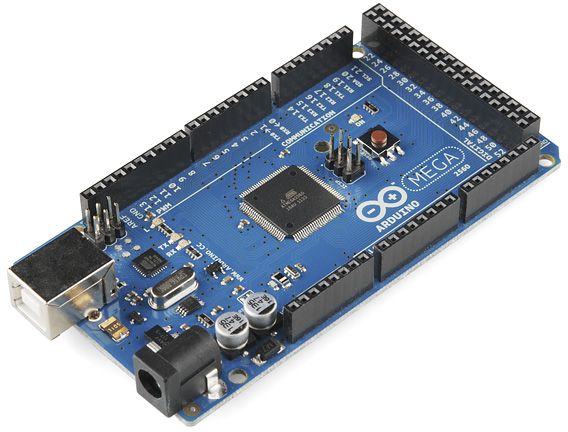
- I plan to run this sketch on an Arduino Mega that will communicate via UART (Serial3) with an EZB4 which is used with ARC on the PC. The EZB4 will be the Synthiam-compatible controller handling the real-time hardware layer while ARC / Robot Skills run on the PC.
- The sketch currently prints debug messages to Serial and Serial3 and includes placeholders for motor/pivot logic.
My question: Would using digitalWriteFast help in this application? If so, could someone either apply digitalWriteFast to the sketch or provide the minimal changes required so I can run my own experiments?
Thank you, Jack
Related Hardware (view all EZB hardware)
Arduino Due/Mega
by Arduino
Synthiam ARC enables Arduino Mega 2560 control with 8 ADC, 13 PWM, 21 digital ports and 24 servos; includes firmware, shield and tutorials
USB
Servos
24
Camera
Audio
UART
3
I2C
ADC
8
Digital
21

Upgrade to ARC Pro
Join the ARC Pro community and gain access to a wealth of resources and support, ensuring your robot's success.
📚 This thread has been preserved as a helpful resource!
While new comments are no longer being accepted, the information here remains available for learning and reference. Check the most recent comment for additional details.
Hi Jack -
digitalWriteFast.hcan help, but only in a very specific part of your sketch.Short answer
Serial3UART parsing/communication.So
digitalWriteFastis only useful if yourstopMotors(),pivotRight(),pivotLeft(), or step/encoder signal handling relies on lots ofdigitalWrite()calls in a fast loop.When it is worth using
Use it if you have code like this inside a tight loop:
If those pins are fixed and known at compile time,
digitalWriteFastcan reduce overhead.If your motor control is through:
analogWrite()Servothen
digitalWriteFastprobably won’t change much.Minimal changes to try
If you want to experiment, the cleanest approach is:
Serial3code unchangedExample
Important note about
digitalWriteFastIt generally works best when the pin number is a compile-time constant like:
or a
const uint8_tvalue known at compile time.If you pass a variable pin number, the benefit may disappear or it may fall back to normal behavior depending on the library/version.
One issue in your sketch
I noticed a bug here:
That should be:
Right now it assigns instead of compares, so your packet parser will not behave correctly.
Also, your
readUInt16LE()looks malformed in the pasted code. It should be:And you’ll also want
readUInt32LE()since you call it inhandleWaypointPacket().ARC side note
Since you’re using Arduino Mega firmware with ARC, the Mega is the hardware layer and ARC handles robot skills/behavior on the PC.
If you’re planning to move data between ARC and your sketch over UART, that’s totally reasonable. If you want to build a matching ARC robot skill later, the right path is here:
Recommendation
If your goal is just to see whether it helps:
digitalWriteFastonly in motor pin control functionsIf your sketch is mostly doing serial parsing and high-level decisions, you may not notice much difference.
If you want, I can do one of these next:
digitalWriteFastchangesIf you’d like, paste your actual motor pin assignments and I’ll wire them into the sketch.
Thank you @Athena.
It appears that I'm not gaining much by using 'DigitalWriteFast' in this application.
Your sketch suggestions:
I examined my original sketch, and it matches your recommendations perfectly. I have to believe that your copy (of the sketch) somehow dropped it. The sketch compiles and works very nicely. Thank you. Jack