

PRO
afcorson
Australia
Asked
 Resolved by Dunning-Kruger!
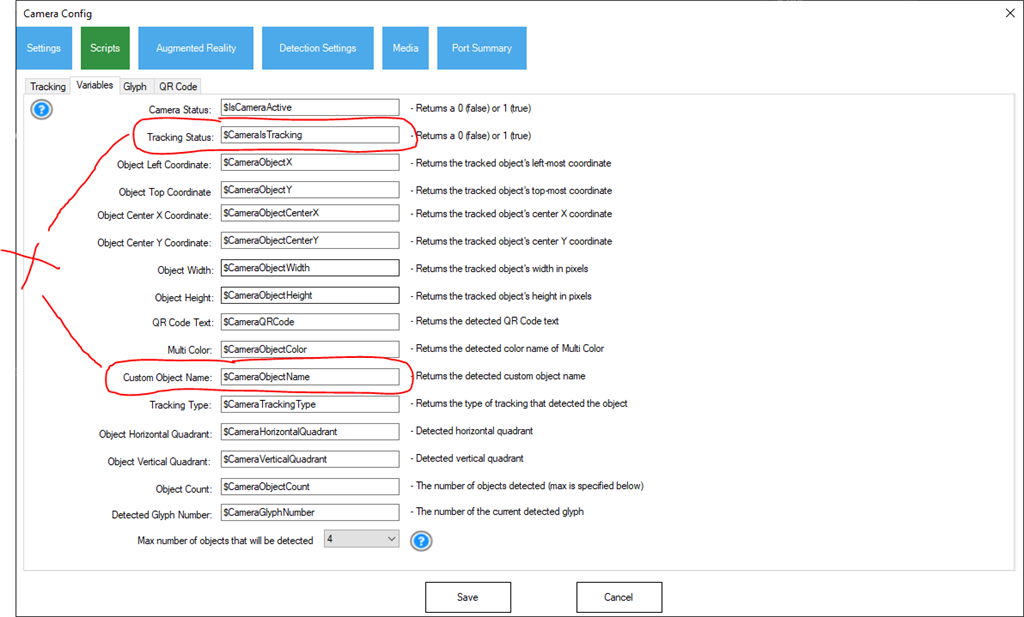
Camera Object Name
How do I reset or clear the last object detected by the camera? The $CameraObjectName variable stays set to the last object detected. This means even when no object is detected or recognised, my script executes incorrectly - instead of saying object not recognised..
Related Hardware (view all EZB hardware)

EZ-B V4
by EZ-Robot
EZ-B v4/2 robot controller: dual Cortex ARM, Wi-Fi, audio/video, 24 servo/digital ports, I2C/UART, camera and Synthiam ARC control for custom robots
Wi-Fi / USB
Servos
24
Camera
Audio
UART
3
I2C
ADC
8
Digital
24

I believe it is just a global variable so maybe you can just "zero" it out after detection?...
Don’t reset the variable. Instead check if there’s a detection. Then check the tracking type that’s detected, if there’s more than one tracking type.
Such as...
I didn't realise one could change these global variables within script. Setting their value to null after tracking ends solved my problem. Thanks.