
slim6072
USA
Asked
— Edited
Blue Tooth Connection Init Script
Is there a way to have a inti script run as sonn as you powerup and or connect to the EZ-B?
 PWM Slider
— Slider to set EZ-B digital PWM for motor speed or LED brightness; shows duty-cycle, stop button, and board/port selection.
Try it →
PWM Slider
— Slider to set EZ-B digital PWM for motor speed or LED brightness; shows duty-cycle, stop button, and board/port selection.
Try it →
Is there a way to have a inti script run as sonn as you powerup and or connect to the EZ-B?

There sure is...
Shortcut creator can be used to make a shortcut that auto runs a script on load.
Or if you want it to run when connected...
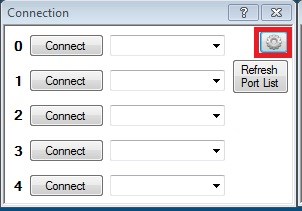
In connection click on the gear icon for settings
Then add in a ControlCommand for when connected
If you check out the showcase post for Melvin amongst the mass of pages is my first init script (it's huge, I've since condensed it) which should give you a few ideas.
Cool
Reason being on the BlinkM's you have to stop the auto program it runs.
I have found that first I have to run the BlinkM control panel whereby I hit the stop script button.
Then I run the script you/Rich gave me which shuts the BlinkM down.
Then my voice commands are used to change the colors of the BlinkM.