


Asked
— Edited
 Resolved by Jeremie!
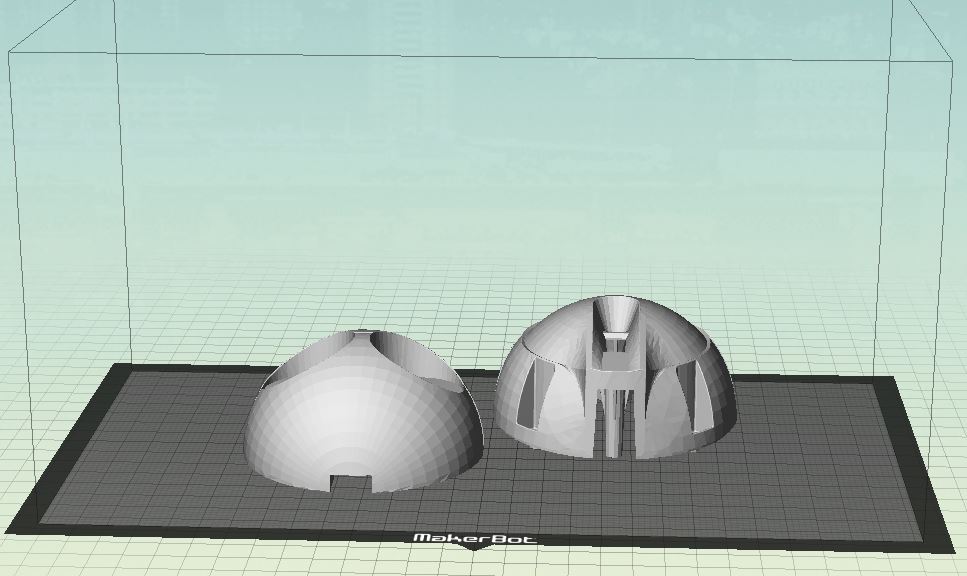
3D Print Jd Head
hi
has anyone printed a jd head?my question is ,how do you print the head on the printbed?
thank you
Related Hardware (view all EZB hardware)

JD Humanoid
by EZ-Robot
JD humanoid robot kit - WiFi-enabled, 16 DOF with metal-gear servos; easy, fun, educational, available from the EZ-Robot online store.
Wi-Fi / USB
Servos
24
Camera
Audio
UART
3
I2C
ADC
8
Digital
24
Related Robot Skill (view all robot skills)
File Manager
by Synthiam
Displays files currently open for reading by scripts, shows only read-opened files, helps diagnose read/write locks and file access errors.

hi
some idea . moveble knee . need to find the perfect spring do . spring i use now is 100x12x1.6 MM relatif strong . using a locknut M4 .the hole for the bolt on outside is 5.5 cm from the edge , hip side just below the two that allreddy there original . 30%infill for the parts .
https://www.youtube.com/watch?v=B1805au-IYM
wallsupport.stlspringBlock.stlspringBlock-2.stl
hi all
one head reddy camera left eye .
https://www.youtube.com/watch?v=o_FY5rq-5fw
hi averyone
i have a problem with my printer . i get een error and sound heat runaway . i have change the complete heatblock and bolt fans . also a new circuitboard al original . also a new termistor . stil have the error sound and message . what can this be ? any ideas please .
thank you
@Nomad, have you contacted the manufacturer? They may have an idea.
I did a quick Google and found this. Maybe???:
hi dave
i found tree problems . the power supply gives only half power 11.94 volt insteadt of 24 volts . and the motherboard is killed . i orderd new parts cause they are cheap .60 euro for complete power supply, and 34 euro complete heatblock include all fans . i saw the video about thermal runaway . the thermistor was complete gone . what i also notes wat the speed from the fans went up&down.
thanks for the tip .
hi all
printer is after 4.5 months back to be used . it was a very anoing 4.5 months . so what was the main problem , firts the power supply was bad . the main board was bad , also the new board was bad , also the new heatblock whit the fan's was not ok . the termister wires were exposed that gives a beep sound when power the printer . the first powersupply was damage on arival in the shop , another 3 weeks later, they send another one . so what caused all these errors ? my opinion is this . when starting printing , the fan of the board doesn start running . also the side fan , heatblock doesn start running . only the fan's of the powersupply and front heatblock, are running . i see no setting in cura to for starting all fan's when printing starts . you can start all fans in the tune setting after the printing has allreddy started . i'm printing with the old board and have a regular check untill the new board arrives .
first print
finiching the legs now . just the ankle and feets left to do .
For parts that contain ball bearings or need extra stiffness, I use gyroid infill with 5 walls and Outer wall first .By printing the outer wall first, you gain a lot of dimensional accuracy. The plastic won't be 'pushed' outward by the infill.