








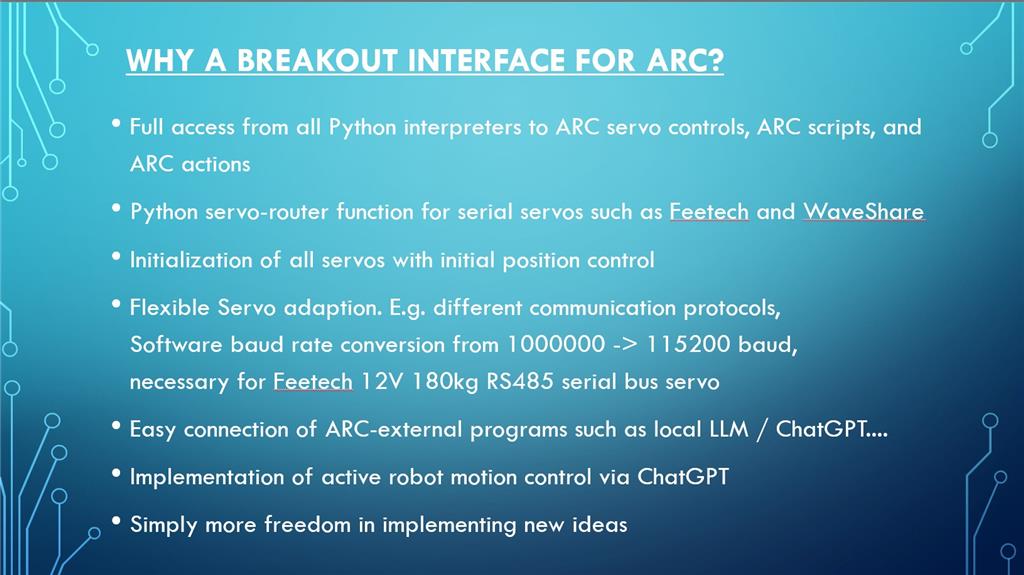
Here is an overview and description of the software structure for the ARC and Win-Python interface, which I’ve implemented successfully for my 36-servo humanoid robot. The system is designed to be stable and performant, ensuring smooth operation of the robot. Below, you'll find some images illustrating this setup:
[Image 1 of 4]
[Image 2 of 4]
[Image 3 of 4]
[Image 4 of 4]
By leveraging the powerful features of Synthiam ARC, along with Python scripting capabilities within the Windows environment, I’ve achieved a robust symbiosis between software components that allows for precise control and coordination of all 36 servos in my humanoid model. The images provide a glimpse into the setup and operation of the system.

The native Python robot skill wasn’t completed. But it’s mostly working. I think the reason is it didn’t jump out to us as a useful addition. I can have it pushed out to see what can be done. But the thing is, only one copy of it can run. That means you have to add the entire Python code into one editor. It becomes a large unmanageable code. That’s what I try to avoid - but if it’s useful I guess we can finish it.
what I’d like to see is events from the Python script. For example, when servos move in ARC to have an event called for the Python script. Python is kinda weird with events. It’s not implemented naturally and we’d have to do more research to find a usable approach that’s dynamic enough to be useful.
but to be clear.. I don’t think we have a full grasp on how to implement the two environments. It would take time to figure that out.
Virtual COMs: The Door to the Outside World
Fundamentally, I don't believe that full integration of Python into ARC is necessary or even useful. Although Python is quite popular, especially with regard to AI, there are of course other interesting languages that could be considered.
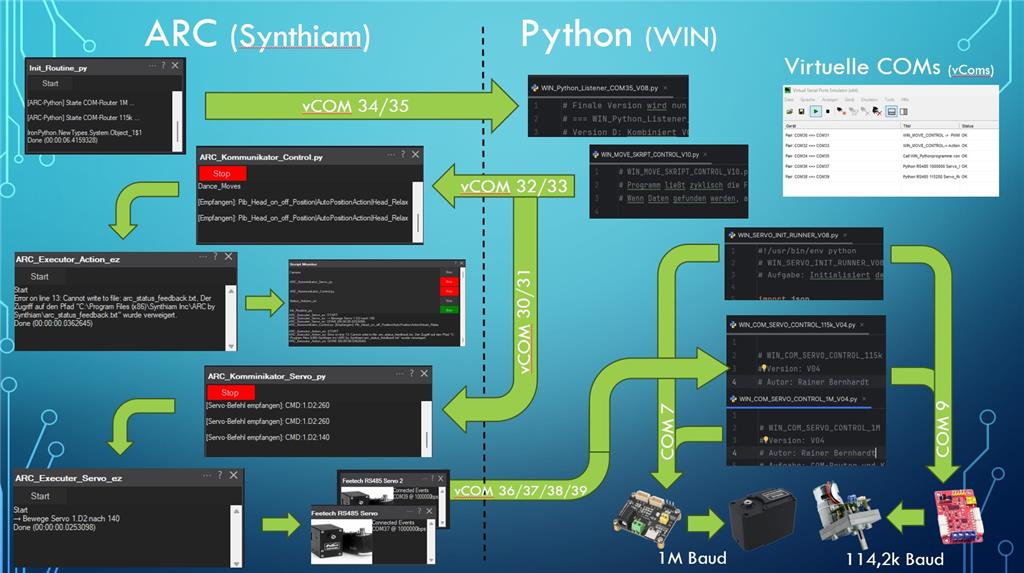
With the "breakout interface" discussed above, it is easy to initiate ARC scripts, actions, and direct servo movements from outside ARC and conversely, to initiate ARC-external processes, in my case, Python programs from within ARC.
In addition, the servo commands from ARC are not sent directly to the real hardware COMs, but rather via virtual COMs to Python "servo routers" outside ARC. The "servo router" can access the servo controller directly via the hardware COM, route ARC commands directly, or, for example, adjust the baud rate, or query servo information such as temperature values, current values, etc., and communicate this back to ARC.
In principle, that's all there is to it, but these communication channels open up many interesting applications.
For example, selected ARC actions can be provided to GPT in a JSON file with aliases and runtimes. Using a prompt, GPT can then automatically and contextually select an action/movement from this library and thus control a robot independently. This isn't a best-fit process, but rather GPT's "free decision." Sometimes it's funny, sometimes it's frustrating.:(
The idea pool for implementing interesting applications via the interface is brimming, especially since there are so many ARC skills that can also be used with external programs and vice versa.
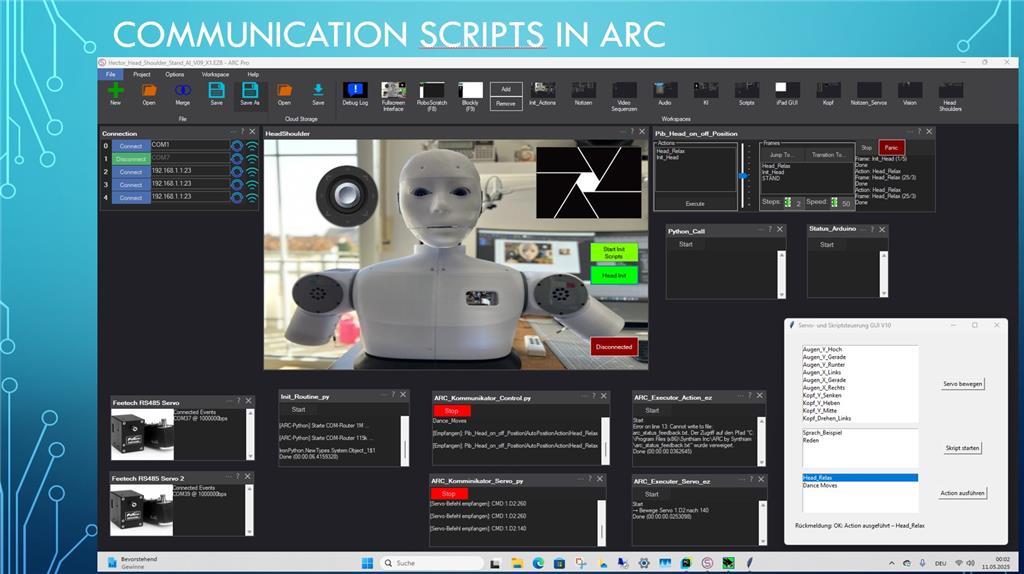
Here are a few examples of what this might look like in ARC.
And this is the appropriate executor.
Here is an example of how to organize virtual COMs. But there are also alternative approaches:
Results: Virtual COM interfaces for communication with and from ARC are well-suited to making ARC even more effective and flexible without having to develop new ARC skills.
ARC skills can certainly be more useful in some cases, such as functional skills for serial servos with full support for all servo properties. But the example shows, that there are other ways to achieve the goal. The concept isn't exclusively focused on Python. It can be combined with almost any language.It's simple, a bit old-fashioned, robust, and I find it practical.
Perhaps it makes sense to consider a data exchange (read/write) skill. The setup could include COM, baudrate, format (JSON, CSV, etc.), and polling frequency.
It should be easy to use without any programming knowledge, just like the ARC philosophy.
If it's interesting for the community, I'd be happy to post more implementation examples.
With that in mind, have fun! cool
Here's a short video about an update to my robot, which presents its new capabilities itself.
The special fun of communicating with AI through the robot lies in the unpredictability of its responses and movements. The AI can now choose from over 50 movements and gestures based on the context. These are provided to it as a prompt (JSON file). This allows the robot to conduct free-flowing dialogues, but also to give prepared presentations in German, English, French, and Greek. Afterwards, he can seamlessly transition to a panel discussion with questions and answers about the presentation or other topics.
Here too, essential functions such as reactions while the AI is thinking or didactic pauses for reflection, as well as idle actions, were implemented again using the ARC <-> Python interface.
It really makes you want to see more.
Enjoy watching!
ARC and Windows-Python: Two Motion Sources, One Shared Hardware Layer
This updates my earlier post, "ARC and Python Interface for Robot":
The updated Feetech skill has enabled me to reintegrate key servo-router functions into ARC. The focus here is how external Windows-Python hand controllers cooperate with ARC AutoPosition Actions.
FROM EXTERNAL ROUTERS TO SHARED ARC HARDWARE ACCESS
Previously, Windows servo routers connected ARC's virtual COM-port pairs to the physical buses, handling feedback and competing commands. Today, two Feetech skill instances directly own those buses. Windows-Python submits hand commands through local TCP to an ARC coordination service, replacing the external router layer. The updated skill supports position, release, speed, acceleration, native targets, register access and feedback such as actual position and temperature:
This enables initialization, monitoring and servo output within ARC. The servo's internal PID remains separate from my outer IMU-based controller. Axis ownership is additional project logic, not a built-in Feetech arbitration feature. Windows-Python retains the control algorithms, Tkinter GUI, sensor processing and future vision functions.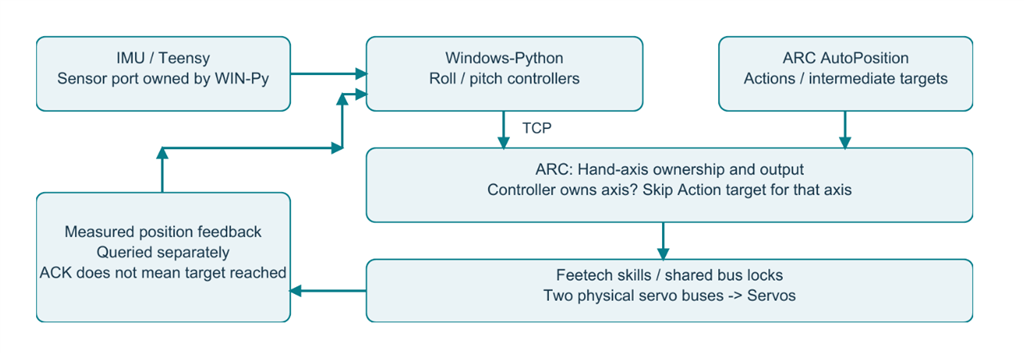
Figure 1 - Only the hand axes require ownership arbitration; other Action axes retain their ARC output path. Measured feedback is separate from target commands.
HAND CONTROLLERS AND ACTIONS: WHO COMMANDS WHAT?
An AutoPosition Action moves the arm while Windows-Python uses IMU feedback to correct hand roll and pitch, keeping it level. The same principle applies to manual teaching.
1. Ownership and handover
CLAIM reserves the hand axes without movement. Actual servo position becomes the initial target before torque is enabled. Pitch and roll use logical Board 1/V23 and V45, mapped to physical servo IDs 23 and 45. While a controller has valid ownership, Action targets for its axes are discarded immediately, without bus waits or later replay. Other axes continue normally. Unowned axes undergo an authoritative check under the core lock before output. Listing 1 - Shortened ActionOutput.submit excerpt from ARC_Hand_Action.py; c is the shared state core.
RELEASE returns ownership for new Action targets without automatically disabling torque. Connection loss initially leaves the axis in HOLD. Ownership decides who may write; the shared Feetech bus lock serializes actual accesses.
Figure 2 - Action targets pass through ownership and state checks before shared bus access.
2. Preserve both motion models
Controller commands specify target, speed and acceleration. AutoPosition generates coordinated intermediate targets that must be forwarded promptly. Keeping only the latest target, or waiting for standstill between targets, alters the profile and can cause jerking. Hand position, speed and acceleration are written as one consistent register block. Actual positions are queried separately, avoiding readback after every intermediate target. A TCP acknowledgment confirms output, not physical arrival at the target.
3. Close the feedback loop
The Windows hand service exclusively owns the Teensy sensor port. IMU measurements drive corrections sent to ARC; subsequent measurements close the outer loop. Servo-position feedback supports activation and diagnostics. Z sensor, laser and magnet share the Teensy interface. The GUI emergency-stop function terminates the Windows processes and separately releases the servos.
INSIDE THE FEETECH CONNECTION
Through .NET reflection, the ARC adapter shares the skill instance's protocol generator, serial-port object, bus lock and speed conversion. Windows-Python opens no second servo COM connection. Listing 2 - Excerpts from FeetechV10Bus in ARC_Hand_Hardware.py, condensed from separate methods; not standalone code. field() reads private fields, invoke() calls internal methods. Comments and error text are translated.
Hand ports are excluded from direct skill mapping so their ARC events pass through ownership checks. The adapter verifies the DLL's SHA-256 fingerprint, configuration and port binding. Internal methods such as writeToBus/readResponse are not guaranteed public APIs; a changed DLL blocks operation pending requalification. A public API for profile blocks and coordinated bus access would be valuable.
TEST STATUS AND NEXT STEPS
Startup, initialization, hand controllers, repeated arm Actions with and without controllers, laser and magnet passed functional tests. Active controllers stabilize the hand during arm motion. Robustness and extended operation still require qualification; newly received sensor telegrams do not necessarily contain fresh measurements. ARC and Windows-Python run together on the robot's headless SBC. I develop and operate it remotely from my notebook; control loops and servo output remain onboard. That is why I am looking forward to ARCx: according to Synthiam, programming and operation use a browser, while the robot continues running when it closes. This fits my configuration and could simplify Remote Desktop access. Skill and adapter compatibility must still be checked: https://synthiam.com/Products/ARCx ARC handles hardware and Actions; Python supplies specialized control and computation. Next, I want vision-based closed-loop motion along individual X, Y and Z axes of the tool center point (TCP), plus tactile automatic calibration of a game board.
Related video, https://www.youtube.com/watch?v=XvH787mLpp4&t=140s