Change Release Notes
This release has significant camera vision movement tracking improvements.
The movement controller has been rewritten to provide speed parameters to new feature, such as the camera control.
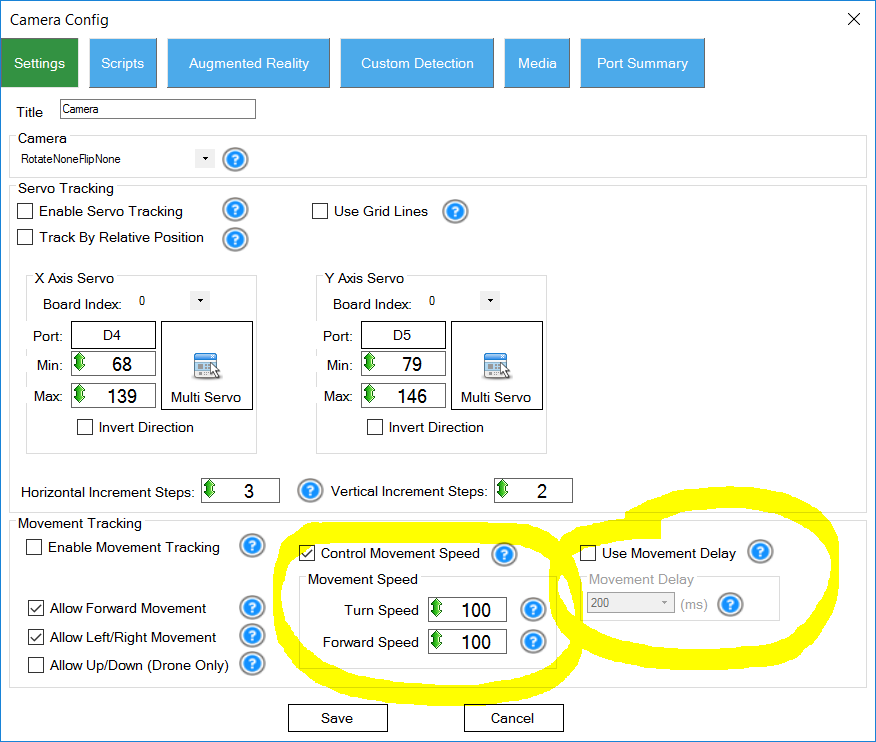
The camera control now has a speed option to select how fast the robot turns or moves forward when tracking an object using Movement Tracking.
The Movement Delay option now has a checkbox to enable/disable it.
There is information in the question marks for the new options if you hover the mouse over.
ARC Downloads
ARC
FREE- 1 third-party plugin skill per project
- Trial cloud services
- Personal, DIY & education use
- Updated every 6–12 months
 Download
ARC
PRO- Use on 2+ PCs simultaneously
- Unlimited robot skills
- Cloud backup & revision history
- Weekly features & bug fixes
- Business use permitted
ARC
RUNTIME- Load & run any ARC project
- Read-only mode
- Unlimited robot skills
- Includes early access fixes & features
- Minimum requirements: Windows 10 or higher, 2 GB RAM, 500 MB free disk space.
- Recommended: Windows 10 or higher, 8 GB RAM, 1 GB free disk space.
- Prices are in USD.
- More about each edition: Download & install guide.
- Latest changes: Release notes.
Compare Editions
| Feature |
ARC
FREE
|
ARC
PRO
|
|---|---|---|
| Get ARC Free | View Plans | |
| Usage | Personal · DIY · Education | Personal · DIY · Education · Business |
| Early access to new features & fixes | — | ✓ |
| Simultaneous microcontroller connections * | 1 | 255 |
| Robot skills * | 20 | Unlimited |
| Skill Store plugins * | 1 | Unlimited |
| Cognitive services usage ** | 10 / day | 6,000 / day |
| Auto-positions gait actions * | 40 | Unlimited |
| Speech recognition phrases * | 10 | Unlimited |
| Camera devices * | 1 | Unlimited |
| Vision resolution | max 320×240 | Unlimited |
| Interface builder * | 2 | Unlimited |
| Cloud project size | — | 128 MB |
| Cloud project revision history | — | ✓ |
| Create Exosphere requests | — | 50 / month |
| Exosphere API access | — | Contact Us |
| Volume license discounts | — | Contact Us |
| Get ARC Free | View Plans |
* Per robot project
** 1,000 per cognitive type: vision recognition, speech recognition, face detection, sentiment, text recognition, emotion detection, azure text to speech

Upgrade to ARC Pro
Synthiam ARC Pro is a new tool that will help unleash your creativity with programming robots in just seconds!
Thanks. Looks like it's working real well.
Question; It appears like your tracking movement based on color. In your video it's red. Can this be set to track just movement without looking for a certain color? For example if I want a robot to just stay in one place but turn at the waist and follow movement as someone walks past it. In the old V3 days that was possible but results were iffy. Your advice back then was to mount the camera on a fixed part of the robot and not the moving part.
I'm looking forward to playing with this again now that EZB is light years past the V3.
Yes you can do that. Best to mount the camera stationary and choose "Track By Relative Position". Find out more about camera features on the camera manual page by pressing the ? (question mark) or following this link: https://synthiam.com/Tutorials/Help.aspx?id=80
Motion tracking type will move toward the the area of motion. It compares current video frame against last video frame. There is a value to "skip" frames in the settings for motion tracking.